9 Best Wi-Fi Thermostats for Home (November 2026)
The best Wi-Fi thermostats for home include the Google Nest Thermostat for everyday remote control, the Honeywell Wireless WiFi Thermostat for a 7-day schedule, and the ecobee Smart Thermostat Premium for room-by-room comfort.
On this page (5 sections)
The best Wi-Fi thermostat for home use depends first on HVAC compatibility and wiring. For most homes, the Google Nest Thermostat is the leading all-around pick in this group, while ecobee Premium adds a room sensor and Honeywell offers a 7-day schedule.
A Wi-Fi enabled thermostat lets you adjust comfort from an app and can make schedule changes easier when plans shift. For a comparison of connected and schedule-based controls, see smart vs programmable thermostats.
We compared connected home thermostats by remote access, scheduling, smart home support and the HVAC limits that can affect installation.
For a plain explanation of the category, see What Is a Smart Home Thermostat? Plainly Explained.
This roundup focuses on home Wi-Fi access and practical system fit.
Our picks at a glance
-
1

-
2

-
3

- 4
 Check it
ecobee Smart Thermostat Enhanced
Best for occupancy-based schedules - 5
 Best for privacy-minded app controlCheck it
- 6
 Check it
meross Matter Smart Thermostats for Home
Best for Matter smart home setups - 7
 Check it
meross Smart WiFi Thermostats for Home
Best for broad HVAC options - 8
 Check it
Riseem WiFi Thermostats for Home Smart Thermostat
Best for compatible single-stage systems - 9
 Check it
Heagstat WiFi Thermostat 1 Heat/1 Cool
Best for conventional 1H/1C systems
How we chose Wi-Fi thermostats for home
We compared the listed app, schedule and compatibility features against the needs of people shopping for a Wi-Fi enabled thermostat. We gave more weight to flexible remote control and clear system guidance, then considered smart home support and features such as occupancy sensing.
Our score weighs specs, features and buyer feedback against what you're shopping for. Product specifications and features inform these picks; we did not test the thermostats in homes.
A connected thermostat still has to match your wiring and HVAC equipment. Read What HVAC Systems Work with Smart Thermostats? before you choose a model, especially if you have a heat pump, a two-wire setup or line-voltage heat.
| Product | Best for | Remote control | Schedule | Wiring note | Our score |
|---|---|---|---|---|---|
| Google Nest Thermostat | everyday remote control | Google Home app on phone, laptop or tablet | Programmable through the Google Home app | Designed to work without a C wire in most homes; some systems need one or a compatible power accessory | 9.7 |
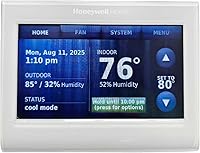
| Honeywell Wireless WiFi Thermostat | a 7-day schedule | Total Connect Comfort app | 7-day programming | C wire required | 9.6 |
| ecobee Smart Thermostat Premium | room-by-room comfort | ecobee app | App schedule and occupancy-based adjustments | Includes Power Extender Kit for homes without a C wire | 9.2 |
| ecobee Smart Thermostat Enhanced | occupancy-based schedules | ecobee app on smartphone, tablet or Apple Watch | Learns preferences and adjusts for occupancy | Includes Power Extender Kit for homes without a C wire | 9.1 |
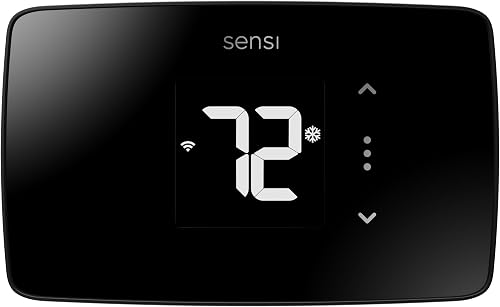
| Sensi Lite Smart Thermostat | privacy-minded app control | Sensi mobile app | Flexible scheduling and geofencing | Designed to work without a C wire in most homes; some systems need one or a compatible power accessory | 8.9 |
| meross Matter Smart Thermostats for Home | Matter smart home setups | meross app | Flexible 24/7 schedule plans | Some wiring configurations require a C wire | 8.8 |
| meross Smart WiFi Thermostats for Home | broad HVAC options | meross app | Programmable | C wire required for some wiring setups; compatibility checker identifies when one is needed | 8.0 |
| Riseem WiFi Thermostats for Home Smart Thermostat | compatible single-stage systems | Phone app | 7-day programming | C wire required; not compatible with heat pumps or multi-stage systems | 8.8 |
| Heagstat WiFi Thermostat 1 Heat/1 Cool | conventional 1H/1C systems | Phone app | 7-day programming | C wire required; not compatible with heat pumps or multi-stage systems | 8.4 |
The best Wi-Fi enabled thermostats for home
The best choice varies by the way you use your HVAC system and the connected features you want. Each pick below has a different strength, along with compatibility checks to make before buying.
Google Nest Thermostat: Best for everyday remote control
- Wi-Fi and Google Home app control
- Programmable schedule
- Turns temperature down when you leave
- Designed to work without a C wire in most homes
App control, scheduling and an away feature cover the main needs of a connected home. Its wiring needs vary by HVAC system, so check compatibility before buying.
Pros
- Remote control through Google Home
- Away temperature adjustment
- Works with Google Assistant and Matter-certified voice assistants
Cons
- Some HVAC systems need a C wire or compatible power accessory
- Compatibility depends on the system
The Google Nest Thermostat is the strongest everyday option for homeowners who want to change settings from a phone and keep a schedule. The Google Home app supports remote control, and the thermostat can turn itself down when you leave.
You can program an energy-efficient schedule in the app, then use Savings Finder suggestions to review possible schedule changes. Nest also offers HVAC monitoring alerts for eligible systems, though those alerts do not replace a diagnosis from an HVAC professional.
Google says the thermostat is designed to work without a C wire in most homes. Some systems, including heating-only, cooling-only, zone-controlled and heat-pump systems, may need a C wire or compatible power accessory, so use the Google compatibility checker before installation.
Choose Nest if you want app-based control and Google Home support without making room sensors a priority. Its controls also work with Google Assistant and Matter-certified voice assistants when you have a compatible smart device.
Honeywell Wireless WiFi Thermostat: Best for a 7-day schedule
- Wi-Fi app control
- 7-day programming
- Energy Savings mode
- Works with Alexa
A 7-day schedule and remote monitoring make this a fit for households that want set routines and app access. Its C-wire requirement makes a wiring check essential.
Pros
- 7-day programming
- Remote comfort and energy-use management
- On-screen comfort information
Cons
- Requires a C wire
- Professional installation is recommended
The Honeywell Wireless WiFi Thermostat suits a household that wants a weekly routine and remote access. Its 7-day programming lets you set a schedule for each day, while the Total Connect Comfort app supports remote monitoring and management.
Energy Savings mode and on-screen comfort information make the thermostat's core controls easy to understand. It also works with Alexa, with an Alexa device sold separately.
This model requires a C wire, so confirm that your current wiring includes one before you plan an installation. Honeywell recommends professional installation, which may be useful if you are unsure how your existing wires connect.
Pick Honeywell if a full weekly schedule matters more than room sensors or Matter support. For a broader comparison of Wi-Fi and schedule features, see our best WiFi programmable thermostat guide.
ecobee Smart Thermostat Premium: Best for room-by-room comfort
- Wi-Fi app control
- Included SmartSensor
- Built-in occupancy sensing
- Power Extender Kit for homes without a C wire
The included SmartSensor detects which rooms are in use and can help address hot or cold spots. The app also supports remote adjustments and schedule management.
Pros
- SmartSensor included
- Remote control and energy-use views
- Power Extender Kit included
Cons
- Check HVAC compatibility before buying
- Some voice features require compatible devices or services
The ecobee Smart Thermostat Premium is a strong match for homes with rooms that do not feel evenly comfortable. Its included SmartSensor detects which rooms are in use, helping the system adjust around occupancy rather than relying only on the thermostat's location.
The ecobee app supports remote temperature changes, vacation settings and energy-use views. Built-in occupancy sensing can adjust comfort when people are home or away, and its built-in air-quality monitor can send alerts when air quality drops.
Ecobee says the model is compatible with 95% of HVAC systems, but you should still check your setup with its compatibility checker. The box includes a Power Extender Kit for homes without a C wire.
Choose Premium if you want the included sensor and additional air and voice features. Some functions depend on compatible devices or services, such as an Apple home hub for Siri.
ecobee Smart Thermostat Enhanced: Best for occupancy-based schedules
- Wi-Fi app control
- Occupancy sensing
- Adjusts when away or asleep
- Power Extender Kit for homes without a C wire
Occupancy sensing and remote app control suit households that want the temperature to adjust around home and away periods. SmartSensors can be added separately for room-by-room comfort.
Pros
- Remote control from several devices
- Works with Alexa, Google Assistant, Apple HomeKit and SmartThings
- Power Extender Kit included
Cons
- SmartSensors are sold separately
- Check HVAC compatibility before buying
The ecobee Smart Thermostat Enhanced fits households that want occupancy-based adjustments and remote app control without needing the Premium model's included SmartSensor. It can adjust the temperature when people are away or asleep, and the app works on a smartphone, tablet or Apple Watch.
The thermostat can learn temperature preferences and adjust for humidity to help maintain comfort. You can add ecobee SmartSensors separately if you want to prioritize occupied rooms.
Ecobee says Enhanced is compatible with 90% of HVAC systems, and it includes a Power Extender Kit for homes without a C wire. Check compatibility for your exact system before installing.
Choose Enhanced if app access and automatic occupancy adjustments are the main goals. For a wider view of connected features, compare it with our best smart thermostat picks.
Sensi Lite Smart Thermostat: Best for privacy-minded app control
- Wi-Fi remote access
- Flexible scheduling and geofencing
- Energy use reports
- Designed to work without a C wire in most homes
Sensi Lite combines app access with flexible schedules, geofencing and usage reports. Sensi says it won't sell personal information to third parties or use thermostat activity for ad targeting.
Pros
- Remote control for Android and iOS
- Geofencing and usage reports
- Privacy policy addresses personal data
Cons
- Some HVAC systems need a C wire or compatible power accessory
- Check system compatibility before buying
Sensi Lite is a practical fit for shoppers who want remote control, flexible scheduling and usage reports in one app. Geofencing can adjust the thermostat based on location, which may suit a household with a changing daily routine.
Sensi says the thermostat is designed to work without a C wire in most homes, though some systems need one or a compatible power accessory. Its app supports Android and iOS devices, and the thermostat also works with Alexa, Google Assistant and SmartThings.
Sensi states that it won't sell personal information to third parties or use thermostat activity data for ad targeting. Check the compatibility details for your HVAC equipment before buying.
Choose Sensi Lite when privacy policy, app access and schedule flexibility matter more than a larger set of built-in sensors. If your current thermostat has only two wires, review our best 2 wire smart thermostat guide before deciding.
meross Matter Smart Thermostats for Home: Best for Matter smart home setups
- Matter integration over Wi-Fi
- App control from anywhere
- Flexible 24/7 schedules
- Alerts for filter life and system issues
Matter integration connects this thermostat with platforms including Apple Home, Amazon Alexa, Google Home, Home Assistant and SmartThings. Its compatibility limits exclude two-wire systems and electric baseboard heaters.
Pros
- Matter support for several smart home platforms
- Remote app control
- Filter and system alerts
Cons
- Not compatible with two-wire systems
- Not compatible with 110V, 120V or 240V electric baseboard heaters
The meross Matter Smart Thermostat suits a home already using Matter-compatible platforms. It integrates with Apple Home, Amazon Alexa, Google Home, Home Assistant and Samsung SmartThings, and its app supports remote control and flexible schedules.
The system can send alerts about filter life, system malfunctions and long-term operation. Meross lists compatibility with heat pumps, air conditioners, furnaces, boilers, humidifiers and dehumidifiers, but this model does not support two-wire systems or electric baseboard heaters.
Some wiring configurations require a C wire. Use the meross compatibility check before buying, and confirm your system is not one of the excluded types.
Choose this model when Matter support is central to your smart home setup. It is a less suitable choice for a two-wire system or line-voltage baseboard heat.
meross Smart WiFi Thermostats for Home: Best for broad HVAC options
- Wi-Fi app control
- Works with several HVAC types
- Smart alerts
- C wire needed for some setups
The meross app supports remote temperature changes, while alerts cover filter life and system issues. It lists compatibility with several HVAC types but excludes two-wire systems and electric baseboard heaters.
Pros
- App control from anywhere
- Works with heat pumps, furnaces, boilers, humidifiers and dehumidifiers
- Voice control support
Cons
- Not compatible with two-wire systems
- Some setups require a C wire
This meross Smart WiFi Thermostat offers app control, voice control and alerts for filter life and system issues. Meross lists support for heat pumps, air conditioners, furnaces, boilers, dehumidifiers and humidifiers.
Some wiring setups require a C wire, and the model does not work with two-wire systems, millivolt thermostats or 110V, 120V and 240V electric baseboard heaters. Check compatibility and C-wire needs before planning an installation.
Choose it if you want app-based remote adjustments and your HVAC system falls within its supported types. If your equipment uses a less common setup, check the brand's compatibility guidance first.
For brand-specific alternatives, see our best honeywell smart thermostat guide.
Riseem WiFi Thermostats for Home Smart Thermostat: Best for compatible single-stage systems
- Remote app control
- 7-day scheduling
- For conventional single-stage 1 heat/1 cool systems
- Requires C wire and 2.4 GHz Wi-Fi
This thermostat offers remote adjustment and 7-day schedules for a narrow set of conventional single-stage systems. Its C-wire and 2.4 GHz Wi-Fi requirements should be confirmed before choosing it.
Pros
- Remote app control
- 7-day schedule
- Backlit LCD screen
Cons
- Not compatible with heat pumps or multi-stage systems
- Requires a C wire and 2.4 GHz Wi-Fi
The Riseem WiFi Thermostat is for a narrow match: conventional single-stage 1 heat/1 cool systems using gas, oil or electric heat with air conditioning. It supports phone app adjustments and 7-day schedules over 2.4 GHz Wi-Fi.
A C wire is required, and the thermostat does not support heat pumps or multi-stage systems. It also excludes line-voltage systems, mini splits and several other HVAC types, so compare your equipment and wiring with its supported terminals before buying.
Choose Riseem only if your system fits those limits and you want remote adjustments with a weekly schedule. Its specific compatibility makes it a poor general-purpose pick for homes with unknown wiring.
Heagstat WiFi Thermostat 1 Heat/1 Cool: Best for conventional 1H/1C systems
- Remote app control
- 7-day programming
- For 24VAC conventional single-stage 1 heat/1 cool forced-air systems
- Requires C wire and 2.4 GHz Wi-Fi
Heagstat provides app control and 7-day scheduling for compatible conventional single-stage forced-air systems. It has specific wiring limits, including a maximum of 5 wires at the base.
Pros
- Remote app control
- 7-day schedule
- Backlit LCD screen
Cons
- Not compatible with heat pumps or multi-stage systems
- Requires C wire and 2.4 GHz Wi-Fi
The Heagstat WiFi Thermostat is another focused option for a conventional single-stage 1 heat/1 cool forced-air system. Its app provides remote temperature changes, and 7-day programming lets you match settings to a weekly routine.
Heagstat requires a constant 24VAC C wire and supports only 2.4 GHz Wi-Fi. It does not work with heat pumps, multi-stage systems, mini splits, line-voltage loads or several packaged systems.
The thermostat base accommodates a maximum of 5 wires, so count and identify your wiring before choosing it. This pick makes sense only when your system matches its stated limits.
What should you check before buying a Wi-Fi thermostat?
Check HVAC compatibility, wiring, Wi-Fi access and the app features you will use. A thermostat with useful remote functions can still be the wrong fit if its wiring requirements or supported equipment do not match your system.
Start with the current thermostat wires and HVAC type. Some models in this roundup need a C wire, some include a Power Extender Kit, and some are designed to work without a C wire in most homes.
Next, check the home network. Riseem and Heagstat support only 2.4 GHz Wi-Fi, so a network configured for 5 GHz alone will not suit those models.
Finally, decide whether you need weekly schedules, geofencing, room sensors or smart home platform integration. If humidity is part of your comfort concern, our guide to How Does a Smart Thermostat Control Humidity? explains what that feature can and cannot do.
How do Wi-Fi thermostats compare with programmable models?
A Wi-Fi thermostat can add remote app access to the scheduling found on many programmable models. The useful difference is that you can check or change settings while away, rather than relying only on the schedule set at the wall.
Schedules still matter, especially if your routine stays similar from week to week. A model such as Honeywell offers 7-day programming, while Nest, Sensi and ecobee pair scheduling with app access or occupancy features.
Choose a basic programmable thermostat if remote control is not useful to you. Choose Wi-Fi if you want to adjust the home temperature while traveling or manage settings from more than one phone.
Which Wi-Fi thermostat should you choose?
Choose Google Nest for straightforward app control and an away feature, or ecobee Premium if the included room sensor and air-quality monitoring suit your home. Honeywell makes sense for 7-day scheduling, while Sensi Lite adds geofencing and usage reports.
For a home built around Matter, consider the meross Matter thermostat after checking wiring and system limits. Pick Riseem or Heagstat only when your conventional single-stage system matches their specific requirements.
The best Wi-Fi thermostat for home use is the one that matches your HVAC system first, then gives you the remote control and schedule features you will use. Start with the best smart thermostat comparison if you want to weigh a wider range of connected features.
Our top 3 picks at a glance
-
1
-
2
-
3
Frequently asked questions
What is the best Wi-Fi thermostat for home use?
The Google Nest Thermostat is our top pick for everyday remote control because it supports app adjustments, scheduling and an away feature. Honeywell is a fit for a 7-day routine, while ecobee Premium adds an included SmartSensor for room-level occupancy.
Start by checking your HVAC compatibility and wiring, since those can rule out a model.
Does a Wi-Fi thermostat work without a C wire?
Some Wi-Fi thermostats are designed to work without a C wire in most homes, including Google Nest Thermostat and Sensi Lite. Both note that some systems still need a C wire or a compatible power accessory.
Ecobee Premium and Enhanced include a Power Extender Kit for homes without a C wire.
Check the exact model and system before installation.
Can I control a Wi-Fi thermostat when I'm away?
Yes, these thermostats offer app-based remote control, though the app and a working Wi-Fi connection are needed. Google Nest uses the Google Home app, Honeywell uses Total Connect Comfort, and ecobee and meross provide their own apps.
Remote access can let you adjust a schedule or temperature before you return home.
Are all Wi-Fi thermostats compatible with heat pumps?
No. Compatibility depends on the thermostat and the HVAC system.
The Riseem and Heagstat models here do not work with heat pumps, while meross lists heat pumps among compatible systems but excludes some wiring types.
Use the brand's compatibility checker and confirm the wiring terminals before you buy.
What should I compare when choosing a Wi-Fi thermostat?
Compare HVAC compatibility, C-wire needs, app control, scheduling and smart home support. If rooms vary in temperature, check whether the thermostat includes room sensors or supports them separately.
For routine control, a clear app and a schedule that matches your week may matter more than extra connected features.