5 Best Honeywell Smart Thermostats (October 2026)
The best Honeywell Home smart thermostats include the Honeywell Home RTH9600WF Smart Color Thermostat ENERGY for a customizable screen, the Playhardest Honeywell TH6320WF2003 T6 Pro Smart Thermostat for staged HVAC systems, and the Honeywell Home T5 Smart Wi-Fi Thermostat for location based scheduling.
On this page (4 sections)
The best Honeywell smart thermostat for most homes in this comparison is the RTH9600WF, with a customizable color touchscreen, Wi-Fi app control, and indoor and outdoor comfort information. The T5 adds geofencing, while the X2S supports Matter smart home integration.
A smart control can make it easier to change a schedule or adjust the temperature away from home, but fit comes first. Check your system type, wiring, and preferred app before choosing a Honeywell Home thermostat.
If you’re weighing the basic features, start with what a smart home thermostat does.
Our picks at a glance
-
1
 Best for a customizable screen
Honeywell Home RTH9600WF Smart Color Thermostat ENERGY
9.2/10 our score
See it on Amazon -
2
 Best for staged HVAC systems
Playhardest Honeywell TH6320WF2003 T6 Pro Smart Thermostat
8.7/10 our score
See it on Amazon -
3
 Best for location based scheduling
Honeywell Home T5 Smart Wi-Fi Thermostat
8.4/10 our score
See it on Amazon
- 4
 Check it
Honeywell Home RTH9585WF1004 Wi-Fi Smart Color Thermostat
Best for color and fan settings - 5
 Check it
Honeywell Home X2S Smart Wi-Fi Thermostat
Best for Matter smart homes
Which Honeywell smart thermostat fits your home?
The RTH9600WF is the strongest fit for a customizable screen, while the T6 Pro is aimed at staged HVAC systems and the X2S at Matter connected homes. The models differ in scheduling, app support, wiring, and system limits.
We compared the connected features and compatibility details provided for these thermostats. Our score weighs specs, features, and buyer feedback against what you're shopping for.
| Product | Best for | Display | Wi-Fi | Power | Our score |
|---|---|---|---|---|---|
| Honeywell Home RTH9600WF Smart Color Thermostat ENERGY | a customizable screen | Customizable color touchscreen | Yes | C-wire required | 9.2 |
| Playhardest Honeywell TH6320WF2003 T6 Pro Smart Thermostat | staged HVAC systems | Yes | 8.7 | ||
| Honeywell Home T5 Smart Wi-Fi Thermostat | location based scheduling | Yes | Check C-wire needs | 8.4 | |
| Honeywell Home RTH9585WF1004 Wi-Fi Smart Color Thermostat | color and fan settings | Customizable color touchscreen | C-wire required | 8.0 | |
| Honeywell Home X2S Smart Wi-Fi Thermostat | Matter smart homes | 2.4 or 5 GHz | 24 VAC C-wire required | 7.9 |
Honeywell Home RTH9600WF Smart Color Thermostat ENERGY: Best for a customizable screen
- Color touchscreen
- Remote app control
- ENERGY STAR certified
- C-wire required
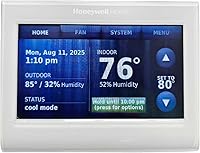
The color screen shows indoor and outdoor temperature and humidity, with a daily forecast. Remote app control and flexible programming suit households that want schedules and at-a-glance comfort information.
Pros
- Customizable color screen
- Remote app control
- Flexible programming
Cons
- C-wire required
- Not compatible with electric baseboard heat
The RTH9600WF is a good match if you want comfort details on the thermostat itself. Its customizable color screen can show indoor and outdoor temperature and humidity, plus a daily weather forecast.
You can use the app to monitor and manage comfort and energy use remotely. Flexible programming also supports schedules or a utility company’s peak rate pricing, and the thermostat can automatically switch between heating and cooling.
Compatibility includes forced air systems using gas, oil, or electric heat, plus hot water, steam, and heat pumps with electric backup. It does not work with 120–240 V electric baseboard heat, and a C-wire is required.
Check your system carefully, particularly if you have a heating only oil furnace.
Choose this model if the display and on-screen information are priorities. For a closer look at another connected Honeywell model, read our X8S smart thermostat review.
Playhardest Honeywell TH6320WF2003 T6 Pro Smart Thermostat: Best for staged HVAC systems
- Wi-Fi touchscreen
- Flexible scheduling or geofencing
- 3H/2C heat pump or 2H/2C conventional stages
- Honeywell Home app
The T6 Pro is designed for the heating stages of an existing system and supports flexible scheduling or geofencing. Its stated system stages make checking compatibility especially important.
Pros
- Supports staged heat pump and conventional systems
- Scheduling or geofencing
- Apple HomeKit integration
Cons
- Check exact HVAC compatibility before buying
- Package is sold under the Playhardest brand
The T6 Pro stands out for homes with a staged HVAC system that matches its stated support. It handles up to 3 heat/2 cool stages on a heat pump or 2 heat/2 cool stages on a conventional system, so compare those limits with your equipment.
You can set a 7-day schedule or use geofencing, then view and change temperature settings through the Honeywell Home platform app. The thermostat also integrates with Apple HomeKit, which can be useful if you manage smart home devices in that app.
The package is sold under the Playhardest brand, while its product description identifies the thermostat as a Honeywell T6 Pro. Confirm the exact model and system fit before buying, especially if your setup uses dual fuel or ventilation control.
Pick it when its stage support matches your system and you want app control with scheduling choices. Our guide to HVAC systems that work with smart thermostats explains the compatibility checks to make.
Honeywell Home T5 Smart Wi-Fi Thermostat: Best for location based scheduling
- 7-day scheduling
- Geofencing
- ENERGY STAR certified
- Wi-Fi remote control
The T5 offers a 7-day schedule or location based temperature control through geofencing. It works with several smart home platforms and is ENERGY STAR certified.
Pros
- Flexible scheduling choices
- Geofencing and auto home/away
- Remote control by phone or tablet
Cons
- Check system compatibility and C-wire needs
- Heating only oil systems require a C-wire
The T5 suits households that want to choose between a weekly routine and location based control. Its 7-day flexible schedule can follow regular hours, while geofencing uses your smartphone’s location to help identify when you leave and return.
It also offers auto home and away mode, remote control by phone or tablet, and monthly energy reports with personalized tips. Honeywell Home states that frequent scheduling saved customers between 8 and 16% on heating and cooling bills, though actual savings vary with use.
The T5 works with most heat/cool oil furnace systems, but heating only oil furnaces require a C-wire. For more options, see smart thermostats for heat-only systems.
Its compatibility guidance also calls for checking whether your home needs a C-wire power adapter, so verify both the HVAC type and wiring before installation.
Choose the T5 if location based control matters more than an advanced display. If setup is the main question, follow our guide to connecting a Honeywell thermostat to Wi-Fi.
Honeywell Home RTH9585WF1004 Wi-Fi Smart Color Thermostat: Best for color and fan settings
- Customizable color touchscreen
- 7-day programming
- Fan control options
- C-wire required
This Wi-Fi color thermostat combines a customizable screen with flexible programming and On, Automatic, and Circulate fan settings. It supports compatible forced air, hot water, steam, and heat pump systems.
Pros
- Customizable touchscreen
- Three fan control options
- Monthly energy reports
Cons
- C-wire required
- Not compatible with electric baseboard heat
The RTH9585WF1004 combines a color touchscreen with flexible programming and fan controls. Its screen can be personalized, and the thermostat offers On, Automatic, and Circulate fan settings.
Compatible systems include forced air using gas, oil, or electric heat, hot water and steam, and heat pumps with electric backup. It does not work with 120–240 V electric baseboard heat, and it requires a C-wire.
This model is a practical alternative if you want color and fan options but don’t need the RTH9600WF’s on-screen outdoor information. The app and compatible smart home options support remote changes, while monthly energy reports can help you review heating and cooling use.
Pick it if the fan controls and screen are useful for your routine. If your home uses baseboard heat, compare models made for that system in our guide to the best smart thermostats for baseboard heaters.
Honeywell Home X2S Smart Wi-Fi Thermostat: Best for Matter smart homes
- Matter certified
- Flexible weekly schedules
- Auto-away
- C-wire required
The X2S pairs Wi-Fi control with Matter certification and flexible schedule options. It also offers auto-away, filter reminders, and an indoor humidity display option.
Pros
- Matter certified
- Multiple schedule formats
- Indoor humidity display option
Cons
- C-wire required
- Not compatible with electric baseboard heat
The X2S is the Honeywell Home pick for shoppers who want Matter support alongside Wi-Fi control. It works with Alexa, Google Assistant, and Apple HomeKit, and you can control it remotely through the First Alert app.
Scheduling is flexible: choose 7-day, 5-1-1 day, 5-2 day, one-week, or non-programmable operation. Auto-away, filter reminders, and an indoor humidity display option add useful controls without requiring a color touchscreen.
The X2S supports up to 2 heat/2 cool conventional systems or up to 2 heat/1 cool heat pump systems with electric backup. It also supports hot water and forced air using gas, oil, or electric heat, but not 120–240 V electric baseboard heat.
A 24 VAC C-wire is required.
Choose it if Matter integration and schedule choices are more useful than a color display. For a different system type, see our guide to the best smart thermostats for mini splits.
How do Honeywell Wi-Fi thermostats differ?
Honeywell Wi-Fi thermostats vary most in how they handle schedules, remote access, and smart home links. The RTH9600WF and RTH9585WF1004 emphasize color touchscreens, while the T5 and T6 Pro offer geofencing and the X2S adds Matter.
For simple remote temperature changes, any of these Wi-Fi models may cover the basics, but app support differs. The X2S uses the First Alert app; the T5 and RTH9600WF descriptions refer to Honeywell Home app control.
Display preferences can narrow the field. The two color models let you personalize the screen, while the T6 Pro is described as a Wi-Fi touchscreen and the X2S focuses on schedules, humidity display options, and smart home compatibility.
What should you check before buying a Honeywell smart thermostat?
Check your HVAC system and thermostat wiring before choosing a connected Honeywell control. A model’s Wi-Fi features do not guarantee that it works with your heating or cooling equipment.
Start by identifying whether you have forced air, a heat pump, hot water, steam, or electric baseboard heat. The RTH9600WF, RTH9585WF1004, and X2S specifically exclude 120–240 V electric baseboard systems, while some models list supported heating stages.
For compatible connected controls, compare smart line-voltage thermostats.
Next, check whether a C-wire is present. The RTH9600WF and RTH9585WF1004 require one, as does the X2S; the T5 advises checking whether a power adapter is needed.
For a deeper compatibility overview, see which HVAC systems work with smart thermostats.
Finally, choose a control style you’ll use. Geofencing can suit changing routines, a fixed weekly schedule may suit regular hours, and Matter support can matter if you want thermostat controls within other compatible smart home apps.
Which Honeywell smart thermostat should you choose?
Choose the RTH9600WF for a customizable color screen and at-a-glance comfort information, or the T5 for weekly scheduling and geofencing. The T6 Pro fits buyers whose HVAC stages match its stated support, while the X2S is the pick for Matter integration.
Before you decide, verify the system type and C-wire requirement against your current thermostat wiring. If you need a different brand for comparison, read our Ecobee Smart Thermostat Essential review, or use the space heater buying guide if a thermostat isn’t the right way to heat a room.
Our top 3 picks at a glance
-
1
Best for a customizable screen
Honeywell Home RTH9600WF Smart Color Thermostat ENERGY
9.2/10 our score
See it on Amazon -
2
Best for staged HVAC systems
Playhardest Honeywell TH6320WF2003 T6 Pro Smart Thermostat
8.7/10 our score
See it on Amazon -
3
Best for location based scheduling
Honeywell Home T5 Smart Wi-Fi Thermostat
8.4/10 our score
See it on Amazon
Frequently asked questions
Which Honeywell Home thermostat works with Wi-Fi?
The Honeywell Home RTH9600WF, T5, RTH9585WF1004, X2S, and the T6 Pro version listed here all support Wi-Fi. Their apps and smart home integrations differ, so choose based on the devices you use and the controls you want.
Check your HVAC type and wiring before buying.
Do Honeywell smart thermostats need a C-wire?
Several picks here require a C-wire, including the RTH9600WF, RTH9585WF1004, and X2S. The T5 advises checking whether your home needs a C-wire power adapter.
Confirm the wiring at your thermostat and the model’s compatibility guidance before installation.
Can I control a Honeywell thermostat from my phone?
Yes. The Honeywell Wi-Fi models in this guide provide remote control through their compatible apps.
The X2S uses the First Alert app, while the RTH9600WF and T6 Pro use Honeywell Home app support.
Remote access requires a working Wi-Fi connection.
Will these Honeywell thermostats work with electric baseboard heat?
The RTH9600WF, RTH9585WF1004, and X2S are not compatible with 120–240 V electric baseboard heat. The other models also need a careful system compatibility check before you buy.
For line voltage baseboard systems, compare thermostats made for that equipment.