9 Best Smart Thermostats (October 2026)
The best smart thermostats for home include the Google Nest Thermostat for everyday app control, the Google Nest Learning Thermostat for room-by-room sensing, and the Sensi Smart Thermostat for familiar button controls.
On this page (7 sections)
- Which smart thermostat is best for each home?
- The best smart thermostats
- How do you choose a smart thermostat for your HVAC system?
- Which smart thermostat features are useful day to day?
- Are Wi-Fi and smart home compatibility important?
- What should you check before replacing a thermostat?
- Which smart thermostat should you choose?
The Google Nest Thermostat is our top pick among the best smart thermostats for most homes, with app control, schedules and automatic adjustments when you leave. The Nest Learning Thermostat adds an included room sensor, ecobee Premium adds an air quality monitor, and Sensi keeps physical buttons.
Smart thermostat systems can vary in wiring, HVAC compatibility and connected home support. Check those basics first, then choose the features you expect to use.
Our plain guide to What Is a Smart Home Thermostat? Plainly Explained covers the basics.
Our picks at a glance
-
1

-
2

-
3

- 4
 Check it
ecobee Smart Thermostat Premium
Best for added home monitoring - 5
 Check it
ecobee Smart Thermostat Enhanced
Best for occupancy-based schedules - 6
 Best for Alexa householdsCheck it
 - 7
 Check it
Sensi Touch 2 Smart Thermostat Wi-Fi
Best for touchscreen room sensing - 8
 Check it
Riseem WiFi Thermostats for Home Smart Thermostat
Best for compatible single-stage systems - 9
 Check it
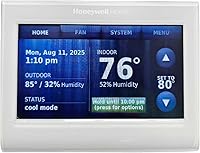
Honeywell Home RTH9585WF1004 Wi-Fi Smart Color Thermostat
Best for a customizable display
Which smart thermostat is best for each home?
The best smart thermostat depends on your wiring, HVAC system and preferred controls. We compared the listed features and system requirements to match each option with a practical use.
We score each pick by how its specs and features fit the needs of someone shopping for a connected thermostat. The score weighs specs, features and buyer feedback against what you're shopping for.
| Product | Best for | Control | Power | Smart home | Our score |
|---|---|---|---|---|---|
| Google Nest Thermostat | everyday app control | Google Home app, voice, button | No C wire in most homes; some systems need one or a compatible accessory | Google Home, Alexa, Matter-certified voice assistants | 9.7 |
| Google Nest Learning Thermostat | room-by-room sensing | Google Home app and compatible voice assistants | No C wire required in most homes | 9.5 | |
| Sensi Smart Thermostat | familiar button controls | App, touch and voice | C wire not required in most applications | Alexa, Apple HomeKit, Google Assistant, SmartThings and Vera | 9.3 |
| ecobee Smart Thermostat Premium | added home monitoring | App, Alexa or Siri | Power Extender Kit included for homes without a C wire | 9.2 | |
| ecobee Smart Thermostat Enhanced | occupancy-based schedules | ecobee app and compatible voice assistants | Power Extender Kit included for homes without a C wire | 9.1 | |
| Amazon Smart Thermostat | Alexa households | Alexa and Alexa app | C wire required | Alexa and Ring | 9.0 |
| Sensi Touch 2 Smart Thermostat Wi-Fi | touchscreen room sensing | App, touch and voice | C wire required | 8.9 | |
| Riseem WiFi Thermostats for Home Smart Thermostat | compatible single-stage systems | 24V C wire required; does not run on batteries | 8.8 | ||
| Honeywell Home RTH9585WF1004 Wi-Fi Smart Color Thermostat | a customizable display | Touchscreen, app and voice | C wire required | 8.0 |
The best smart thermostats
These smart thermostats cover different needs, from a familiar button layout to room sensing and a customizable display. Confirm your system's compatibility before you settle on one.
Google Nest Thermostat: Best for everyday app control
- ENERGY STAR certified
- Wi-Fi and Google Home app control
- Away temperature adjustments
- HVAC alerts on eligible systems
The Nest Thermostat combines scheduling, remote control and away adjustments in a straightforward connected option. Check wiring and system compatibility before choosing it.
Pros
- Remote control from a phone, laptop or tablet
- Suggests schedule tweaks with Savings Finder
- Can send HVAC alerts on eligible systems
Cons
- Some heating, cooling, zone and heat pump systems need a C wire or compatible accessory
- Voice features require a compatible device and internet
The Google Nest Thermostat is a practical first choice if you want remote changes and a schedule you can manage in the Google Home app. It can turn itself down when you leave and offers Savings Finder suggestions for schedule tweaks.
You can adjust the temperature from a phone, laptop or tablet. It also works with Google Home and compatible voice assistants, though voice control requires a compatible device and a working internet connection.
The thermostat is designed to work without a C wire in most homes. Some systems, including heating only, cooling only, zone controlled and heat pump systems, need a C wire or another compatible power accessory, so check the Nest Compatibility Checker first.
Choose it for straightforward app control and scheduling. Consider a model with a room sensor if you want to set temperatures based on a particular room.
Google Nest Learning Thermostat: Best for room-by-room sensing
- Includes a 2nd generation Nest Temperature Sensor
- Learns temperature preferences and schedule
- Works with Alexa, Siri and Google Assistant
- Matter compatible
The included temperature sensor can help manage hot and cold spots by setting a room's target for a chosen time. Its learning features suit buyers who want schedule suggestions and automatic adjustments.
Pros
- Includes a room sensor
- Can ask permission before schedule changes
- Works with most 24V systems
Cons
- Check compatibility for your specific HVAC setup
- Some voice features require compatible devices
The Nest Learning Thermostat suits buyers who want schedule learning and more visibility into suggested changes. It can ask for permission before making schedule adjustments, which lets you review them in the Google Home app.
Its included 2nd generation Nest Temperature Sensor can help with hot and cold spots. Place it in a room and use the app to set the temperature you want there at a certain time of day.
Google says this model works with most 24V systems, including gas, electric, oil, forced air, heat pump and radiant systems. It needs no C wire in most homes, but the compatibility checker is still the right first step for your setup.
Choose it for learning features and room sensing. The included sensor and broader system features make it a good fit when your priority goes beyond basic remote adjustment.
Sensi Smart Thermostat: Best for familiar button controls
- ENERGY STAR certified
- Buttons and traditional thermostat footprint
- C wire not required in most applications
- Usage reports and maintenance reminders
Sensi keeps physical buttons and a traditional thermostat feel while adding Wi-Fi, flexible schedules and remote access. It also provides usage reports and maintenance reminders.
Pros
- Built-in level and app setup steps
- Does not sell personal information to third parties
- Fits the same space as a traditional thermostat
Cons
- Confirm compatibility with your HVAC equipment
- Energy savings depend on how you use the system
The Sensi Smart Thermostat keeps a familiar button layout while adding Wi-Fi, schedules and remote access. Its shape fits the same space as a traditional thermostat, which can help avoid patching and painting after a swap.
Sensi includes a built-in level and step-by-step app instructions for installation. It also offers usage reports, equipment alerts and reminders such as filter replacement.
The brand says it won't sell your personal information to third parties. A C wire isn't required in most applications, but check the compatibility guidance for your HVAC equipment before installation.
Choose it if you prefer physical buttons and a traditional thermostat feel. Its privacy policy and maintenance reminders add useful details to the basic schedule and app controls.
ecobee Smart Thermostat Premium: Best for added home monitoring
- Includes SmartSensor
- Built-in air quality monitor
- Built-in Alexa or Siri speaker
- Power Extender Kit included
Premium combines room sensing with a built-in air quality monitor and smart speaker. Its feature set may suit buyers who want thermostat control and added home functions in one device.
Pros
- Includes a SmartSensor
- Can send air quality alerts and filter reminders
- Includes a Power Extender Kit
Cons
- Check HVAC compatibility before buying
- Siri requires an Apple home hub
ecobee Smart Thermostat Premium combines temperature control with a built-in air quality monitor and smart speaker. Its included SmartSensor detects which rooms are in use and can help the system focus comfort there rather than relying only on the hallway reading.
The air quality monitor can send alerts when air quality drops and offer tips, while also reminding you to change the furnace filter. The speaker includes Alexa or Siri, and the thermostat can stream Spotify playlists or podcasts.
The box includes a Power Extender Kit for homes without a C wire. ecobee says this thermostat is compatible with 95% of HVAC systems, but use its compatibility checker to confirm your system before buying.
Choose it for room sensing and added home monitoring features. Siri requires an Apple home hub, and some home security functions require an ecobee Smart Security subscription.
ecobee Smart Thermostat Enhanced: Best for occupancy-based schedules
- Occupancy sensing
- Remote app control
- Works with Alexa, Google Assistant, Apple HomeKit and SmartThings
- Power Extender Kit included
Enhanced can adjust temperature when you're away or asleep and use occupancy sensing to preheat or precool before you arrive. It also adjusts for humidity to help manage comfort.
Pros
- Remote control through the app
- Works with several smart home platforms
- Includes a Power Extender Kit
Cons
- SmartSensors are sold separately
- Confirm compatibility with your HVAC system
ecobee Smart Thermostat Enhanced uses occupancy sensing to adjust temperatures when people are home, away or asleep. It can preheat or precool before you arrive and adjusts for humidity to help keep the home comfortable.
You can manage temperature and system settings through the ecobee app from a phone, tablet or Apple Watch. It also works with Alexa, Google Assistant, Apple HomeKit and SmartThings.
A Power Extender Kit is included for homes without a C wire. The thermostat works with 90% of HVAC systems according to ecobee, and you can add SmartSensors separately to help prioritize comfort in occupied rooms.
Choose it for occupancy-based comfort without the Premium model's built-in speaker and air quality monitor. Check system fit and consider the extra cost of sensors if you need room-by-room readings.
Amazon Smart Thermostat: Best for Alexa households
- Works with Alexa and Ring
- Alexa can switch home, away and sleep temperatures
- C wire required
- App-guided installation
The Amazon Smart Thermostat fits homes already using Alexa for temperature routines and remote adjustments. Its C wire requirement makes a wiring check especially important.
Pros
- Alexa can automate preferred temperature settings
- Control from the Alexa app
- Can use select Echo devices for comfort zones
Cons
- C wire required
- Smart home functions center on Alexa
The Amazon Smart Thermostat makes sense if Alexa already manages your home's routines. Alexa can switch between preferred home, away and sleep temperatures, and you can adjust the setting remotely in the Alexa app.
Select Echo devices or an Amazon Smart Air Quality Monitor can support comfort zones by using temperature readings or presence detection. The Alexa app guides installation, but the thermostat requires a C wire.
Amazon says the thermostat uses Honeywell Home thermostat technology. If you don't already use Alexa, compare the connected features with options that support other platforms before choosing.
Choose it for Alexa routines and simple remote adjustments. The C wire requirement is a key fit check before you start.
Sensi Touch 2 Smart Thermostat Wi-Fi: Best for touchscreen room sensing
- Wi-Fi touchscreen
- Works with Sensi Room Sensors, sold separately
- C wire required
- Usage reports and filter reminders
Touch 2 adds a touchscreen and optional room sensors to Sensi's scheduling and remote control features. It also provides equipment alerts and filter reminders.
Pros
- Compatible with up to 15 Sensi room sensors
- App guides installation steps
- Does not sell personal information to third parties
Cons
- C wire required
- Room sensors sold separately
Sensi Touch 2 adds a glass LCD touchscreen and Wi-Fi control to Sensi's scheduling and reporting features. It can pair with up to 15 Sensi Room Sensors, sold separately, to help balance temperatures in different parts of the home.
The app guides installation steps using Bluetooth. Sensi also provides usage reports, equipment alerts and filter reminders, and says it won't sell personal information to third parties.
This thermostat requires a C wire. Confirm wiring before buying, and include the cost of separate room sensors in your comparison if you want to use that feature.
Choose it for touchscreen control and optional room sensors. Read our Sensi Touch 2 Smart Thermostat Review for a closer look at this model.
Riseem WiFi Thermostats for Home Smart Thermostat: Best for compatible single-stage systems
- App remote control
- 7-day scheduling
- 2.4 GHz Wi-Fi only
- C wire required
Riseem offers app control and a weekly schedule for compatible single-stage conventional systems. Its system limits are specific, so compare your wiring and HVAC type carefully.
Pros
- Remote temperature changes through an app
- 7-day programming
- Backlit LCD
Cons
- Does not work with heat pumps or multi-stage systems
- Requires 2.4 GHz Wi-Fi and a C wire
Riseem is a focused option for a conventional single-stage system with 1 heat and 1 cool. It supports app control, remote temperature changes and a 7-day schedule.
Compatibility is narrower than with the other picks: it does not work with heat pumps, multi-stage systems, heat-only or cool-only systems, line-voltage setups, mini splits or RV air conditioners. It requires a C wire and 2.4 GHz Wi-Fi only.
Check your existing thermostat terminals and HVAC type carefully before considering it. A wrong system match can cause abnormal operation, so get help identifying your system if the wiring labels aren't clear.
Choose it only when your system matches its stated limits. For broader system coverage, compare the Nest or ecobee options and verify compatibility.
Honeywell Home RTH9585WF1004 Wi-Fi Smart Color Thermostat: Best for a customizable display
- Customizable color touchscreen
- 7-day programming
- Energy reports and usage tips
- C wire required
Honeywell Home pairs a color touchscreen with flexible programming and remote control. It works with several common system types, but not electric baseboard heat.
Pros
- Change the display background color
- Monthly energy reports and tips
- Works with Alexa and Google Home
Cons
- C wire required
- Not compatible with 120–240V electric baseboard heat
Honeywell Home RTH9585WF1004 stands out for its customizable color touchscreen and flexible 7-day programming. You can change the background color and manage settings through its app, screen or compatible voice control.
It provides monthly energy reports and tips, plus filter and humidifier pad reminders. Honeywell Home lists compatibility with forced air, hot water, steam and heat pumps with electric backup, but the thermostat requires a C wire.
For room sensing, see Honeywell thermostat remote sensors.
It does not work with 120–240V electric baseboard heat. Check your system and wiring before buying, especially if you have an oil furnace that only heats.
Choose it for a color display and flexible schedules. The wiring and system limits make compatibility checks essential.
How do you choose a smart thermostat for your HVAC system?
Start with HVAC compatibility and wiring, because a thermostat that can't operate your system is the wrong choice regardless of its app features. Check the system type, available wires and any brand compatibility guidance before comparing convenience features.
A C wire supplies power to some thermostats. The Nest Thermostat and Sensi Smart Thermostat can work without one in many cases, ecobee includes a Power Extender Kit for homes without one, and several picks here require a C wire.
System labels can be confusing, especially for heat pumps and multi-stage equipment. Use our guide to What HVAC Systems Work with Smart Thermostats? and ask an HVAC professional if you can't identify your setup.
Which smart thermostat features are useful day to day?
Remote access, schedules and occupancy sensing are useful when you want to change the temperature away from home or automate comfort around a routine. Room sensors are useful when one hallway reading doesn't reflect the rooms you use most.
The Nest Thermostat and Sensi models offer schedules and app control.
The Nest Learning Thermostat includes a room sensor, while ecobee Premium includes SmartSensor and Enhanced supports separate SmartSensors. Read [What Can a Smart Thermostat Control?
A Simple Guide](/what-can-a-smart-thermostat-control/) for examples of controls beyond temperature.
Humidity and air quality features differ by model. ecobee Premium has a built-in air quality monitor, while Enhanced adjusts for humidity to help with comfort; see How Does a Smart Thermostat Control Humidity? for what thermostat humidity control can and cannot do.
Are Wi-Fi and smart home compatibility important?
Wi-Fi and platform support matter if you plan to adjust the thermostat from an app or use voice controls and automations. Match the thermostat to the smart home system you already use, and remember that connected functions need a working network.
Google Nest supports Google Home and compatible voice assistants, ecobee supports several major smart home platforms, and Amazon Smart Thermostat centers on Alexa. Riseem specifies 2.4 GHz Wi-Fi only, so check your network band before choosing it.
For a narrower comparison focused on wireless controls, see our best Wi-Fi thermostat for home guide. You can also review vine smart thermostat reviews for another set of connected options.
What should you check before replacing a thermostat?
Check the existing wiring, HVAC type, and manufacturer compatibility tool before removing the old thermostat. Take a photo of the wiring labels with power off, and follow the thermostat maker's installation guidance.
Some systems use wires or equipment that a standard smart thermostat doesn't support. If you aren't sure which terminals are active or how your system is configured, ask a qualified HVAC professional rather than guessing.
If a Nest model uses batteries, follow its instructions for the exact device. Our guide to how to replace battery in nest thermostat covers that maintenance question.
Which smart thermostat should you choose?
Choose the Google Nest Thermostat for a simple connected upgrade with scheduling and app adjustments, the Nest Learning Thermostat for its included room sensor, or ecobee Premium for an air quality monitor and smart speaker. Pick Sensi if you prefer physical buttons, and choose the Amazon model when Alexa routines are central to your home.
Before you decide which smart thermostat fits best, confirm HVAC compatibility and wiring. That check matters more than an extra app feature because the thermostat needs to match the equipment it will control.
Our top 3 picks at a glance
-
1
-
2
-
3
Frequently asked questions
What is the best smart thermostat for most homes?
The Google Nest Thermostat is our top pick for most homes because it combines app control, scheduling and away temperature adjustments. Your HVAC system and wiring still decide whether it will work in your home.
Check compatibility before you buy, especially if you have a heat pump, zone controls or a system that needs a C wire.
Which smart thermostat is easiest to match to my HVAC system?
Start with your system type and thermostat wiring, then use the brand's compatibility checker before buying. The Nest Learning Thermostat works with most 24V systems, while Riseem is limited to single-stage conventional 1 heat/1 cool systems.
If you're unsure what you have, ask an HVAC professional to identify it.
Do smart thermostats work without a C wire?
Some can work without a C wire in many homes, including the Nest Thermostat and Sensi Smart Thermostat. Other options here require a C wire, while ecobee includes a Power Extender Kit for homes without one.
Check the exact thermostat and system requirements before starting installation.
Can a smart thermostat control more than temperature?
Some models can do more than change the temperature. The ecobee Premium has a built-in air quality monitor, and select thermostats provide HVAC alerts, filter reminders or voice control.
Features vary by model, so compare the functions you plan to use with your home's HVAC system.
Are smart thermostats worth replacing a basic thermostat?
A smart thermostat can add remote app control, schedules and automatic temperature changes when you're away or asleep. Those features are useful if you want to adjust settings from elsewhere or manage a regular routine.
Choose one only after checking compatibility and whether its wiring needs fit your home.