8 Best WiFi Programmable Thermostats (October 2026)
The best WiFi programmable thermostats include the Google Nest Thermostat for flexible app scheduling, the Honeywell Wireless WiFi Thermostat for 7-day programming, and the ecobee Smart Thermostat Enhanced for occupancy-based comfort.
On this page (5 sections)
The Google Nest Thermostat is the best WiFi programmable thermostat for most homes, with a schedule in the Google Home app, remote control and an away mode. Honeywell is a strong fit for 7-day scheduling, while ecobee adds occupancy sensing and Vine pairs weekly programming with a large touchscreen.
A thermostat that connects to WiFi can let you adjust temperatures through an app, but the right choice still depends on your HVAC system, wiring and the way you like to schedule your home. For a plain overview of connected features, see [What Is a Smart Home Thermostat?
Plainly Explained](/what-is-a-smart-home-thermostat/).
Our picks at a glance
-
1

-
2

-
3

- 4
 Check it
Vine Smart Thermostat for House with Nightlight
Best for a large touchscreen - 5
 Check it
Riseem WiFi Thermostats for Home Smart Thermostat
Best for single-stage systems - 6
 Check it
Honeywell Home X2P Programmable Thermostat
Best for simple weekly schedules - 7
 Check it
SITERWELL Smart Thermostat Programmable Home Wifi Thermostat
Best for a color touchscreen - 8
 Check it
Coiiwsei Programmable Thermostat
Best for schedules without WiFi
How we compared WiFi programmable thermostats
The best options combine schedules that fit your routine with connected controls you can use from home or away. We compared the stated scheduling, app and voice features, wiring needs and system compatibility for these eight models.
A weekly schedule can mean different things across models. Nest supports a programmable schedule through Google Home, Honeywell offers 7-day programming, and Vine specifies 7 days with 8 periods. ecobee says it learns preferences and schedule, while its occupancy sensing can adjust comfort when people are home or away.
WiFi support does not guarantee that a thermostat works with every heating and cooling setup. Riseem, for example, is limited to conventional single-stage 1 heat/1 cool systems and does not support heat pumps or multi-stage systems.
Compare the wiring and system requirements with your equipment before buying.
Our scores weigh stated specs and features against what shoppers want from a connected schedule. They do not reflect testing.
How do the thermostat features compare?
Nest leads this group for a mix of schedule control, remote access and away adjustments. The table highlights the differences that may change your choice.
| Product | Best for | Connectivity | Scheduling | Wiring | Our score |
|---|---|---|---|---|---|
| Google Nest Thermostat | flexible app scheduling | WiFi | Programmable schedule in Google Home app | Designed to work without a C wire in most homes; some systems need one or a compatible power accessory | 9.7 |
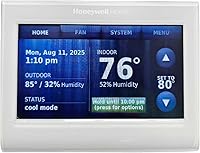
| Honeywell Wireless WiFi Thermostat | 7-day programming | WiFi | 7-day programming | C wire required | 9.6 |
| ecobee Smart Thermostat Enhanced | occupancy-based comfort | WiFi | Learns preferences and schedule | Power Extender Kit included for homes without a C wire | 9.1 |
| Vine Smart Thermostat for House with Nightlight | a large touchscreen | WiFi | 7 days with 8 periods | C wire required | 9.0 |
| Riseem WiFi Thermostats for Home Smart Thermostat | single-stage systems | 2.4 GHz WiFi only | 7-day programming | 8.8 | |
| Honeywell Home X2P Programmable Thermostat | simple weekly schedules | Wired; WiFi is not specified | 5-2 day programming or non-programmable mode | Battery powered; no C wire required | 8.7 |
| SITERWELL Smart Thermostat Programmable Home Wifi Thermostat | a color touchscreen | WiFi | Programmable | C wire needed; C-wire converter sold separately | 8.4 |
| Coiiwsei Programmable Thermostat | schedules without WiFi | WiFi is not specified | 7-day, 5/1/1 programming | 8.1 |
Which WiFi programmable thermostats stand out?
Nest is the most balanced connected pick, while Honeywell, ecobee and Vine fit different scheduling and control preferences. Each option below has a distinct use case and a wiring or compatibility detail worth checking.
Google Nest Thermostat: Best for flexible app scheduling
- WiFi and Google Home app control
- Programmable schedule
- Turns down when you leave
- C wire needed for some systems
Remote app control, a programmable schedule and an away mode cover the main connected scheduling needs. Check system compatibility and wiring before you buy.
Pros
- Remote control from a phone, laptop or tablet
- Away mode and schedule suggestions
- Works with Google Assistant and Matter-certified voice assistants
Cons
- Some system types need a C wire or compatible power accessory
- Remote features need working internet and WiFi
Google Nest Thermostat is the easiest place to start if you want a schedule, remote access and automatic adjustments when the home is empty. You can create an energy-efficient schedule in the Google Home app, then use a phone, laptop or tablet to change the temperature remotely.
The away mode turns the thermostat down when you leave. Savings Finder can suggest schedule changes, and HVAC monitoring can send an alert when something seems wrong with an eligible system.
Google says these alerts are informational and do not replace a diagnosis from an HVAC professional.
Nest works with Google Assistant and Matter-certified voice assistants. Voice control needs a compatible smart device, plus working internet and WiFi.
Check wiring before you buy. Nest is designed to work without a C wire in most homes.
Some systems, including heating-only, cooling-only, zone-controlled and heat-pump setups, need a C wire or compatible power accessory. Google’s Nest Compatibility Checker can help you check your system.
Honeywell Wireless WiFi Thermostat: Best for 7-day programming
- 7-day programming
- Total Connect Comfort app
- Alexa voice control
- C wire required
This Honeywell pairs 7-day scheduling with remote management through Total Connect Comfort. Its C wire requirement makes wiring checks important before choosing it.
Pros
- 7-day programming
- Remote app management
- Works with Alexa devices
Cons
- C wire required
- Professional installation is noted
Honeywell Wireless WiFi Thermostat is a good match if a separate schedule for each day matters to you. Its 7-day programming can follow a routine that changes across the week, and the Total Connect Comfort app supports remote monitoring and management.
The touchscreen provides on-screen comfort information, and the thermostat has an Energy Savings mode. It also works with Alexa when you have a compatible Alexa device.
The main tradeoff is installation: this Honeywell requires a C wire, and professional installation is noted.
Check your wiring and system before choosing it. If you're comparing connected models from the same brand, our guide to the best Honeywell smart thermostat covers more options.
ecobee Smart Thermostat Enhanced: Best for occupancy-based comfort
- WiFi and app control
- Adjusts for occupancy and sleep
- Power Extender Kit included
- Works with several smart home systems
Occupancy sensing and schedule learning add automatic adjustments to app-based control. The included Power Extender Kit is intended for homes without a C wire.
Pros
- Remote control from phone, tablet or Apple Watch
- Works with Alexa, Google Assistant, Apple HomeKit and SmartThings
- Three-year manufacturer warranty
Cons
- SmartSensors for room-by-room comfort are sold separately
- Confirm HVAC compatibility before buying
ecobee Smart Thermostat Enhanced suits households that want occupancy-based adjustments alongside app scheduling. It can adjust temperature when people are away or asleep, detect occupancy, and preheat or precool before you arrive.
The ecobee app lets you adjust settings remotely, set a vacation and review energy use.
It works with Amazon Alexa, Google Assistant, Apple HomeKit and SmartThings. The included Power Extender Kit is intended for homes without a C wire, but ecobee recommends checking compatibility before installation.
The SmartSensor option can help prioritize rooms where people spend time, but those sensors are sold separately. ecobee backs the thermostat with a 3-year manufacturer warranty.
For broader connected choices, compare this model with our picks for the best smart thermostat. If humidity control matters in your home, read How Does a Smart Thermostat Control Humidity? before deciding which features to prioritize.
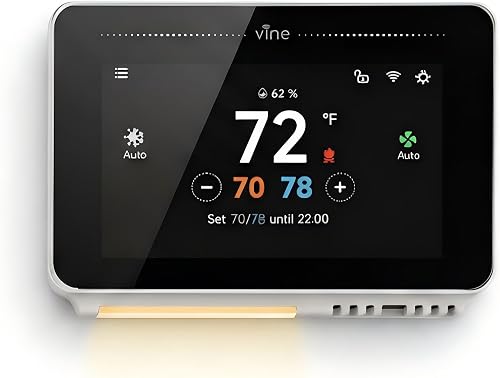
Vine Smart Thermostat for House with Nightlight: Best for a large touchscreen
- 4.3-inch touchscreen
- 7-day scheduling with 8 periods
- Nightlight
- C wire required
A large touchscreen, nightlight and flexible weekly schedule suit buyers who want visible controls at the wall as well as remote app access. Check its 24V system compatibility.
Pros
- Large touchscreen with nightlight
- Remote and voice control
- Supports 7-day scheduling
Cons
- C wire required
- Compatibility is limited to supported 24V systems
Vine Smart Thermostat for House with Nightlight stands out for its 4.3-inch touchscreen and 7-day schedule with 8 periods. A nightlight helps make the screen visible in a dark room, while the Vine Thermostat or Smart Life app gives you remote control.
It works with Alexa and Google Home for voice adjustments. Other features include Auto Home/Away mode, fan control, weather forecasting and WiFi auto reconnect.
Vine requires a C wire. It is designed for supported 24V AC systems, including certain conventional and heat-pump configurations.
Check the compatibility details before buying. For more options from this brand, see our Vine smart thermostat reviews.
Riseem WiFi Thermostats for Home Smart Thermostat: Best for single-stage systems
- App remote control
- 7-day scheduling
- 2.4 GHz WiFi
- C wire required
Riseem offers app control and weekly schedules for a narrow set of conventional systems. Its single-stage limit and 2.4 GHz WiFi requirement deserve a careful compatibility check.
Pros
- 7-day schedules
- Remote app adjustment
- Backlit LCD
Cons
- Does not support heat pumps or multi-stage systems
- Requires a C wire and 2.4 GHz WiFi
Riseem is a focused option for a conventional single-stage system that matches its requirements. It provides app control, 7-day schedules and a backlit LCD, with remote temperature adjustments through a phone app.
Its limits are specific: it requires a C wire, works only with 2.4 GHz WiFi, and does not support heat pumps or multi-stage systems. It also excludes heat-only and cool-only systems, among others, so verify your system terminals before you buy.
The narrow compatibility makes this a better fit for shoppers who have already confirmed their equipment is a supported single-stage 1 heat/1 cool setup. If your system type is unclear, use our guide to what HVAC systems work with smart thermostats as a starting point.
Honeywell Home X2P Programmable Thermostat: Best for simple weekly schedules
- 5-2 day schedule
- Filter reminders
- Battery powered
- No C wire required
The X2P is a useful schedule-focused alternative if WiFi is not essential. Its 5-2 schedule and filter reminders are paired with battery power.
Pros
- 5-2 day schedule
- No C wire required
- Filter reminders
Cons
- WiFi and app control are not specified
- Not compatible with electric baseboard heat or multi-stage systems
Honeywell Home X2P Programmable Thermostat is a schedule-first alternative for buyers who do not need WiFi or app control. Its 5-2 schedule lets you set one pattern for weekdays and another for weekends, and it also offers a non-programmable mode.
A large screen, clear font and change-filter reminder support everyday use. The X2P runs on 2 AA batteries and does not require a C wire.
This model is not a WiFi thermostat, so it does not match the connected part of this roundup.
It earns a place as a useful fallback if your priority is a weekly schedule without remote access. Its compatibility includes certain single-stage systems, but not electric baseboard heat or multi-stage systems.
SITERWELL Smart Thermostat Programmable Home Wifi Thermostat: Best for a color touchscreen
- 3.5-inch color touchscreen
- Remote app control
- Voice control
- C wire needed for steady power
A color touchscreen, phone app and voice control give SITERWELL several ways to adjust settings. Confirm wiring and system compatibility before buying.
Pros
- Remote control through a smartphone app
- Works with Alexa and Google Assistant
- 3.5-inch color touchscreen
Cons
- C-wire converter sold separately
- Check compatibility with your HVAC system
SITERWELL Smart Thermostat Programmable Home Wifi Thermostat offers a 3.5-inch color touchscreen, remote smartphone app control and voice control with Alexa or Google Assistant. Its app can also show device status while you're away.
The thermostat is described as compatible with many standard 24VAC residential systems, including single-stage and multi-stage heating and cooling.
Still, check your system and C-wire setup before installation. A C-wire converter needs to be bought separately if your wiring requires one.
Its combination of touch, app and voice controls can suit a home where several people adjust the temperature in different ways. For a comparison focused on two connected touchscreen thermostats, read Sensi Touch vs Sensi Touch 2: Which Should You Choose?.
Coiiwsei Programmable Thermostat: Best for schedules without WiFi
- 7-day, 5/1/1 programming
- Backlit LCD
- Broad stated system compatibility
- WiFi is not specified
Coiiwsei provides schedule options and a backlit screen for buyers who value programming over app access. Check its exclusions, especially for heat pumps with auxiliary or emergency heat.
Pros
- 7-day, 5/1/1 scheduling
- Large backlit LCD
- Supports several system types
Cons
- WiFi control is not specified
- Not compatible with several system types, including heat pumps with auxiliary or emergency heat
Coiiwsei Programmable Thermostat is for buyers who value a schedule and backlit screen more than connected control. Its programming supports 7-day, 5/1/1 options, and the large LCD is designed for easy reading.
WiFi and app control are not specified, so consider it a non-connected alternative rather than a WiFi pick. Its stated compatibility covers several heating and cooling types, including some heat pumps, but it excludes heat pumps with auxiliary or emergency heat, dual-fuel systems and electric baseboard heat.
Check the full system limits before choosing it. A thermostat that fits the schedule you want still needs to match your equipment.
What should you check before choosing a connected thermostat?
Start with HVAC compatibility and wiring, then compare the schedule and remote features you’ll actually use. This order helps you avoid choosing a thermostat whose controls look right but cannot work with your system.
Does your HVAC system support the thermostat?
Confirm whether your system is conventional, a heat pump, single-stage or multi-stage, then compare that with the model’s stated compatibility. Some models in this roundup support only a narrow set of equipment, and several require a C wire.
When you are unsure about system type, review What HVAC Systems Work with Smart Thermostats? and check the thermostat maker’s compatibility guidance. Turn off power and follow the installation instructions, or use a qualified HVAC professional if you are unsure about wiring.
Which schedule style matches your week?
Choose 7-day programming if weekdays and weekends vary, or look for a 5-2 schedule if you use one pattern for workdays and another for days off. Vine specifies 8 periods per day, while Honeywell’s WiFi model offers 7-day programming.
An app schedule can be handy when you want to make changes from your phone.
If remote access is not useful to you, a non-WiFi programmable thermostat may cover the schedule you need. Our smart thermostat vs programmable thermostat guide explains how those feature sets differ.
Which app or voice controls do you use?
Check that the thermostat works with the platform you already use. Nest works with Google Assistant and Matter-certified voice assistants; ecobee supports Alexa, Google Assistant, Apple HomeKit and SmartThings; Vine and SITERWELL support Alexa and Google Assistant.
App features also vary. Nest offers schedule suggestions and remote control, while ecobee includes occupancy sensing and schedule learning.
Focus on the controls you expect to use, rather than choosing a model based on a long feature list.
Do you need humidity features or room sensors?
Some thermostats describe humidity adjustments or offer add-on sensors, but those features differ by model. ecobee says it adjusts for humidity and can work with separately sold SmartSensors to help prioritize occupied rooms.
Read the specific feature details before treating a thermostat as a humidity controller or assuming it includes room sensors. Our guide to how a smart thermostat controls humidity explains what to check.
Which WiFi programmable thermostat should you choose?
Choose the Google Nest Thermostat for a balanced mix of app scheduling, remote access and away adjustments. Pick Honeywell if 7-day programming is your priority and your system has a C wire; choose ecobee for occupancy features, or Vine for a large touchscreen with a nightlight.
If WiFi is optional, the Honeywell Home X2P offers a 5-2 schedule without connected control. Before buying any model, confirm HVAC compatibility and wiring, then choose the schedule and app features that fit your routine.
Our top 3 picks at a glance
-
1
-
2
-
3
Frequently asked questions
What should you check before buying a WiFi thermostat?
Check that the thermostat supports your HVAC system and wiring, then confirm that your home WiFi and preferred app or voice assistant are compatible. C-wire needs vary by model and system.
A compatibility checker can help narrow the options, but compare the thermostat’s stated system limits with your equipment.
Can a programmable thermostat work without WiFi?
Yes. A thermostat can follow a schedule set at the device without connecting to WiFi.
The Honeywell Home X2P and Coiiwsei picks here provide programming, while WiFi and app control are not specified for either.
Choose a connected model if you want remote adjustments through a phone.
Does a WiFi thermostat need a C wire?
It depends on the thermostat and your HVAC system. Nest is designed to work without a C wire in most homes, while ecobee includes a Power Extender Kit for homes without one; Vine requires a C wire.
Check the model’s wiring guidance and your system before buying.
Is a smart thermostat the same as a programmable thermostat?
A programmable thermostat follows a schedule, while a smart thermostat can add connected controls such as remote app access or voice commands. Some models offer both, so the labels alone do not show which features you’ll get.
Compare the schedule options and connected features you expect to use.