How to Use a Braeburn Thermostat
Use the arrows to change the set temperature, then choose Heat, Cool, or Auto as needed. Exact buttons and menu options vary by Braeburn model, so check the model's manual before changing advanced settings.
On this page (9 sections)
- How do you change the temperature on a Braeburn thermostat?
- Which operating mode should you choose?
- How do you use a schedule or hold?
- What do the fan settings do?
- How do you use the temperature swing setting?
- What should you check if the thermostat does not respond?
- Which thermostat-related products may help?
- When should you open a Braeburn thermostat?
- How do you use a Braeburn thermostat day to day?
Here's how to use a Braeburn thermostat: choose the operating mode, then use the temperature arrows to set the target. The display and buttons vary by model, so use the model number to find instructions for schedule, hold, fan, and other controls.
How do you change the temperature on a Braeburn thermostat?
Press the up or down arrow until the set temperature reaches your target. Check the display to make sure you changed the setpoint, not just viewed the room temperature.
First select Heat or Cool if your thermostat is not already in the mode you need. In Heat mode, set a target above the room temperature to call for heat; in Cool mode, set one below the room temperature to call for cooling.
Some Braeburn models apply a temporary hold when you change the setpoint. The scheduled program may resume later, so check the screen for a hold indicator or consult the manual.
If you are still getting familiar with controls, our guide to how to set up a thermostat explains basic setup terms and choices.
Which operating mode should you choose?
Choose Heat for heating, Cool for cooling, and Auto only if your model supports automatic switching and you want it. For a related heat-pump mode, see EM Heat explained.
Off stops normal heating and cooling calls, though the system may still have safety functions.
The mode button may be labeled System, Mode, or another term. Press it to cycle through available options, then pause to confirm the display shows the mode you intended.
Auto can use heating and cooling setpoints to keep the room within a chosen range. If the settings are too close together, the system may switch modes more often than you expect; check your manual for the recommended spacing.
For a similar brand-specific walkthrough, see how to use a Honeywell Home thermostat.
How do you use a schedule or hold?
A schedule changes the setpoint at programmed times; a hold keeps a chosen temperature for a period or until you cancel it. The exact hold behavior depends on the Braeburn model.
If the temperature changes unexpectedly, look for a schedule, hold, or temporary override indicator on the display. A temporary hold may end at the next scheduled period, while a permanent hold may remain until you cancel it.
Use the thermostat's menu or program button to review schedule periods. For a brand-specific example, see program a White Rodgers thermostat.
Avoid changing installer settings while searching for a schedule control, since those options may affect how the heating and cooling system operates.
Related controls differ by brand. These guides explain how to set a Trane thermostat and how to set a Carrier thermostat.
What do the fan settings do?
The fan setting controls whether the HVAC fan runs only with heating or cooling, or runs more often. Auto generally runs it when the system calls for heating or cooling, while On may keep it running continuously.
Use Auto for ordinary operation if you want the fan to run with a heating or cooling cycle. Choose On only if you want continuous airflow and understand how your system handles that setting.
Some thermostats have additional fan options, such as a timed circulation setting. The names and behavior vary, so check your model's manual before relying on them.
How do you use the temperature swing setting?
Temperature swing controls how far the room temperature can move from the setpoint before the system starts or stops. A wider swing can mean fewer system starts, while a narrower one may keep temperature closer to the target.
The setting may also be called differential or cycle rate. Leave it at the default unless you have a clear reason to change it and know the setting recommended for your equipment.
For more background, read what temperature swing means on a thermostat. Don't use swing adjustments to compensate for a thermostat in a poor location.
What should you check if the thermostat does not respond?
Check the display, mode, setpoint, and schedule or hold status first. If the screen is blank or the HVAC system does not respond, use the thermostat and equipment manuals before trying a reset or wiring change.
If the display is blank, the thermostat may need batteries or the HVAC system may have lost power. Check only the power steps described in the manuals, and don't remove the thermostat from its wall plate unless you know how to do so safely.
If a temperature change seems delayed, allow the equipment time to run. A thermostat can show the setpoint immediately while the room takes longer to reach it.
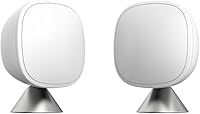
For room temperature differences, a remote sensor may help a compatible smart thermostat use readings from another room. The ecobee SmartSensor 2-Pack is designed to share room temperature and occupancy readings with an ecobee Smart Thermostat.
This sensor is for ecobee systems, not a direct add-on for a Braeburn thermostat. For how a thermostat reads temperature, see how smart thermostats know the temperature.
Which thermostat-related products may help?
Choose a product based on the system you have and the problem you are trying to solve. A smart thermostat or room sensor may help with remote control or room readings, while a heating controller is meant for a separate, specific use.
The Sensi Smart Thermostat offers button controls, app access, flexible scheduling, and usage reports. It is a separate thermostat option for readers considering a smart thermostat, not an accessory for a Braeburn.
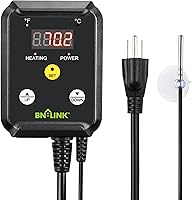
The BN-LINK Reptile Thermostat Temperature Controller is intended for heating devices such as heat mats and heat lamps. It is not a household HVAC thermostat and should not be used to control a central heating or cooling system.
If you want to compare another programmable thermostat's controls, see how to program a Lux thermostat.
When should you open a Braeburn thermostat?
Open the thermostat only when the manual says you need to access its batteries or wiring. Turn off power to the HVAC system before working near wiring, and get qualified help if you're unsure.
Different models open in different ways, and forcing a cover can damage its clips or wiring. Follow the steps in how to open a Braeburn thermostat for model-aware guidance.
How do you use a Braeburn thermostat day to day?
Set the mode first, adjust the temperature with the arrows, and check whether a schedule or hold will change it later. Use the fan setting that matches your preference and leave advanced system settings at their defaults unless your manual advises otherwise.
If you want simple manual control, adjust the setpoint and verify the display. If you want temperatures to change on a routine, review the schedule; if you need room-by-room readings, use a sensor system that is compatible with your thermostat.
For most questions about how to use a Braeburn thermostat, the model number and manual are the best guides to exact button names and available settings.
Frequently asked questions
How do I set the temperature on a Braeburn thermostat?
Use the up or down arrows to change the set temperature, then confirm the display shows your intended setting. The system must also be in the matching Heat or Cool mode.
Button names and whether a temporary hold ends automatically vary by model, so check its manual.
How do I switch a Braeburn thermostat from heat to cool?
Use the system or mode button to select Heat or Cool, then set the temperature with the arrows. Some models also offer Auto, which can switch between heating and cooling based on setpoints.
Check the manual for the exact controls and any required system limits.
Why is my Braeburn thermostat not changing the room temperature?
First check the operating mode, set temperature, and whether a hold or schedule is active. Give the HVAC system time to respond, and make sure the thermostat display is powered.
If the system still does not run, consult the thermostat and HVAC manuals or contact a qualified technician.
Can I use a Braeburn thermostat without a schedule?
Many models let you adjust the set temperature without changing the schedule, often through a temporary hold. The schedule may resume at its next programmed period, depending on the model and hold setting.
Consult the manual to learn whether your thermostat offers a temporary or permanent hold.