How to Identify Older Honeywell Thermostat Models
To identify older Honeywell thermostat models, find the model number on the thermostat or its packaging, then match it to Honeywell’s product information. The display, buttons, and wiring can help narrow it down, but they don't confirm compatibility by themselves.
On this page (7 sections)
- Where can you find an older Honeywell thermostat model number?
- What details help distinguish older Honeywell models?
- How can you verify the model before changing settings?
- Can you identify the thermostat from its wiring?
- What should you check before choosing a replacement?
- What if you can't find the model number?
- How should you use an older Honeywell model identification?
To identify older Honeywell thermostat models, find the model number on the device or its paperwork and verify it with Honeywell’s product information. The display style, controls, and wiring provide clues, but the model number is the clearest identifier.
Before changing settings or shopping for a replacement, write down the model number exactly as shown. If there is no visible number, take photos of the front, controls, and any wiring labels so you can compare them with official information or ask an HVAC professional.
Where can you find an older Honeywell thermostat model number?
Look for a label on the thermostat, under its removable cover, or on the original packaging. Installation instructions, invoices, and product registration records may also include the model number.
Check the front and sides first. Some thermostats have a small label around the edge or behind a hinged panel.
If the number isn't visible, turn off power to the system before removing the thermostat cover, and don't pull on any wires.
Copy letters, numbers, and hyphens carefully. Similar model names can differ by a character, and that difference may point to a different control or system compatibility.
If you still can't locate a number, take photos of the thermostat and its terminal labels. Don't rely on a vague description such as “round Honeywell with buttons” when asking for help.
What details help distinguish older Honeywell models?
Record the display, control layout, and terminal labels alongside the model number. These details can help narrow down a model family when a label is missing or hard to read.
Note whether the thermostat has a digital screen, a dial, or a simple switch. Write down visible button names and any mode labels, such as heat, cool, or fan.
Treat these as clues only, because similar layouts can appear across different models.
The wiring terminals offer another useful record. Photograph the labels beside the wires, such as R, W, Y, G, or C.
For what those labels mean, see How to Identify Thermostat Wires: Quick Fixes.
Also note whether the thermostat appears to control heating only, cooling only, or both. The equipment type and wiring matter when assessing a replacement, even when two thermostats look alike.
How can you verify the model before changing settings?
Compare the exact model number with Honeywell’s own product information or support resources. Confirm the product name and any documented instructions before changing settings or following a reset procedure.
Search the manufacturer’s support site using the complete number, including letters and suffixes. Check the manual for the same model, rather than using instructions for a thermostat that only looks similar.
If the number brings up several close matches, compare the full label and terminal arrangement.
Once you know the model, follow instructions specific to it. Our guide on how to use a Honeywell Home thermostat explains basic controls, while Honeywell Home thermostat permanent hold covers one common setting.
Don't change installer settings just to see what they do. A setting can affect how your heating or cooling equipment operates, and the right values depend on the model and system.
Can you identify the thermostat from its wiring?
Wiring can help you assess system compatibility, but it doesn't identify the thermostat model on its own. Record terminal labels and take a clear photo before any replacement work.
Wire colors aren't a reliable substitute for terminal labels. A red wire often connects to R, for example, but installations can vary.
Read the label at the terminal and note any unused wires tucked behind the thermostat.
If you're planning to change the thermostat, first identify the heating and cooling equipment and check the replacement's compatibility guidance. For setup steps after selecting a suitable model, use our guide on how to set up a thermostat.
Stop and get qualified help if wires are unlabeled, damaged, or confusing, or if the system uses a configuration you don't recognize. Don't assume a replacement will work just because the old thermostat has a familiar set of terminals.
What should you check before choosing a replacement?
Confirm the HVAC system type, terminal labels, and replacement compatibility before buying. A similar appearance or shared brand name doesn't guarantee that two thermostats use the same wiring or support the same equipment.
Keep the old thermostat's model number, photos, and manual together. Compare them with the replacement’s compatibility information, and contact the manufacturer or an HVAC professional if any connection or system detail is uncertain.
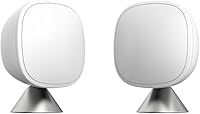
A smart thermostat sensor can help manage room comfort after you have a compatible thermostat. The ecobee SmartSensor 2-Pack detects room occupancy and shares temperature readings with an ecobee Smart Thermostat, so it suits readers already using that system.
For a thermostat replacement option, the Sensi Smart Thermostat has app instructions for installation and works with HVAC equipment found in most homes, though compatibility still needs checking for your system.
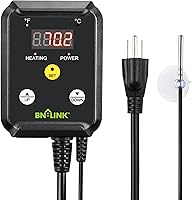
The BN-LINK controller serves a different purpose: it controls heating devices such as heat mats and heat lamps. It isn't a home HVAC wall thermostat, so it won't replace an older Honeywell thermostat.
What if you can't find the model number?
Use the thermostat’s paperwork, clear photos, and terminal labels to get help identifying it. If the exact model remains uncertain, avoid changing advanced settings or buying a replacement based on appearance alone.
Check any installation manual, receipt, or home maintenance record you have. A previous owner may have left the thermostat packaging or service notes near the HVAC equipment.
If you need help from an HVAC professional, share the photos, the visible model markings, and the type of heating or cooling system. That gives them a better starting point than a brand name alone.
How should you use an older Honeywell model identification?
When identifying Honeywell thermostat older models, use the model number as your main reference and treat display style and wiring as supporting clues. Confirm the HVAC system and replacement compatibility before changing settings or buying a new control.
Choose the next step based on what you need: follow the model-specific manual to adjust settings, consult a professional if wiring is unclear, or compare compatible replacements after recording the system details. If the thermostat sits in a spot where you need to hide it temporarily, see how to cover a thermostat on a wall.
Frequently asked questions
Where is the model number on an older Honeywell thermostat?
Check the front, sides, and area beneath the thermostat cover for a model number or other identifying label. If you can't find it, look for the original box, installation paperwork, or a registration record.
Turn off power before removing a cover, and don't disconnect wires just to search for a label.
Can I identify a Honeywell thermostat by its appearance?
Appearance can narrow down the model family, but it can't confirm an exact model or replacement fit. Honeywell has made thermostats with similar displays and button layouts.
Record the model number and check the terminal labels, system type, and manufacturer information before choosing a replacement.
Should I remove an old Honeywell thermostat before identifying it?
No, start by checking the front and any visible label. If you need to remove the cover, switch off power to the heating and cooling system first and take a clear photo of the wiring before touching anything.
Ask an HVAC professional if the wiring or system is unclear.
Do older Honeywell thermostat wires identify the model?
Wire labels can help identify the system connections, but they don't tell you the thermostat's exact model. Note the terminal names and take a photo before any replacement work.
For help reading labels, see our guide to identifying thermostat wires.