Honeywell Home X8S Smart Thermostat Review: Worth It? (November 2026)
The Honeywell Home X8S is a premium smart thermostat for homes that want a large display, occupancy-based adjustments and broad HVAC support. Choose it when doorbell viewing and indoor air quality controls matter, or choose Sensi for simpler button controls.
On this page (10 sections)
- The X8S smart thermostat at a glance
- What does the X8S support?
- Does the X8S need a C-wire?
- How does the X8S compare with Sensi?
- How does the X8S compare with Amazon Smart Thermostat?
- Which smart home features matter most?
- Is the 5-inch display useful?
- How should you choose between these 3 thermostats?
- What should you check before installing?
- Final verdict: is the X8S worth considering?
The Honeywell Home X8S is a strong choice for a connected home that wants a large touchscreen, occupancy detection and broad HVAC support. It brings several features together in one wall mounted unit rather than keeping them separate.
Its main limits are the required C-wire and the fact that 120 to 240V electric baseboard heat is not supported. Those points matter before you order, so check your heating type and wiring first.
The X8S also connects temperature control with compatible First Alert and Ring streaming doorbells. That link lets you see and speak to visitors from the thermostat itself, although those doorbells are sold separately.
Choose it for a feature-rich wall display, or consider Sensi if you want simpler button controls and a C-wire that is not required in most applications. The best fit depends on how you like to make quick changes at home.
Remote control through the First Alert app adds another layer of convenience. You can adjust temperature from away from home once setup is complete and the Wi-Fi connection is stable.
Humidity and ventilation control also set this model apart from basic thermostats. Those functions may need extra HVAC equipment or accessories, so factor that into your plans.
Broad HVAC support is another reason to consider the X8S. It works with up to 3 heat and 2 cool heat pump systems with electric backup, or up to 2 heat and 2 cool conventional systems.
It also supports hot water heat and forced air using gas, oil or electric power. That range covers many homes, but it does not remove the need to check your own equipment.
Occupancy and presence detection help the X8S adjust when you are home or away. In daily use that can keep comfort steady without constant manual changes.
Matter certification and links to Amazon Alexa, Google Assistant and Apple Home widen its appeal. If your home already uses those platforms, the X8S can sit comfortably alongside them.
The X8S smart thermostat at a glance
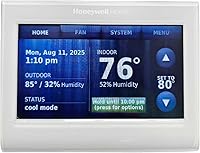
The X8S combines a 5-inch customizable touchscreen with remote app control, smart home compatibility and indoor air quality controls. It is designed for homeowners who want more than basic scheduling from a wall thermostat.
Honeywell Home X8S Premium Smart Wi-Fi Thermostat: Best for connected home comfort

- 5-inch touchscreen
- Occupancy and presence detection
- Humidity and ventilation control
- First Alert and Ring doorbell support
- Matter certified
A feature-rich thermostat for shoppers who want a large touch display, remote app control, occupancy detection and smart home interoperability. It requires a C-wire, with a Honeywell Home C-Wire Adapter voucher included when needed.
Pros
- Large customizable display
- Broad stated HVAC compatibility
- Occupancy and presence detection
- Doorbell camera view and intercom support
- Matter certified
Cons
- C-wire is required
- Electric baseboard heat is not supported
- Doorbell and extra HVAC features may need separate equipment
The display can show visitors from compatible First Alert VX1 and Ring streaming doorbells, and the intercom feature lets you speak with them from the thermostat. The doorbells are separate equipment, so this feature should not drive your decision unless it fits your existing setup.
The X8S also supports Amazon Alexa, Google Assistant and Apple Home. Matter certification may help it work within a broader smart home system, while the First Alert app handles remote control.
Who should consider the X8S?
The X8S makes sense if you want a large touch display and automatic adjustments based on occupancy or presence. It also suits homes with supported heat pump or conventional systems and shoppers who want humidity or ventilation control.
It may be too much thermostat if you only need simple temperature changes. In that case, a button-based model can be easier to understand and may have fewer setup decisions.
What does the X8S support?
The X8S supports up to 3 heat and 2 cool heat pump systems with electric backup, or up to 2 heat and 2 cool conventional systems. It also supports hot water heat and forced air systems using gas, oil or electric power.
That range covers several common HVAC arrangements, but compatibility still depends on your wiring and equipment. Write down the labels on your existing thermostat terminals before removing anything.
The X8S does not work with 120–240V electric baseboard heat. If your home uses electric wall heaters, confirm the system type before choosing this model.
For more general guidance, see what HVAC systems work with smart thermostats. It helps you compare the heating and cooling equipment in your home with the control requirements of a smart thermostat.
Does the X8S need a C-wire?
Yes, the X8S requires a C-wire for power. If your system does not already have one, the package includes a voucher to receive a Honeywell Home C-Wire Adapter by mail at no cost.
Check the existing wiring before ordering. Turn off HVAC power, remove the thermostat cover carefully and photograph the terminal labels so you can restore the connections if needed.
A C-wire question is not only about the number of visible wires. The equipment type, terminal labels and installation method all matter, especially in systems with multiple heating or cooling stages.
Use this guide to connecting a Honeywell thermostat to WiFi after confirming the wiring and completing the physical installation. Wi-Fi setup comes after the thermostat can power on and communicate with your HVAC equipment.
How does the X8S compare with Sensi?
The X8S offers more stated smart home and display features, while Sensi is the simpler choice for familiar button controls and guided DIY setup. Sensi does not require a C-wire in most applications and includes a built-in level for installation.
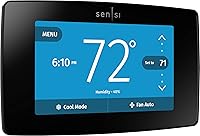
Sensi Smart Thermostat: Best for simpler installation

- Button controls
- Built-in level
- DIY app guidance
- Flexible scheduling
- Usage reports and maintenance reminders
A practical alternative for shoppers who want a familiar thermostat shape, button controls and guided DIY installation. Sensi also includes usage reports, equipment alerts and filter replacement reminders.
Pros
- C-wire not required in most applications
- Button controls feel familiar
- Built-in level helps installation
- Usage reports and maintenance reminders
- Privacy protection
Cons
- Smaller feature set than the X8S
- The exact HVAC setup still needs compatibility checking
- No stated doorbell view or intercom feature
Sensi is designed to look and feel like a traditional thermostat. Its buttons can be a better fit if you prefer direct controls over a touchscreen.
The Sensi app supports flexible scheduling, remote access and usage reports. It can also provide equipment alerts and filter replacement reminders, which may help you keep routine HVAC tasks visible.
Sensi supports app, touch and voice control, along with Amazon Alexa, Apple HomeKit, Google Assistant, SmartThings and Vera. Its stated privacy feature says personal information is not sold to third parties.
Choose Sensi when installation simplicity and familiar controls matter more than doorbell viewing, occupancy detection or a 5-inch display.
How does the X8S compare with Amazon Smart Thermostat?
The Amazon Smart Thermostat is the better match for a home that already uses Alexa and compatible Echo devices. It supports Alexa app control and can automatically switch between preferred home, away and sleep temperatures.
Amazon Smart Thermostat: Best for Alexa homes

- Alexa app control
- Automatic home, away and sleep temperatures
- C-wire required
- Optional Echo temperature readings
- Ring compatibility
An Alexa-focused option for homes already using compatible Echo devices or Ring. It supports app control and automatic temperature changes, but a C-wire is required.
Pros
- Fits an Alexa-centered setup
- Supports automatic home, away and sleep temperatures
- Optional comfort zones with select Echo devices
- Installation guidance in the Alexa app
Cons
- C-wire required
- Best fit depends on Alexa ecosystem use
- Less stated HVAC detail than the X8S
The Amazon Smart Thermostat requires a C-wire, so it does not remove the wiring question that comes with the X8S. Its installation guidance appears in the Alexa app, and customer service is available during setup.
Select Echo devices or the Amazon Smart Air Quality Monitor can help create comfort zones through temperature readings or presence detection. That makes it a useful option for an Alexa-centered home, but the feature depends on using compatible devices.
The X8S has more detailed stated HVAC compatibility and adds a customizable 5-inch display, humidity and ventilation control, Matter certification and compatible doorbell viewing. Amazon's model is more focused on Alexa routines and automatic temperature changes.
Which smart home features matter most?
The right feature set depends on how you plan to control your home. The X8S is strongest when you want one wall display to combine HVAC control, smart home access and compatible doorbell communication.
Occupancy and presence detection can adjust settings for home and away conditions. That may reduce the need to manage every schedule change manually, but you should still review the settings so they match your household routine.
Humidity and ventilation control may help maintain indoor air quality when your HVAC system has the required equipment. The X8S notes that additional HVAC equipment or accessories may be required.
The plain explanation of smart home thermostats covers the difference between remote control, scheduling, presence detection and broader home automation.
Is the 5-inch display useful?
The X8S's 5-inch touchscreen gives you a larger control surface than a small basic thermostat. The size makes everyday readings easier to spot as you pass by in a hallway or living room.
You can choose the color and style of the idle screen to better match the room. That choice helps the thermostat blend in rather than stand out on the wall.
A large display lets you read settings from farther away. You do not need to stand close to check the current temperature or mode.
It also gives the thermostat room to show connected features, such as compatible doorbell activity. Seeing a visitor on the wall can be handy when your phone is elsewhere.
The 5 inch screen suits households with different comfort preferences. Each person can see the set temperature clearly without squinting at small digits.
Set up starts with choosing a display look that works in your space and light. A darker style may suit a room with bright screens, while a lighter style may suit a quieter corner.
Touch control replaces physical buttons for most tasks on this model. That keeps the front clean, but it does ask you to learn a few taps.
Care is simple, since the smooth front wipes clean with a soft dry cloth. Avoid harsh cleaners that could dull the finish or affect the touch response over time.
The trade-off is that more features can mean more setup choices. Decide which functions you will actually use, then keep the everyday controls simple for everyone in the home.
If you rarely look at the thermostat, a smaller screen may be enough. If you use connected features often, the extra space earns its place on the wall.
How should you choose between these 3 thermostats?
Choose the X8S if your HVAC system is supported, you have a C-wire plan and you want its touchscreen, occupancy detection, indoor air quality controls or doorbell features.
Choose Sensi if you want button controls, guided DIY installation and a C-wire that is not required in most applications. It is the clearest fit for shoppers who prefer a familiar thermostat layout.
Choose Amazon Smart Thermostat if Alexa is already the center of your smart home. Its home, away and sleep temperature changes, app control and optional Echo-based comfort zones fit that ecosystem.
The best Honeywell smart thermostat options can help if you want to compare the X8S with other Honeywell Home models before deciding.
What should you check before installing?
Start with your HVAC type, wire labels, C-wire status and Wi-Fi network. The X8S supports 2.4 or 5.0 GHz Wi-Fi through an 802.11ax/ac/a/b/g/n wireless router.
Turn off power to the HVAC system before handling thermostat wiring. Use the installation guide, label wires before disconnecting them and do not guess when the terminal layout is unclear.
After mounting the wall plate, connect the thermostat and follow the app setup. Check heating and cooling separately, then confirm remote control works before relying on automatic schedules.
Keep the display clean with a soft, dry cloth. Review occupancy, temperature and humidity settings after the first few days so the system reflects how your home is actually used.
Final verdict: is the X8S worth considering?
The X8S smart thermostat is the most capable option here for a connected home with supported HVAC equipment. Its 5-inch display, occupancy detection, indoor air quality controls, smart home links and compatible doorbell support give it a wide feature set.
Pick the X8S when those features justify the C-wire requirement. The package includes a voucher for a Honeywell Home C-Wire Adapter by mail at no cost if your system needs one.
Pick Sensi for simpler controls and easier wiring in many homes. Its button layout and guided DIY setup suit shoppers who want a familiar feel on the wall.
Choose Amazon Smart Thermostat when Alexa routines and Echo-based comfort zones are your main priority. That model fits best when your home already leans on Alexa for daily control.
Think about who will use the thermostat most often. A touchscreen with many options suits a tech comfortable household, while buttons suit quick hands on use.
Think about your HVAC layout before you decide. Compatibility with heat pump or conventional systems, plus hot water and forced air options, narrows the field in a helpful way.
Also weigh the extra equipment some features may need. Doorbell viewing needs a compatible First Alert VX1 or Ring doorbell, and air quality control may need more HVAC gear.
Daily care across all three models stays modest. Keep screens clean, review schedules after the first week and adjust settings to match real routines at home.
Energy savings come from steady habits as much as from smart features. Occupancy detection, away settings and clear schedules help you avoid heating or cooling an empty house.
For a nearby humidity-control topic, see the guide to the best 50 pint dehumidifiers if your home also needs help managing excess moisture. Moisture and air quality often shape comfort as much as temperature alone.
In the end, the X8S rewards homes that want one display to handle comfort, presence and doorbell contact. If that list sounds like your home, it is worth a closer look.
Frequently asked questions
Is the Honeywell Home X8S a good smart thermostat?
The Honeywell Home X8S suits shoppers who want a 5-inch touchscreen, occupancy and presence detection, remote app control and broad support for heat pump or conventional systems. It is less suitable for electric baseboard heat, and its installation requires a C-wire.
Does the Honeywell Home X8S require a C-wire?
Yes, the Honeywell Home X8S requires a C-wire. If your system does not already have one, the package includes a voucher to receive a Honeywell Home C-Wire Adapter by mail at no cost.
Confirm your wiring and HVAC type before starting installation.
What HVAC systems work with the Honeywell Home X8S?
The X8S works with up to 3 heat and 2 cool heat pump systems with electric backup, or up to 2 heat and 2 cool conventional systems. It also supports hot water heat and forced air using gas, oil or electric.
It does not work with 120–240V electric baseboard heat.
Can the X8S show a video doorbell?
The X8S can show and speak with visitors through compatible First Alert VX1 and Ring streaming doorbells. Those doorbells are not included, so this feature matters most if you already use, or plan to add, compatible doorbell equipment.