Sensi Touch Thermostat Review: Worth It? (November 2026)
The Sensi Touch Smart Thermostat is the strongest fit for connected control and DIY setup when your HVAC system has a C-wire. Honeywell suits staged systems, while LUX offers simple 7-day touchscreen scheduling.
On this page (9 sections)
- Is the Sensi Touch thermostat a good choice?
- How does the Sensi Touch compare with other touchscreen thermostats?
- What connected features does Sensi Touch provide?
- Is Sensi Touch easy to install?
- How does Honeywell compare for staged systems?
- What does LUX offer for basic programmable control?
- Which Sensi Touch alternative should you choose?
- How should you choose and use a touchscreen thermostat?
- Final verdict on Sensi Touch thermostat reviews
The Sensi Touch Smart Thermostat is the best overall choice in these Sensi Touch thermostat reviews if you have a compatible HVAC system with a C-wire and want touchscreen, app and voice control. Honeywell is the better fit for staged heating and cooling, while LUX is a simpler scheduling alternative.
We compared the stated controls, connectivity, installation details and system information for all 3 models.
Is the Sensi Touch thermostat a good choice?
The Sensi Touch is a strong choice for connected home comfort with guided installation. Its color touchscreen, Wi-Fi, mobile app, programmable schedules, usage reports and maintenance alerts cover more connected tasks than the other 2 options here.
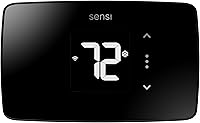
Sensi Touch Smart Thermostat by Emerson: Best for connected DIY control

- Touchscreen color display
- Wi-Fi and mobile app control
- C-wire required
- Works with Alexa
- Energy Star certified
The Sensi Touch combines a color touchscreen, Wi-Fi control, scheduling, usage reports and app-guided installation. It is the best match here for households that want connected features and have a compatible C-wire system.
Pros
- Color touchscreen
- Android and iOS mobile app control
- Usage reports and maintenance reminders
- Privacy protection described by Sensi
Cons
- C-wire is required
- Compatibility still needs to be checked before installation
Sensi says the thermostat can help save about 23% on HVAC energy through flexible scheduling, remote access and usage reports. That figure is a brand claim, not a guarantee for every home, because actual savings depend on your schedule, equipment and settings.
The thermostat is wall mounted and measures 1.17 in deep, 5.63 in wide and 3.2 in high. It weighs 13.6 ounces and has a glossy black plastic finish.
The box includes the thermostat, installation guide, mounting hardware, owner's manual and warranty booklet. Sensi also states a 3-year manufacturer warranty.
Who should choose the Sensi Touch?
Choose it if you want remote control from an Android or iOS phone or tablet and prefer a color display with touch menus. The thermostat also supports control through Amazon Alexa, Apple HomeKit, Google Assistant, SmartThings and Vera.
The C-wire requirement is the main installation limit. Sensi describes easy-click terminals, a built-in level and step-by-step app instructions, but you still need to confirm that your wiring and HVAC equipment are compatible.
Sensi also describes privacy protection, including a promise not to sell personal information to third parties. If connected-home data matters to you, that policy is a useful part of the buying decision.
How does the Sensi Touch compare with other touchscreen thermostats?
The Sensi Touch offers the broadest connected feature set here, but the best choice depends on your HVAC stages and preferred controls. Honeywell adds support for up to 3 heat and 2 cool stages, while LUX centers on 7-day touchscreen scheduling.
| Feature | Sensi Touch | Honeywell VisionPRO 8000 | LUX TX9600TS |
|---|---|---|---|
| Display | Touchscreen color LCD | Large touchscreen | Large LCD touchscreen |
| Connectivity | Wi-Fi | Wi-Fi | Wi-Fi listed |
| Remote control | Sensi mobile app | Total Connect Comfort app | No mobile app described |
| Scheduling | Programmable | 7-day programming | 7-day programming |
| HVAC detail | C-wire required; works with HVAC equipment found in most homes | Up to 3 heat / 2 cool stages | Heating and cooling control |
| Power detail | C-wire required | 2 AAA batteries | 2 AA batteries |
| Dimensions | 1.17 x 5.63 x 3.2 in | 4.96 x 1.14 x 4.65 in | 1.13 x 5.38 x 3.38 in |
For a closer feature comparison, read Sensi Touch vs Sensi Touch 2 before deciding between the 2 Sensi generations.
What connected features does Sensi Touch provide?
The Sensi Touch provides app, touch and voice control through its listed connectivity and controller support. You can adjust the thermostat from the wall, use the Sensi app on a phone or tablet, or connect it with supported smart-home controllers.
Programmable scheduling is useful when your home's comfort needs change through the day. You can set a routine rather than making repeated temperature changes at the wall.
Geofence technology is also listed as an additional feature. The product data does not explain its exact trigger settings, so review the app controls and privacy information before relying on it for automatic changes.
Usage reports can help you see how your schedule relates to HVAC operation. Maintenance alerts and filter replacement reminders may also make routine care easier to remember.
The color LCD and intuitive menus are aimed at quick reading and adjustment. A large display matters most when the thermostat is mounted where you need to check it from across the room.
Is Sensi Touch easy to install?
Sensi Touch is designed for DIY installation with a built-in level, illuminated easy-click terminals and app instructions, but the C-wire requirement still matters. Turn off HVAC power before handling thermostat wiring and follow the installation guide for your system.
Take a photo of the existing terminal connections before removing the old thermostat. Label wires by terminal rather than relying only on color, since wire colors can vary between installations.
Check the compatibility information from Sensi's official support resources before ordering or installing. If your system does not have the required C-wire or has unfamiliar equipment, ask a qualified HVAC professional to confirm the setup.
The Sensi Touch works with HVAC equipment found in most homes according to the product information. That broad statement does not replace a system-specific compatibility check.
How does Honeywell compare for staged systems?
Honeywell's VisionPRO 8000 is the better match when your system has up to 3 heat and 2 cool stages. That makes its system support the key reason to choose it over Sensi Touch for a more complex staged setup.
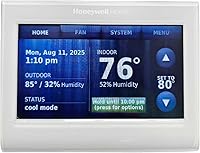
Honeywell TH8321WF1001 Touchscreen Thermostat Wifi Vision Pro 8000: Best for staged HVAC systems

- Large touchscreen display
- Wi-Fi
- Up to 3 heat and 2 cool stages
- 7-day programming
- Total Connect Comfort app
Honeywell's VisionPRO 8000 is the better fit when your system needs support for up to 3 heat and 2 cool stages. It also offers touchscreen scheduling and remote control through the Total Connect Comfort app.
Pros
- Supports up to 3 heat and 2 cool stages
- Large touchscreen
- 7-day programming
- Remote control through the Total Connect Comfort app
Cons
- More system-focused than the Sensi Touch
- Compatibility should be confirmed for your exact HVAC setup
The Honeywell model has a large touchscreen and supports a schedule for each day of the week. Its Total Connect Comfort app provides remote temperature control.
The thermostat measures 4.96 x 1.14 x 4.65 in and weighs 12.8 ounces. It requires 2 AAA batteries.
Honeywell's information here does not provide the same installation detail as Sensi's built-in level and illuminated terminals. Confirm wiring, equipment stages and app requirements before replacing an existing control.
What does LUX offer for basic programmable control?
LUX is the better fit for simple 7-day heating and cooling schedules on a large touchscreen. It gives each day its own schedule, which can suit households with different weekday and weekend routines.
LUX TX9600TS Programmable 7-Day Large Touchscreen Heating: Best for simple 7-day scheduling

- Large touchscreen
- 7-day programming
- Heating and cooling control
- Wi-Fi connectivity listed
- Wall mount
The LUX TX9600TS focuses on large touchscreen control and separate schedules for each day. It suits readers who want programmable heating and cooling control without choosing the Sensi Touch's app-centered feature set.
Pros
- 7-day programming
- Large touchscreen
- Heating and cooling control
- Wall-mount design
Cons
- No mobile app is described in the supplied product information
- Compatibility should be confirmed before replacing an existing thermostat
The TX9600TS measures 1.13 in deep, 5.38 in wide and 3.38 in high. It weighs 8.8 ounces, uses 2 AA batteries and mounts on the wall.
Its product data describes Wi-Fi connectivity, but it does not describe a mobile app or remote-control service. Confirm how the Wi-Fi feature works for your intended setup before treating it as an alternative to Sensi or Honeywell app control.
The LUX uses a white plastic finish and includes the thermostat as the listed component. Its large touchscreen and LCD display keep the focus on direct wall control.
Which Sensi Touch alternative should you choose?
Choose Honeywell when your main concern is support for up to 3 heat and 2 cool stages. Choose LUX when you want a large touchscreen with separate 7-day schedules and do not need the Sensi app features described above.
Sensi Touch remains the better match for households that want app access, voice control, usage reports, maintenance reminders and a color display. Its C-wire requirement should be checked before any other feature.
If you are comparing newer Sensi options, read the Sensi Touch 2 smart thermostat review for a separate look at that model. For a simpler Sensi option, see the Sensi Lite Smart Thermostat review.
How should you choose and use a touchscreen thermostat?
Start with your HVAC compatibility and wiring, then compare control features. A beautiful touchscreen cannot compensate for a thermostat that does not support your system or power arrangement.
Check whether you need a C-wire, batteries, support for multiple heat or cool stages, Wi-Fi access or a specific mobile app. Write down your current thermostat's terminals and system type before comparing models.
Use scheduling around your actual routine. Set changes for times when the home is empty or when comfort needs change, then review the schedule after a week to remove settings you do not use.
Keep the screen clean with a soft, dry cloth unless the manufacturer's instructions say otherwise. Do not spray cleaner directly onto the display or open the thermostat housing.
Review app permissions and connected-home settings before linking accounts. Privacy controls are especially relevant for thermostats that collect usage information or support remote access.
Final verdict on Sensi Touch thermostat reviews
The Sensi Touch earns the highest score here because it combines color touchscreen control, Wi-Fi, app access, voice support, scheduling and maintenance tools. Pick it when your HVAC system has a compatible C-wire and you want connected control from more than the wall.
Pick Honeywell for up to 3 heat and 2 cool stages. Pick LUX for a large touchscreen and straightforward 7-day heating and cooling schedules.
Frequently asked questions
Is the Sensi Touch thermostat worth it?
The Sensi Touch is worth considering if you want a color touchscreen, Wi-Fi control, mobile app access, scheduling and usage reports in one thermostat. Its main condition is compatibility: the product requires a C-wire, so confirm your HVAC wiring before choosing it.
Does the Sensi Touch thermostat need a C-wire?
Yes. The Sensi Touch requires a common wire, also called a C-wire.
Check the wiring at your current thermostat and compare it with Sensi's compatibility guidance before starting installation.
Do not assume that a thermostat with similar terminals will work with the same HVAC equipment.
What is the difference between Sensi Touch and Honeywell VisionPRO 8000?
Sensi Touch emphasizes app control, privacy protection, usage reports and DIY installation guidance. Honeywell's VisionPRO 8000 is a stronger match for systems with up to 3 heat and 2 cool stages, while both offer touchscreen control, Wi-Fi and remote scheduling.
Can the LUX TX9600TS replace a smart thermostat?
The LUX TX9600TS offers a large touchscreen, heating and cooling control, 7-day programming and Wi-Fi connectivity in its product data. It does not have a mobile app described here, so compare the connected controls you need before replacing a Sensi or Honeywell thermostat.