What Is EM Heat on a Thermostat?
EM Heat means emergency heat. On a heat pump system, it turns off the outdoor heat pump and calls for backup heat, often electric heat strips. Use it when the heat pump needs service or your system manual directs you to.
On this page (9 sections)
- What is EM Heat on a thermostat?
- What does the EM Heat setting do?
- When should you select emergency heat?
- Does EM Heat cost more to run?
- Why does my thermostat show EM Heat?
- How do you turn EM Heat off?
- Can a thermostat sensor or controller manage EM Heat?
- What should you check before using EM Heat?
- What is the EM Heat setting on a thermostat for?
EM Heat on a thermostat means emergency heat, a backup mode for many heat pump systems. It typically shuts off the outdoor heat pump and uses a secondary heat source to warm your home.
Use it when the heat pump isn't working and you need temporary heat, or when your system instructions or an HVAC technician tell you to. For normal cold weather, leave the thermostat in its regular Heat mode so the heat pump can operate as designed.
What is EM Heat on a thermostat?
EM Heat is a manual backup setting for a heat pump. When you select it, the thermostat usually stops calling the outdoor unit and runs the system's backup heat source instead.
That backup may be electric resistance heat strips inside the air handler, or a furnace in a dual-fuel system. Your equipment determines which source is available and how the controls behave.
The term “emergency” can sound like the system is in immediate danger, but the setting itself is a way to request backup heat. It doesn't diagnose a problem or repair the heat pump.
If you're new to heat pump controls, what a heat pump thermostat does explains the system's normal heating and backup roles.
What does the EM Heat setting do?
The EM Heat setting tells a compatible thermostat to use backup heat instead of the outdoor heat pump. This differs from auxiliary heat, which a system may turn on automatically while the heat pump continues operating.
A heat pump moves heat from outdoors into the home. When it needs help meeting the set temperature, auxiliary heat can add warmth; emergency heat generally locks out the heat pump and relies on the backup source alone.
Names and behavior vary by thermostat and HVAC system. Check your owner's manual before changing modes, especially if your thermostat shows “Aux,” “EM,” or both.
What is the difference between Aux Heat and EM Heat?
Aux Heat is usually automatic backup assistance, while EM Heat is usually a mode you select. With auxiliary heat, the heat pump may keep running while backup heat helps bring the room to temperature.
Emergency mode commonly disables the heat pump. Because the backup source may use more energy, don't select EM Heat just because the thermostat displays “Aux” during a cold spell.
When should you select emergency heat?
Select EM Heat if the heat pump has stopped working and you need temporary heat, or if a qualified technician or the system manual directs you to use it. Arrange service if the system has a fault, since emergency mode won't solve the underlying issue.
It can be appropriate if the outdoor unit is damaged or the technician has asked you to keep it off until repairs. If the thermostat and equipment are working normally, leave the system in Heat and let its controls manage backup operation.
Avoid switching to emergency heat solely because outdoor temperatures have dropped. A heat pump can run for long periods in cold weather, and its normal controls may use auxiliary heat when needed.
If the system stops heating, check the thermostat mode and setpoint, the air filter, and the breaker only if you can do so safely. For unusual sounds, burning smells, repeated breaker trips, or visible equipment damage, turn off the system if safe and contact an HVAC professional.
Does EM Heat cost more to run?
EM Heat may cost more than normal heat pump operation, especially when the backup is electric resistance heat. Resistance elements produce heat directly, while a heat pump transfers heat, so their electricity use can differ.
Your actual cost depends on the backup type, energy rates, weather, home insulation, and how long the system runs. A dual-fuel system may use a gas furnace for backup, so its costs depend on fuel prices and system controls.
Use emergency mode only as long as needed to keep the home warm until the heat pump can be checked or returned to normal service. If your bill rises sharply, ask an HVAC technician whether the system is relying on backup heat too often.
Why does my thermostat show EM Heat?
A thermostat usually shows EM Heat because someone selected that mode. On many systems, the display remains in emergency mode until you switch it back to Heat.
If you didn't select it, check whether another household member changed the setting or whether the thermostat has a schedule or control feature that changed modes. Don't assume the display means the equipment detected a failure.
When the display shows “Aux Heat,” the system may be using automatic backup rather than emergency mode. The exact labels depend on the thermostat and its configuration.
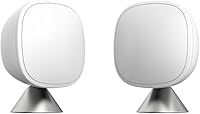
A thermostat's room reading may not match the temperature where you spend time. A room sensor can give a compatible thermostat another reading; the ecobee SmartSensor 2-Pack can share room temperature and occupancy information with an ecobee Smart Thermostat.
A sensor won't tell you whether emergency heat is the right mode or repair an HVAC fault. Use the thermostat and equipment manuals to confirm compatibility and control behavior.
How do you turn EM Heat off?
Switch the thermostat from EM Heat back to Heat when the heat pump is ready for normal operation. Follow the instructions for your thermostat, since control names and menus differ.
Don't turn emergency mode off if a technician has told you to keep the heat pump disabled. If you're unsure why the system is in EM Heat, contact the HVAC company that services it.
Some thermostats let you change modes through buttons or an app. For example, the Sensi Smart Thermostat has button controls and app access, but compatibility and setup depend on your HVAC wiring and system.
A thermostat change should not replace checking the equipment's wiring or installation requirements. For a wiring question, ask a qualified technician to verify how your system is configured.
Can a thermostat sensor or controller manage EM Heat?
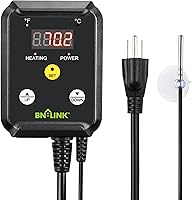
Only a thermostat configured for your heat pump can control its emergency heat function. A room sensor may provide temperature information, but a separate plug-in temperature controller is made for the heating devices it supports, not a home's central HVAC system.
The BN-LINK Reptile Thermostat Temperature Controller is intended for heating devices such as heat mats and heat lamps. It's not a substitute for a heat pump thermostat or a control for household emergency heat.
If your concern is whether the displayed room temperature is accurate, learn the difference in thermostat vs temperature sensor. If the system cycles on and off frequently, what temperature swing means on a thermostat explains a separate control setting.
What should you check before using EM Heat?
Confirm that your system is a heat pump and identify its backup heat source before selecting EM Heat. Your thermostat manual, HVAC documentation, or installer can confirm whether the mode is available and what it controls.
If you need to change a thermostat schedule or setpoint, follow the model-specific steps, such as how to program a Lux thermostat. Don't treat a schedule change as a repair for a heat pump that isn't heating.
For a thermostat that won't respond, shows an unexpected message, or seems to call for heat continuously, review the manual or contact an HVAC professional. The purpose of a thermostat is to control heating and cooling based on temperature, but equipment faults need separate attention.
If the display is blinking “Cool On” instead, that message relates to cooling operation; see why a thermostat blinks Cool On. For seasonal settings, read the best thermostat setting for summer.
What is the EM Heat setting on a thermostat for?
The EM Heat setting on a thermostat is for temporarily heating with a heat pump's backup source when the outdoor heat pump should not run. It is a manual fallback, not the normal setting for everyday heating.
Keep the system in Heat when it operates normally and let its controls manage auxiliary heat. Choose EM Heat only when the equipment instructions or an HVAC professional call for it, then return to normal Heat once the heat pump is ready.
Frequently asked questions
What does EM Heat mean on a thermostat?
EM Heat means emergency heat, a backup heating mode for many heat pump systems. When selected, the thermostat typically stops using the outdoor heat pump and calls for a secondary heat source, such as electric heat strips or a furnace.
The exact operation depends on your equipment and its wiring.
When should I use EM Heat?
Use EM Heat if your heat pump is not working and you need temporary warmth, or if your HVAC technician or system manual tells you to select it. If the outdoor unit is damaged, iced over beyond normal defrosting, or making unusual noises, contact a technician.
Don't use emergency mode as a routine setting.
Is EM Heat more expensive to run?
It can cost more to run than a heat pump because backup heat, especially electric resistance heat strips, may use more electricity to produce heat. The actual cost depends on the backup heat source, local energy rates, outdoor conditions, and how long emergency mode runs.
Check your utility bill and equipment details.
Should EM Heat turn on automatically?
Some heat pump systems switch to backup heat automatically when needed, while EM Heat is a separate mode you select manually. Thermostat labels and controls vary, so check the system manual or ask an HVAC technician how your equipment handles auxiliary and emergency heat.