How to Program a Lux Thermostat
To program a Lux thermostat, choose the system mode, set the clock, then enter a temperature for each schedule period using the model’s buttons or menu. Check your manual because button names and programming steps vary by model.
On this page (9 sections)
- How do you program a Lux thermostat?
- What temperature settings should you use?
- How do you set the Lux thermostat mode?
- Why does the Lux thermostat temperature keep changing?
- Can a room sensor help with uneven temperatures?
- When does a smart thermostat make sense?
- Is a temperature controller the same as a Lux thermostat?
- How do you keep a Lux schedule working as intended?
- What is the simplest way to program a Lux thermostat?
To program a Lux thermostat, choose the system mode, set the clock, then enter a temperature for each schedule period using the model’s buttons or menu. Exact controls differ across Lux models, so use the manual for your thermostat to confirm the sequence.
A programmed schedule tells the thermostat when to use each temperature. Set periods around your routine, and check the clock before troubleshooting a schedule that seems to run at the wrong time.
How do you program a Lux thermostat?
Set the clock, choose a mode, and program a temperature for each period. Many Lux thermostats use buttons such as SET, NEXT, or arrow keys, but the labels and order vary by model.
- Find the model number on the thermostat or its manual.
- Set the correct day and time.
- Select Heat, Cool, or another mode your model supports.
- Open the program or schedule setting.
- Enter the start time and temperature for each period.
- Save the settings and return to the main display.
Some models offer weekday and weekend schedules, while others let you program each day separately. Follow the instructions for your exact model rather than assuming all Lux thermostats use the same steps.
If you're installing a replacement thermostat, start with how to set up a thermostat and confirm that its wiring and system settings match your HVAC equipment.
What temperature settings should you use?
Choose temperatures that suit your comfort and routine, then program them for the times you need them. A thermostat schedule can use a lower heating setpoint or a higher cooling setpoint while you're away, if that works for your household.
Think through the times you wake up, leave home, return, and go to bed. Enter the temperature you want at each period's start time, and remember that the thermostat may begin heating or cooling then.
For summer, compare your preferences with what is the best thermostat setting for summer. Use a setting you can maintain comfortably, and follow any equipment guidance for your home.
How do you set a Lux thermostat for a daily schedule?
Choose the periods your model provides and enter the time and target temperature for each one. A common pattern is wake, away, return, and sleep, but some models use fewer periods.
Write down the desired times and temperatures before you start. This makes it easier to enter a consistent schedule and spot a wrong time or temperature before you exit the menu.
If the thermostat offers different weekday and weekend programs, set each to match your routine. Check that AM and PM are correct where the display uses a 12-hour clock.
How do you set the Lux thermostat mode?
Use Heat for heating, Cool for cooling, and Auto only if your model and HVAC system support it. The mode controls which equipment the thermostat can call to reach the set temperature.
Use the thermostat’s mode button or menu to choose the setting. If you have a heat pump or a system with separate heating and cooling equipment, check both manuals before selecting a mode or changing installer settings.
Don't confuse the system mode with the fan setting. The fan may have its own Auto or On control, which determines whether it runs only with heating or cooling or runs continuously.
Why does the Lux thermostat temperature keep changing?
A schedule is the first thing to check when the setpoint changes on its own. Confirm the day and time, then review the periods for an unexpected setting.
A clock set to the wrong time can make a correct schedule run at the wrong part of the day. Check for a temporary hold, vacation mode, or other override if your model has those features.
If the schedule is correct but the thermostat still behaves unexpectedly, consult the model manual for reset or troubleshooting steps. For a locked control panel, see how to open a Lux thermostat.
Can a room sensor help with uneven temperatures?
A room sensor can share readings from another room with a compatible smart thermostat. It won't program a Lux thermostat by itself, so check compatibility before choosing a sensor or thermostat.
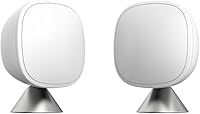
The ecobee SmartSensor 2-Pack detects room occupancy and shares temperature readings with an ecobee Smart Thermostat from up to 60 feet away, including through walls and floors. Its sensors can be placed on stands or mounted to walls, then connected through the ecobee app.
This option is for someone considering a compatible ecobee system, not a direct Lux thermostat accessory. Check the thermostat’s compatibility information before buying.
When does a smart thermostat make sense?
Consider a smart thermostat if you want app access, flexible scheduling, or usage reports. Confirm that the model works with your HVAC system and wiring before replacing a Lux thermostat.
The Sensi Smart Thermostat includes flexible scheduling, remote access, and usage reports. It has button controls, and Sensi says a common wire isn't required in most applications.
If you plan to replace the thermostat, record the existing wiring and follow the new unit’s installation instructions. A guide to how to use a Braeburn thermostat can also help you compare another brand’s controls and schedule features.
Is a temperature controller the same as a Lux thermostat?
No. A plug-in temperature controller is meant to control a connected heating device, not a home HVAC system.
Check the device’s intended use and power limits before using one.
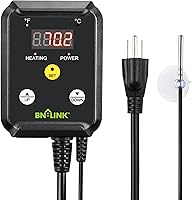
The BN-LINK Reptile Thermostat Temperature Controller has a wired temperature probe and controls heating devices such as heat mats and heat lamps. It has a stated control range of 40–108°F and is intended for heating devices only.
Use it only for an appropriate heating device within its stated limits. It is not a substitute for a wall thermostat that controls central heating and cooling.
How do you keep a Lux schedule working as intended?
Check the time, mode, and programmed periods whenever the schedule seems off. A quick review can reveal a clock error, an unintended setpoint, or an active hold.
Change one setting at a time, then watch the display to confirm the thermostat accepted it. If the buttons or menu don't match the instructions you have, verify the model number and find the matching manual.
If you decide to reset the thermostat, first note your schedule and settings because a reset may clear them. Follow how to reset a Lux thermostat for model-specific cautions, or compare the controls with how to set a Luxpro thermostat.
What is the simplest way to program a Lux thermostat?
Set the clock first, select the right mode, and enter the temperatures and times that fit your daily routine. Check the display after saving so you know the schedule is active.
If the thermostat changes temperature unexpectedly, review the schedule and clock before changing other settings. If you're switching to another thermostat, verify system compatibility and wiring, then follow that model's instructions.
Frequently asked questions
How do I program a Lux thermostat?
Set the day and time, select Heat, Cool, or Auto if your model offers it, then enter a temperature for each schedule period. Use the model’s manual to find the correct buttons and whether it uses weekday and weekend schedules or separate daily programs.
Review the schedule before leaving programming mode.
How do I change the temperature on a Lux thermostat?
Use the up and down buttons to choose a new setpoint. If a schedule is active, the change may last only until the next programmed period.
To keep a different temperature, adjust the schedule itself or use the hold feature if your model has one.
Why does my Lux thermostat keep changing temperature?
A programmed schedule may be changing the setpoint at the next period. Check the clock and schedule, then look for a temporary hold or vacation setting.
If the display or controls differ from your manual, find the model number and follow its specific instructions.
Should my Lux thermostat be set to Heat or Auto?
Choose Heat when you want the thermostat to control heating only, and Cool for cooling only. Auto can switch between heating and cooling on models and systems that support it.
Follow your HVAC and thermostat manuals, and avoid settings that make heating and cooling run against each other.