How to Replace a Thermostat Battery
To replace a thermostat battery, switch the system off, open the battery compartment, fit the type and number shown by the thermostat, then restore power and check its display. Your model's manual takes priority if it gives a different procedure.
On this page (7 sections)
- How do you replace a thermostat battery?
- How do you open the battery compartment?
- How do you fit replacement batteries correctly?
- What should you check after replacing the battery?
- How often should you replace thermostat batteries?
- Which thermostat accessories may help with temperature control?
- What is the safest way to replace a thermostat battery?
To replace a thermostat battery, switch the system off, open the battery compartment, fit the correct replacements, and check the display afterward. Thermostats differ: the compartment may slide out, sit behind a removable front, or be accessible only after lifting the thermostat from its wall plate.
Check your model's manual before opening it. Use the battery type and number it calls for, and don't disturb wiring to reach the compartment.
How do you replace a thermostat battery?
Use the model's battery instructions and match the polarity marks. A typical replacement takes these steps:
- Check the thermostat manual for the battery type, number, and replacement steps.
- Switch off the HVAC system using its normal control.
- Open the compartment or remove the thermostat face as the manual directs.
- Take out the old batteries and note how their plus and minus ends sit.
- Insert the specified replacements, matching the polarity marks.
- Close the compartment or refit the thermostat face.
- Restore system power and check the display and settings.
Keep batteries away from children and dispose of old ones according to local guidance. If you see damaged wires, corrosion, or a loose wall plate, stop and follow the manufacturer's support instructions.
How do you open the battery compartment?
Look for a battery drawer, a hinged cover, or a removable front panel. The release point and direction of movement vary by thermostat, so don't pry at the plastic or pull on the wall plate.
Some models have a compartment on the side or bottom edge. Others expose it when the front section lifts away from the base.
For a model-specific example, see how to open a Braeburn thermostat. If your thermostat is a different brand, follow its own manual rather than assuming the same latch or removal method.
Can you replace batteries without removing the thermostat?
Often, yes, if the compartment opens from the front, side, or bottom. A removable drawer or cover can let you change batteries while the thermostat stays mounted.
If the manual says to lift the thermostat from its base, support it with both hands and avoid touching the terminals or wires. Don't force a thermostat that doesn't release easily.
How do you fit replacement batteries correctly?
Use the exact battery type and number specified for your thermostat. Check the compartment label or manual, then align each battery with the plus and minus marks.
Replace all batteries in the compartment together. Mixing old and new batteries, or mixing types, can cause poor contact or unreliable operation.
Don't use rechargeable batteries unless the thermostat maker says they are suitable. Keep the contacts dry, and don't scrape or bend them if they look dirty.
What if you have a Honeywell, Trane, or Nest thermostat?
Use instructions for your exact model, since battery access and power needs vary. Our guides show brand-specific steps for a Honeywell thermostat battery replacement, replacing Trane thermostat batteries, and replacing a Nest thermostat battery.
Some Nest thermostats use a rechargeable internal battery rather than user-replaceable cells. Check whether a Nest Learning Thermostat battery can be replaced before trying to open one, and see how to charge a Nest thermostat battery if the model calls for charging.
What should you check after replacing the battery?
Confirm that the screen turns on and the thermostat responds to its controls. Check the mode and temperature settings, then see whether the heating or cooling system starts when called for.
The screen may take a moment to return. If the thermostat asks for a time, schedule, or setup choice, use the manual to restore the settings.
A low-battery warning that remains after replacement may point to a seating issue, an incorrect battery, or a power problem. For Nest-specific guidance, read why a Nest thermostat battery may be low.
What if the thermostat still has no display?
Check the battery type, polarity, and seating first. Open the compartment again only as the manual directs, then confirm each battery is fully seated and the cover is closed.
If the display remains blank, use the manual's reset or power troubleshooting steps. Don't remove wires or probe electrical terminals; contact the thermostat maker or a qualified HVAC technician if the steps don't resolve it.
How often should you replace thermostat batteries?
Replace batteries when the thermostat prompts you or the manual recommends it. A low-battery warning, blank display, or loss of settings can be a sign that replacement is due, but some thermostats don't use replaceable batteries at all.
Don't set a calendar interval unless your model's instructions give one. Keep the manual or battery details handy so you can buy the right replacements when needed.
For context on which models need cells, read whether home thermostats use batteries. If you have a Braeburn model, the guide to changing Braeburn thermostat batteries covers its brand-specific process.
Which thermostat accessories may help with temperature control?
A thermostat battery replacement fixes a power issue; sensors and controllers serve different temperature-control needs. These options may be useful if you're also setting up room sensing or controlling a separate heating device.
The ecobee SmartSensor 2-Pack can help prioritize occupied rooms when paired with an ecobee Smart Thermostat. Each sensor uses an included CR2477 battery, which ecobee says can last up to 5 years.
The Sensi Smart Thermostat is a wall thermostat with app access, scheduling, and maintenance reminders. Check compatibility with your HVAC equipment before choosing a replacement thermostat.
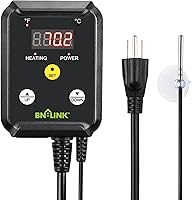
The BN-LINK controller is intended for heating devices, including heat mats and heat lamps, rather than household HVAC systems. Its temperature range is 40–108°F, and it should only be used with a compatible heating device within its stated power limit.
What is the safest way to replace a thermostat battery?
Follow the model's manual, use the specified batteries, and leave wiring alone. Open only the compartment or panel the instructions describe, then check the display and system response after closing it.
If a screen remains blank, work through the manual's power checks before replacing the thermostat. Choose the Honeywell, Trane, Braeburn, or Nest guide above when you need steps for that specific brand.
Frequently asked questions
How do I know which battery my thermostat needs?
Check the label inside the battery compartment or the thermostat's manual for the required type and number. Match the markings, including polarity, and replace batteries as a set when the thermostat uses more than one.
Don't guess based on the size of the old battery.
Do I need to turn off power before changing thermostat batteries?
Follow the thermostat manual first. If it allows battery replacement with the thermostat mounted, switch off the HVAC system at its control before opening the compartment; don't touch wiring or remove the thermostat from its wall plate unless instructed.
Why is my thermostat blank after I replaced the batteries?
Check that each battery is the right type, seated fully, and aligned with the plus and minus marks. If the display stays blank, reinstall the compartment or thermostat face as directed, then consult the manual for reset steps and power checks.
Do all home thermostats use batteries?
No. Some thermostats use batteries for backup or display power, while others draw power from the HVAC system or a wire connection.
Check your model's manual or our guide to whether home thermostats use batteries before buying replacements.