How to Replace Honeywell Thermostat Batteries
Match the battery type to your Honeywell model, then open its battery compartment, replace every cell in the correct direction, and reinstall the thermostat. The housing may slide off the wall plate, flip open, or have a separate battery drawer, so check the model instructions before removing parts.
On this page (8 sections)
- How do you replace batteries in a Honeywell thermostat?
- How do you identify the Honeywell battery compartment?
- Which battery fits a Honeywell thermostat?
- What should you check before closing the compartment?
- Why does a Honeywell thermostat still show a low-battery warning?
- Do all thermostat brands use the same battery steps?
- Which products help with room temperature control?
- What should you do if the thermostat won't restart?
To replace Honeywell thermostat batteries, identify the model and battery type, open its battery compartment as designed, replace all cells with the correct polarity, and reinstall the housing. Honeywell designs vary: some have a drawer or hinged cover, while others release from the wall plate.
Don't assume every Honeywell thermostat uses the same battery. Check the model number and its manual before removing the unit or buying cells.
How do you replace batteries in a Honeywell thermostat?
Use the replacement steps for your exact housing design. A battery drawer, hinged front cover, and removable thermostat face may each open differently.
- Note the thermostat's model number and check its manual for the battery type and removal steps.
- If the manual directs you to shut off HVAC power, use the system switch or breaker before handling the thermostat.
- Open the compartment using its drawer, cover, or release tabs. Avoid prying at the edges.
- Remove the old cells and note their orientation.
- Install the specified battery type, matching the plus and minus marks.
- Close the compartment or reattach the face until it is seated securely.
- Restore power if you turned it off, then check that the display and controls work.
If you're looking for a general guide to how to replace a thermostat battery, the same rule applies: use the exact battery type and opening method in the thermostat manual. Don't pull the wall plate or wires to make a compartment easier to reach.
How do you identify the Honeywell battery compartment?
Look for the designed release point rather than forcing the thermostat open. The battery compartment may be a slide-out tray, an opening behind the front cover, or space inside a face that separates from its wall plate.
Check the thermostat's side and lower edges for a small drawer or release tabs. If the manual says the front unit lifts or slides away, support it with both hands and move it in the stated direction.
Some thermostats have batteries even when their display seems connected to the HVAC system. For details, see which thermostats use batteries.
Others may have no user-replaceable battery compartment, so don't remove a thermostat that has no clear release or battery instructions.
For an unfamiliar unit, first identify the model. Our guide to older Honeywell thermostat models can help narrow down the design and model family.
Should you remove the whole Honeywell thermostat?
Only remove the thermostat face if the model instructions call for it. A tray or hinged cover can often give access without detaching the unit from the wall plate.
If removal is required, follow the manual's direction and hold the thermostat by its casing. Don't tug on wires or touch terminals.
Turn off power first if the manufacturer instructs you to, or if you can't safely access the battery compartment with the thermostat in place.
Which battery fits a Honeywell thermostat?
Use the battery size and type specified for the exact model. A battery that fits loosely or requires pressure isn't the right substitute.
Look for the model number on the front, side, back, or inside the battery compartment. Match the manual's battery type, then check the polarity symbols before inserting cells.
If the old batteries are still readable, use their labels as a clue, but confirm against the manual.
A household battery is useful only if its size, chemistry, and voltage match the thermostat's instructions. Don't replace rechargeable cells with disposable ones, or the reverse, unless the manual allows it.
Buy a fresh matching set and replace every battery in the compartment at once. Mixing old and new cells can lead to uneven power and another low-battery warning.
What should you check before closing the compartment?
Make sure the new cells sit flat, face the marked direction, and don't block the cover. A reversed battery or a compartment that isn't fully closed can keep the thermostat from starting.
Check for corrosion, leaking, or damaged contacts before inserting replacements. Don't touch residue with bare hands; follow the battery maker's cleanup guidance or seek help if a cell has leaked inside the thermostat.
Keep batteries dry and away from loose metal objects. If a battery is stuck, don't use a sharp tool against the thermostat's contacts.
Why does a Honeywell thermostat still show a low-battery warning?
Check the battery type, orientation, and fit first. Then make sure the drawer or front cover is fully seated.
Some displays take a short time to update after new batteries are installed. If the warning remains, remove and reinstall the cells only if the manual permits it, and check that the contacts aren't dirty or bent.
A warning that returns quickly may point to a weak or incorrect cell, a poor connection, or a thermostat issue. Consult the manual or Honeywell support if the warning continues with a fresh, correctly installed set.
Do all thermostat brands use the same battery steps?
No. The battery and housing instructions differ by brand and model.
Follow the exact guide for each thermostat rather than applying Honeywell's removal steps to another unit.
If you're replacing batteries in another thermostat, see how to replace batteries in a Nest thermostat, how to replace Trane thermostat batteries, or how to change Braeburn thermostat batteries. Each guide covers a different brand's housing.
A battery-powered register booster fan is a separate device with its own power needs. Read whether a register booster fan can run on batteries if you're troubleshooting airflow equipment rather than the thermostat.
Which products help with room temperature control?
A thermostat battery replacement restores the thermostat's power; room sensors and other controls address separate comfort needs. These picks serve different uses, so choose only if that need applies to your home.
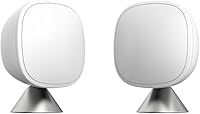
The ecobee SmartSensor 2-Pack measures temperature and occupancy in other rooms and shares readings with a compatible ecobee Smart Thermostat.
The Sensi Smart Thermostat is a Wi-Fi thermostat with buttons, app access, scheduling, and two AA batteries included.
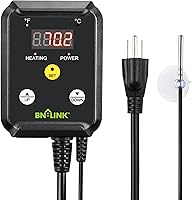
The BN-LINK controller is intended for heating devices such as heat mats and heat lamps, not for replacing a wall thermostat's batteries.
What should you do if the thermostat won't restart?
Confirm the battery installation and model instructions before troubleshooting further. Check the polarity, make sure the compartment is closed, and restore any power you turned off.
If the screen remains blank or the thermostat controls don't respond, stop and check Honeywell's instructions for the model. Don't probe wiring or remove the wall plate to diagnose a battery issue.
For future battery changes, note the model number and battery type somewhere easy to find. When replacing Honeywell thermostat batteries, match that information first, open only the designed compartment, and follow the steps for that housing.
Frequently asked questions
Which batteries does a Honeywell thermostat use?
The battery type depends on the Honeywell thermostat model. Some use AA or AAA cells, while others use a different type or rely on the HVAC system for power.
Check the model label, battery compartment, or official manual before buying, and replace all cells with the specified type.
How do you open a Honeywell thermostat to replace batteries?
Honeywell thermostats use different housings, so look for a battery drawer, hinged cover, or a front unit that releases from its wall plate. Check the model instructions, then use only the intended tabs or release points.
Don't pry against the wall plate or pull on connected wires.
Do I need to turn off power to replace thermostat batteries?
Follow the instructions for your model. If the thermostat detaches from its wall plate, turn off HVAC power first when the manual directs you to do so, and avoid touching wiring.
For a battery drawer that stays attached, use the model's steps and keep the cells away from moisture.
Why is my Honeywell thermostat still blank after replacing batteries?
Check that each cell is the correct type and polarity, and that the battery contacts are clean and dry. Reinstall the cover or thermostat fully, then allow a short time for the display to return.
If it stays blank, consult the model manual or contact Honeywell support.