How to Program a White Rodgers Thermostat
To program a White Rodgers thermostat, set its clock, choose the system and fan modes, then enter the temperature and schedule for each period. Button names and programming steps vary by model, so check the model number and use its manual for exact controls.
On this page (9 sections)
- How do you identify your White Rodgers thermostat?
- What do the operating modes and buttons do?
- How do you adjust the temperature?
- How do you program a White Rodgers thermostat schedule?
- Why isn't the thermostat following its schedule?
- Can a room sensor help with uneven temperatures?
- When does a replacement thermostat make sense?
- Is a reptile temperature controller a substitute for a home thermostat?
- How should you choose your next step?
To program a White Rodgers thermostat, set the clock, choose the operating mode, and enter a temperature for each schedule period your model supports. Since controls differ across models, identify your thermostat and follow its manual for the exact button sequence.
You can usually make a quick temperature adjustment without changing the schedule. For lasting changes to the heating or cooling routine, program the clock and periods first, then verify the display.
How do you identify your White Rodgers thermostat?
Find the model number before programming the schedule. White Rodgers thermostats use different button layouts and menu steps, so a sequence for one model may not work on another.
Look for a model label on the thermostat, its base, or the paperwork that came with it. If you need to remove the thermostat from its wall plate to find a label, first follow the manual's safety directions; don't pull on wires or open HVAC equipment.
Use the model number to find the corresponding instructions from the manufacturer. This is especially useful when your thermostat has unfamiliar labels, a touchscreen, or buttons for multiple periods.
What do the operating modes and buttons do?
System mode tells the thermostat whether to control heating or cooling; fan mode controls the blower setting. The labels and available options depend on your model and HVAC setup.
Common system choices include Heat, Cool, Off, and Auto. In Auto mode, some thermostats can switch between heating and cooling based on their settings; check your model's instructions before relying on it.
Fan settings may include Auto and On. Auto runs the fan as needed with heating or cooling, while On can keep it running continuously; your system may use different labels or behavior.
If you need to how to set up a thermostat, start by matching its settings to the equipment and wiring instructions. Don't change installer settings or wiring based on a guess.
How do you adjust the temperature?
Use the up or down controls to change the set temperature, then check the display to see whether the new setting is active. A brief adjustment may be temporary if a schedule is running.
Set Heat when you want a heating setpoint and Cool for a cooling setpoint. If the thermostat has Auto mode, review the model's instructions to understand how it handles the heating and cooling targets.
Many programmable models resume their schedule at the next period after a temporary adjustment. If you want the chosen temperature to stay in place, look for a Hold control and confirm whether the hold is temporary or stays active until canceled.
How do you program a White Rodgers thermostat schedule?
Set the day and clock, then enter the desired temperature and start time for each period. Your thermostat may support separate weekday and weekend schedules or another format, so use the matching manual.
- Set the correct day and time.
- Choose the system mode you want the schedule to control.
- Open the program or schedule controls.
- Select a day or group of days, if prompted.
- Enter a start time and temperature for each period.
- Save the schedule and check the display.
Avoid creating more schedule changes than your routine needs. For example, set a lower heating target or higher cooling target for periods when you are away only if those settings suit your household and system.
For another brand's steps, see how to program a Lux thermostat. The controls will differ, but the same basic task applies: set the clock, choose periods, and confirm the saved temperatures.
What should you check after programming?
Confirm the time, mode, setpoint, and next scheduled period on the display. A schedule can appear incorrect if the clock is wrong or the thermostat is in Hold.
Check the displayed time against a reliable clock and confirm the day is correct. Then wait until the next period or review the schedule menu to verify that each time and temperature saved as intended.
Why isn't the thermostat following its schedule?
Check the clock, system mode, schedule entries, and Hold setting first. These settings can explain why the display differs from the temperature you expected.
If the time is wrong, correct it and recheck the schedule. If Hold is active, cancel it when you want the thermostat to resume the program; follow the model's manual to see whether the hold ends at a set time or stays in place.
A blank or dim display can have different causes, including batteries on models that use them or a power issue. Consult the manual before replacing batteries or checking wiring, and contact an HVAC professional if the system does not respond as expected.
For a different control layout, compare how to set a Trane thermostat or how to use a Honeywell Home thermostat. Those guides cover other brands, so use your White Rodgers manual for its specific buttons and settings.
Can a room sensor help with uneven temperatures?
A room sensor can give a compatible smart thermostat temperature and occupancy information from another room. It won't program a White Rodgers thermostat directly, so check compatibility before considering a sensor or thermostat change.
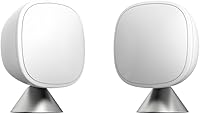
The ecobee SmartSensor 2-Pack includes two sensors that share room temperature and occupancy readings with an ecobee Smart Thermostat. Each can be placed on a stand or mounted to a wall, and setup connects through the ecobee app.
Choose this only if you have or plan to use a compatible ecobee thermostat. It does not add room sensing to a White Rodgers thermostat by itself.
When does a replacement thermostat make sense?
Consider a replacement if you want features your current model doesn't support, such as app access or flexible scheduling. Check your HVAC system's compatibility and wiring requirements before choosing one.
The Sensi Smart Thermostat offers Wi-Fi, app control, flexible scheduling, and usage reports. Its installation instructions use a built-in level and app guidance, and a common wire isn't required in most applications.
Confirm compatibility with your heating and cooling equipment before installation. If you're unsure about wiring or system types, ask a qualified HVAC professional.
Is a reptile temperature controller a substitute for a home thermostat?
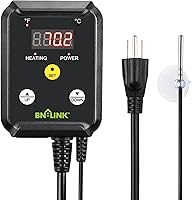
No. The BN-LINK controller is intended for heating devices such as heat mats and heat lamps, not central home heating and cooling.
Its manual describes use for applications such as seed starting, brewing, and reptile enclosures.
It has a wired temperature probe, push-button controls, and a 40–108°F control range. The connected heating device must stay within the controller's 1000W maximum load.
Don't connect a home HVAC system to this controller. Use a thermostat designed for your equipment and follow its wiring and installation instructions.
How should you choose your next step?
If your White Rodgers thermostat works and you only need a different routine, use its model-specific manual to set the clock, modes, and schedule periods. If you want app control or room sensing, check system compatibility before replacing the thermostat or adding a sensor.
A compatible ecobee thermostat and SmartSensors may suit someone who wants readings from more than one room. Sensi is an option to consider for Wi-Fi access and flexible scheduling, while the BN-LINK controller serves separate heating devices.
For help with a different brand's controls, use the guides to program a Lux thermostat, set a Trane thermostat, and use a Honeywell Home thermostat.
Frequently asked questions
How do I program a White Rodgers thermostat?
Set the clock first, then choose the system mode and enter a temperature for each schedule period your model supports. Use the thermostat's program or schedule controls, save each change, and check that the display shows the expected mode and setpoint.
Button names and steps vary by model, so follow its manual.
What does Hold mean on a White Rodgers thermostat?
Hold keeps a selected temperature in place instead of following the normal schedule, though the exact behavior depends on the model. Some thermostats offer a temporary hold that ends at the next scheduled period, while others keep the setpoint until you cancel hold or change it.
Why is my White Rodgers thermostat not following its schedule?
Check that the clock and day are correct, the thermostat is in the intended system mode, and Hold is off if you want the schedule to resume. Then review the programmed times and temperatures.
If the controls still don't match the manual, note the model number and contact the manufacturer or an HVAC professional.
Can I program a White Rodgers thermostat without a manual?
You can adjust the temperature and modes using the labeled controls, but schedule programming varies across White Rodgers models. Find the model number on the thermostat or its documentation and use the matching manual before changing installer settings or wiring.
Avoid guessing at controls that could affect system operation.