5 Best WiFi Touchscreen Thermostats (November 2026)
The best WiFi touchscreen thermostats include the Honeywell Home RTH9600WF Smart Color Thermostat ENERGY for most WiFi-enabled homes, the Schluter Ditra-Heat-E-RT Thermostat for electric floor heating, and the Honeywell TH8321WF1001 Touchscreen Thermostat Wifi Vision Pro for multi-stage HVAC.
On this page (5 sections)
The best wifi touchscreen thermostat for most homes is the Honeywell Home RTH9600WF, with a selectable color screen, remote app control and compatibility with several forced-air systems.
That pick suits a home where central heating and cooling already work well and the main goal is easier daily control. The color screen can be changed to suit the room, while the app lets you check or adjust the setting from elsewhere.
Schluter is the better match for electric floor heating, while AprilAire is the specialist pick for whole-home indoor air quality control.
A touchscreen puts temperature changes and schedules on the wall instead of behind physical buttons. That can make routine changes quicker to see and easier to make without learning a dial or a row of small controls.
Wi-Fi adds remote access, but compatibility matters more than the screen itself. A thermostat may look simple to use and still be wrong for your wires, your heating type or your cooling equipment.
Start by checking your HVAC type, wire setup and whether the thermostat needs a C-wire.
Forced air, hot water, steam, heat pumps and electric floor heating each ask for a different control. The right choice depends on the equipment already installed, not on which display has the most colors.
Take time to read the compatibility notes before you compare app features or screen size. A short check at that stage can save you from returning a thermostat that cannot run the system you have.
Consider who will use the thermostat each day as well. A clear wall display helps when guests, family members or tenants need to make a quick change.
Remote control helps when you are away or when the home needs a temporary adjustment. It works best when the schedules already match normal routines for work, school and sleep.
If you're new to connected controls, read What Is a Smart Home Thermostat? Plainly Explained before comparing features.
You can also see our broader best smart thermostat guide for models that may use different control methods.
Use that background to sort the options by system type first. Screen design, voice control and app extras can come after the basic fit is clear.
Our picks at a glance
-
1
 Best for most WiFi-enabled homes
Honeywell Home RTH9600WF Smart Color Thermostat ENERGY
9.2/10 our score
See it on Amazon -
2
 Best for electric floor heating
Schluter Ditra-Heat-E-RT Thermostat
9.1/10 our score
See it on Amazon -
3
 Best for multi-stage HVAC
Honeywell TH8321WF1001 Touchscreen Thermostat Wifi Vision Pro
8.7/10 our score
See it on Amazon
- 4
 Check it
AprilAire 8920W Wi-Fi Programmable Color Touchscreen Thermostat
Best for indoor air quality control - 5
 Check it
LUX TX9600TS Programmable 7-Day Large Touchscreen Heating
Best for simple 7-day wall control
The best wifi touchscreen thermostats by use
The Honeywell Home RTH9600WF is the best all-around option, but each thermostat here serves a different installation. Choose by the equipment you need to control, then compare the screen, schedule and remote-access features.
Honeywell Home RTH9600WF Smart Color Thermostat ENERGY: Best for most WiFi-enabled homes
- ENERGY STAR certified
- Selectable color touchscreen
- Remote control through an app
- C-wire required
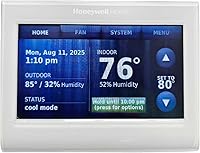
The Honeywell Home RTH9600WF combines a color touchscreen with app control and flexible programming. It suits many forced-air systems, but it requires a C-wire and does not work with 120–240V electric baseboard heat.
Pros
- Color touchscreen
- Remote app and smart-home control
- Indoor and outdoor temperature and humidity information
Cons
- C-wire required
- Not compatible with electric baseboard heat
The Honeywell Home RTH9600WF is the strongest general pick for a home with compatible central heating and cooling. It has a selectable color touchscreen, so you can change the display color to suit the room instead of accepting a fixed screen design.
The display shows indoor and outdoor temperature and humidity information, along with a daily weather forecast. That gives you more context at the wall when you are deciding whether to adjust the schedule or leave it alone.
Remote control works through an app and compatible smart-home partners, including Amazon Alexa, Google Assistant and Microsoft Cortana. Flexible programming also suits households that want automatic schedule changes without adjusting the thermostat every day.
Honeywell Home lists compatibility with forced-air gas, oil or electric systems, hot water, steam and heat pumps with electric backup. It does not work with 120–240V electric baseboard heat, and a C-wire is required.
The box includes the thermostat, wall plate, screws, anchors, quick start guide, thermostat ID card, wire labels and user guide. The thermostat is a wall-mounted plastic unit measuring 1 in deep by 4.75 in wide by 3.5 in high.
Choose this model when you want the broadest mix of wall controls, remote access and energy information. Confirm your wiring before ordering, especially if your current thermostat has no C-wire.
Schluter Ditra-Heat-E-RT Thermostat: Best for electric floor heating
- 3.5 in touchscreen
- Works with 120V and 240V Ditra-Heat-E-HK heating cables
- Energy tracking
- Built-in GFCI
The Schluter Ditra-Heat-E-RT is designed for Ditra-Heat-E-HK electric floor-heating cables. Its touchscreen, energy logging and GFCI focus make it a specialized choice rather than a general central HVAC thermostat.
Pros
- Supports 120V and 240V heating cables
- Built-in GFCI
- Energy-use tracking
Cons
- Designed for Ditra-Heat-E-HK systems
- Not a general forced-air thermostat
The Schluter Ditra-Heat-E-RT is the right choice when the thermostat needs to control electric floor heating, not a standard forced-air furnace or air conditioner. It works with 120V and 240V Ditra-Heat-E-HK heating cables.
Its 3.5 in touchscreen handles programming and setup from the wall. The display is smaller than the Honeywell Home color screen, but the design is focused on controlling a specific floor-heating system.
Energy tracking lets you monitor and log power use. A built-in GFCI cuts power to help prevent electrical shock, which is a key difference from general-purpose HVAC thermostats.
The included components are a GFCI, floor sensor, 120V and 240V cables, and a QR code for system settings. It is a corded electric, wall-mounted thermostat with a white finish.
This is the specialized pick in the group. Choose it for a compatible Schluter floor-heating installation, and do not treat it as a replacement for a central HVAC thermostat.
Honeywell TH8321WF1001 Touchscreen Thermostat Wifi Vision Pro: Best for multi-stage HVAC
- Large touchscreen
- WiFi control
- Up to 3 heat and 2 cool stages
- 7-day scheduling
The Honeywell VisionPRO 8000 fits homes with staged heating and cooling. Its large touchscreen supports daily programming, while the Total Connect Comfort app adds remote temperature control.
Pros
- Supports up to 3 heat and 2 cool stages
- Large touchscreen
- 7-day scheduling
Cons
- System compatibility needs checking
- Uses 2 AAA batteries
The Honeywell TH8321WF1001 VisionPRO 8000 is best for a system with up to 3 heat and 2 cool stages.
Staged HVAC equipment can need more control than a basic single-stage thermostat, so verify your system before choosing it. Multi-stage heating and cooling can call for different levels of output at different times.
That makes this model a more specific choice than a general thermostat for a simple one-stage setup. Matching the stages matters because the thermostat needs to send the right call to the equipment.
Its large touchscreen makes schedule changes easier to see at the wall. A larger display can help when you need to check the day, the mode or the set temperature at a glance.
You can program a schedule for each day of the week or control the temperature remotely through the Total Connect Comfort app. That mix suits a household with a regular weekly routine and a need to adjust the setting away from home.
The product measures 4.96 x 1.14 x 4.65 inches and weighs 12.8 ounces. It uses 2 AAA batteries, so check the installation instructions and your existing wiring before replacing a thermostat.
Keep spare batteries in mind as part of care, since the screen and controls still need power to work as expected. Battery checks are a simple task to add to a regular home maintenance routine.
This model is a good fit when the main need is multi-stage control and a large wall interface. It has fewer published details in the supplied product information than the other picks, so system verification should come before purchase.
AprilAire 8920W Wi-Fi Programmable Color Touchscreen Thermostat: Best for indoor air quality control
- Color touchscreen
- Remote app control
- Temperature and humidity control
- 3-wire connection between interface and equipment module
The AprilAire 8920W goes beyond temperature by controlling compatible indoor air quality equipment. It suits homes using AprilAire humidifiers, dehumidifiers, air purifiers or fresh-air ventilation.
Pros
- Whole-home indoor air quality controls
- Color touchscreen
- Amazon Alexa and Google Assistant compatibility
Cons
- Best fit for AprilAire indoor air quality equipment
- Larger 7.1 in wide body
The AprilAire 8920W is the best fit for a home that needs temperature and indoor air quality control from one wall interface. It can control temperature, humidity, air cleaning and fresh-air ventilation when paired with compatible AprilAire equipment.
The full-color touchscreen supports local adjustments, while the AprilAire Wi-Fi thermostat app provides remote monitoring and control from iOS and Android devices. Amazon Alexa and Google Assistant compatibility adds voice control.
The system consists of a user interface and equipment control module, with 3 wires needed between them. The included components are the 8920W thermostat, equipment control module, 8052 outdoor temperature sensor, instructions, quick start guide, 2 screws and 2 wall anchors.
At 7.1 in wide, it is the widest thermostat in this roundup. Measure the wall space around your current thermostat before installation, particularly if it sits near trim or a cabinet.
Choose AprilAire when your home already uses compatible whole-house indoor air quality equipment. For general connected HVAC shopping, compare it with our guide to the best wifi thermostat for home.
LUX TX9600TS Programmable 7-Day Large Touchscreen Heating: Best for simple 7-day wall control
- Large touchscreen
- 7-day programming
- Heating and cooling control
- Wall mount
The LUX TX9600TS is a straightforward programmable touchscreen for buyers who want separate settings for each day. It offers heating and cooling control without the broader connected features of the WiFi-focused picks.
Pros
- 7-day scheduling
- Large LCD touchscreen
- Wall-mounted design
Cons
- Less connected than the WiFi models
- Uses 2 AA batteries
The LUX TX9600TS is best for buyers who want a large touchscreen and separate 7-day schedules for heating and cooling. It provides wall-based programming without the broader app and smart-home focus of the Wi-Fi models above.
The LCD touchscreen gives you a direct way to set the temperature and schedule each day. A 7-day program is useful when weekdays and weekends follow different routines, or when each day has its own pattern.
The thermostat measures 1.13 in deep by 5.38 in wide by 3.38 in high. It is a white, wall-mounted plastic unit and uses 2 AA batteries.
Its information describes Wi-Fi connectivity, but the product description focuses on touchscreen heating and cooling control rather than remote app functions. Confirm the exact connected features and system compatibility before choosing it for a remote-control setup.
Pick the LUX when simple wall programming matters more than advanced connected controls. It is also the least expensive-looking feature set in this group, but no price is needed to understand its role: it is a basic schedule-first option.
How we compared WiFi touchscreen thermostat options
We compared the products by system fit, touchscreen usefulness, connected control, scheduling and installation requirements.
Our score weighs specs, features and buyer feedback against what you're shopping for. The order matters, since a thermostat that cannot control your equipment will not help, no matter how clear the screen looks.
System fit comes first. The Honeywell Home RTH9600WF covers several central HVAC types but needs a C-wire.
That C-wire check is a practical starting point for many homes. If the wire is missing, you may need a different thermostat or a separate power solution before installation can proceed.
Schluter is limited to Ditra-Heat-E-HK floor-heating cables, while AprilAire is most useful when indoor air quality equipment is part of the system.
Those limits are not flaws, since they reflect different jobs in the home. Floor heating needs a control built for that cable system, and indoor air quality control needs equipment that can manage humidity, cleaning or ventilation.
Touchscreen size and information also differ. AprilAire has the widest body, Honeywell Home offers a selectable color screen, Schluter uses a 3.5 in display, and LUX focuses on a large LCD interface.
A wider body may be easier to read, but it also needs more clear wall space. A smaller display can still work well when the layout is simple and the controls are responsive.
Connected control is not the same across all 5 models. Honeywell Home and AprilAire clearly support app-based remote control in the information.
The VisionPRO 8000 supports the Total Connect Comfort app, while the Schluter and LUX models should be checked against the exact installation you plan.
Scheduling also plays a role in daily use. Separate day settings can match workdays, weekends and changing routines without manual changes each morning.
Installation needs shape the final order too. Wall plates, control modules, floor sensors, batteries and power wires all affect how a thermostat fits into place.
We gave more weight to clear system boundaries than to extra display features. That keeps the comparison focused on practical limits that buyers can check before they order.
What should you check before choosing a wifi touchscreen thermostat?
Check HVAC compatibility and wiring before screen size or app features. A thermostat with the right display can still be wrong for your equipment.
Look at the current thermostat terminals and identify whether the system uses heating, cooling, heat-pump, hot-water, steam, floor-heating or indoor air quality equipment. Do not assume that a Wi-Fi label means universal compatibility.
The C-wire is another important check. Honeywell Home specifically requires one, while AprilAire uses a separate equipment control module.
If your wiring does not match the installation requirements, ask an HVAC professional to confirm the options.
You should also measure the wall area. A larger touchscreen can be easier to read, but a wide thermostat may cover trim, leave an uneven outline or need a different mounting position.
For a workplace or larger property, see our guide to the best wifi thermostat for commercial buildings. It covers a different set of planning concerns than a single-family home.
How do you set up and use a touchscreen thermostat?
Turn off HVAC power before touching thermostat wiring, label wires before removing the old control and follow the installation guide for the exact model.
That order helps you keep track of each wire and avoid damage to the new control or the equipment. A photo of the old wiring can also help if a label is hard to read.
Wi-Fi setup should come after the thermostat can control the equipment locally.
Local control is the basic task, and it should work before you add an app, a voice assistant or remote access. If heating or cooling does not respond at the wall, adding a phone connection will not fix the underlying issue.
After installation, set the clock, choose heating and cooling schedules and confirm that the displayed mode matches the equipment. Test heating, cooling and fan functions separately when the system supports them.
Separate tests make it easier to spot a problem with one mode. You can also check that the thermostat switches between heat and cool at the right time for the season.
Use schedules that match when the home is occupied. Remote access is useful for checking or changing the setting, but it does not remove the need to maintain filters, service HVAC equipment or address wiring problems.
A schedule that fits normal routines can reduce the need for constant manual changes. Temporary holds still help for guests, illness, travel or an unusually warm or cold day.
Keep the wall area clean and free from direct heat, drafts or sunlight where possible. Placement can affect how the thermostat reads the room, so avoid a spot that gives a false sense of the temperature.
For Honeywell owners, our guide on how to connect to honeywell thermostat wifi explains the connection process. Keep the model number and app account details available during setup.
During setup, make sure the Wi-Fi network is working and the password is easy to enter on the touchscreen. A stable connection helps the app show the current setting without delay.
After the first week, review the schedule and adjust it to match what you actually do at home. Small changes to wake, leave, return and sleep times can make the thermostat feel more natural to use.
Which wifi touchscreen thermostat should you choose?
Choose the Honeywell Home RTH9600WF if you need a general Wi-Fi touchscreen for compatible central HVAC and can provide a C-wire.
That model covers the widest range of central systems in this group. It also adds remote app control, smart-home partners and a color screen you can change to suit the room.
Check the wiring first, since the C-wire requirement is a firm limit. It also does not work with 120 to 240V electric baseboard heat, so that system needs a different control.
Choose the Schluter Ditra-Heat-E-RT for Ditra-Heat-E-HK floor heating, the VisionPRO 8000 for multi-stage HVAC and the AprilAire 8920W for indoor air quality equipment.
The Schluter suits a floor-heating cable system with 120V or 240V options, plus energy tracking and a built-in GFCI. It is a focused choice, not a general furnace or air conditioner control.
The VisionPRO 8000 fits systems with up to 3 heat and 2 cool stages, with a large touchscreen and Total Connect Comfort app control. That makes sense when staged equipment is the main need.
The AprilAire 8920W suits homes with compatible whole-house indoor air quality equipment for humidity, air cleaning or fresh-air ventilation. Its wider body and color touchscreen also need enough clear wall space.
Choose the LUX TX9600TS when a large touchscreen and 7-day programming are the main goals.
That model is a simpler wall-based option for heating and cooling schedules by day. It suits buyers who value clear daily programming more than broader app or smart-home features.
The best wifi touchscreen thermostat is the one that matches your wiring and equipment before it adds remote control or a more colorful display.
Check system type, power needs and wall space, then compare the screen and scheduling features. That order leads to a thermostat that works in daily use, not just one that looks advanced on the wall.
Our top 3 picks at a glance
-
1
Best for most WiFi-enabled homes
Honeywell Home RTH9600WF Smart Color Thermostat ENERGY
9.2/10 our score
See it on Amazon -
2
Best for electric floor heating
Schluter Ditra-Heat-E-RT Thermostat
9.1/10 our score
See it on Amazon -
3
Best for multi-stage HVAC
Honeywell TH8321WF1001 Touchscreen Thermostat Wifi Vision Pro
8.7/10 our score
See it on Amazon
Frequently asked questions
What is the best wifi touchscreen thermostat for most homes?
The Honeywell Home RTH9600WF is the strongest general choice here because it combines Wi-Fi, a selectable color touchscreen, remote app control and compatibility with forced-air, hot water, steam and some heat-pump systems.
Check for a C-wire before buying, and confirm that your system is not electric baseboard heat.
Do WiFi touchscreen thermostats need a C-wire?
Some do and some do not. The Honeywell Home RTH9600WF specifically requires a C-wire, while the AprilAire 8920W uses a user interface and equipment control module with 3 wires between them.
Check the wiring and system type before choosing a thermostat.
Can a WiFi touchscreen thermostat control electric floor heating?
Yes, but it must be designed for the floor-heating system. The Schluter Ditra-Heat-E-RT works with 120V and 240V Ditra-Heat-E-HK heating cables and includes a built-in GFCI.
A general central HVAC thermostat is not a substitute for a floor-heating control.
What should you check before installing a WiFi thermostat?
Check the existing system type, wire labels, power requirements and equipment compatibility. Also confirm whether the thermostat needs a C-wire, an equipment control module or a floor sensor.
Turn off HVAC power before handling thermostat wiring, and use a qualified installer when the wiring or system type is unclear.