9 Best WiFi Thermostats for Commercial Buildings (November 2026)
The best WiFi thermostats for commercial buildings include the Honeywell Wireless WiFi Thermostat for scheduled business comfort, the ecobee Smart Thermostat Essential for broad HVAC compatibility, and the Google Nest Thermostat for simple remote management.
On this page (4 sections)
The best WiFi thermostat for commercial buildings is the Honeywell Wireless WiFi Thermostat for scheduled control, app management, alerts and reminders. That pick suits a business with set opening hours and a manager who wants to change settings without walking to the wall.
Pro1 is the better fit for light commercial flexibility. ecobee models add occupancy based adjustments and wider stated system compatibility, while Google Nest suits a smaller space that already uses the Google Home app.
A commercial building needs more than a WiFi connection. The thermostat must match the HVAC wiring, stage count, power method and daily schedule.
Those details matter more than the look of the display or the number of app features. A small office, retail space and multi stage building may need very different controls.
A single stage office can use a basic programmable model with app access. A building with a heat pump or several stages needs a thermostat built for that equipment.
Check the existing terminal labels before you order anything. Count the wires and note whether a C wire is present.
Write down the heating and cooling stages shown on the old thermostat. That record will help you rule out models that cannot run the system correctly.
Power is another early check. Some thermostats need a constant C wire for steady operation.
Others can use a Power Extender Kit or another power option on compatible systems. Battery power can help in some installs, but it does not fix a wiring mismatch.
Remote control is useful when opening hours change. A manager may need to heat or cool the space before staff arrive.
App control also helps during a holiday closure or an unexpected schedule change. Occupancy features can help when rooms are used at different times.
A meeting room may sit empty while another area stays busy all day. In that case, room sensing can give a clearer picture than one hallway reading.
Still, occupancy control adds setup steps and needs a check after the first week. If you are new to connected HVAC controls, start with [What Is a Smart Home Thermostat?
Plainly Explained](/what-is-a-smart-home-thermostat/).
That guide explains the basic terms before you compare schedules and wiring. For a wall-mounted display, our guide to the best WiFi touchscreen thermostat covers another useful part of the decision.
Touch controls can make local changes faster for staff. Button controls can also work well when you want a simple menu layout.
The right choice depends on who will use the thermostat each day. A locked or limited control may suit a shared space with many visitors.
A full app setup may suit a small business with one manager. Think about alerts as well.
Display and app reminders can help with filter changes and routine checks. HVAC monitoring alerts can flag a possible issue, but they do not replace a service visit.
Plan for a seasonal review of the schedule. Hours, weather and building use will change across the year.
A short review each season keeps setpoints and setbacks matched to real use. That habit often matters as much as the thermostat model itself.
Our picks at a glance
-
1
 Best for scheduled business comfort
Honeywell Wireless WiFi Thermostat
9.6/10 our score
See it on Amazon -
2
 Best for broad HVAC compatibility
ecobee Smart Thermostat Essential
9.6/10 our score
See it on Amazon -
3

- 4
 Check it
ecobee Smart Thermostat Premium
Best for zone comfort insight - 5
 Check it
ecobee Smart Thermostat Enhanced
Best for occupancy-based schedules - 6
 Check it
Riseem WiFi Thermostats for Home Smart Thermostat
Best for basic single-stage systems - 7
 Check it
Honeywell TH8321WF1001 Touchscreen Thermostat Wifi Vision Pro 8000
Best for multi-stage commercial HVAC - 8
 Best for light commercial flexibilityCheck it
- 9
 Check it
Heagstat WiFi Thermostat 1 Heat/1 Cool
Best for simple 24 VAC offices
The best WiFi thermostats for commercial buildings
Honeywell leads this group for structured business schedules, while ecobee and Google offer strong app-based control. Pro1 stands out when a light commercial building needs broader stage support.
We compared the stated system compatibility, scheduling tools, wiring requirements, remote control options and commercial use patterns. Our score weighs specs, features and buyer feedback against what you're shopping for.
| Product | Best for | Connectivity | Display | Size | Our score |
|---|---|---|---|---|---|
| Honeywell Wireless WiFi Thermostat | scheduled business comfort | Wi-Fi | Touch, custom display | 0.88 D x 4.5 W x 3.5 H in | 9.6 |
| ecobee Smart Thermostat Essential | broad HVAC compatibility | Wi-Fi | Color touchscreen LCD | 0.91 D x 3.62 W x 3.62 H in | 9.6 |
| Google Nest Thermostat | simple remote management | Wi-Fi and Bluetooth | LCD | 1.21 D x 3.3 W x 3.3 H in | 9.4 |
| ecobee Smart Thermostat Premium | zone comfort insight | LCD touchscreen | 9.2 | ||
| ecobee Smart Thermostat Enhanced | occupancy-based schedules | LCD | 0.94 D x 4.09 W x 4.09 H in | 9.1 | |
| Riseem WiFi Thermostats for Home Smart Thermostat | basic single-stage systems | 0.98 D x 4.72 W x 3.86 H in | 8.8 | ||
| Honeywell TH8321WF1001 Touchscreen Thermostat Wifi Vision Pro 8000 | multi-stage commercial HVAC | Large touchscreen | 8.7 | ||
| Pro1 T855iSH WiFi Thermostat | light commercial flexibility | 2.83 in digital display | 8.5 | ||
| Heagstat WiFi Thermostat 1 Heat/1 Cool | simple 24 VAC offices | 0.98 D x 4.72 W x 3.86 H in | 8.4 |
1. Honeywell Wireless WiFi Thermostat: Best for scheduled business comfort
Honeywell Wireless WiFi Thermostat: Best for scheduled business comfort
- 7-day programming
- Total Connect Comfort app
- Energy Savings mode
- Alexa compatibility
7-day scheduling, app management and display or app alerts make this a strong fit for offices with predictable operating hours.
Pros
- 7-day programming
- Remote app management
- Energy Savings mode
- Alerts and reminders
Cons
- Needs a C wire
- Professional installation may be preferred
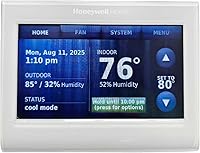
The Honeywell Wireless WiFi Thermostat is the strongest overall choice for a business with set opening and closing hours. Its 7-day programming lets you assign different schedules to individual days, which helps when weekday and weekend occupancy differ.
The Total Connect Comfort app supports remote management and monitoring of comfort and energy use. That gives a manager a way to adjust the schedule when the building opens late, closes early or has a temporary change in use.
Energy Savings mode adds another schedule option, while the custom display shows comfort information on the thermostat itself. Display and app alerts can also provide reminders, so routine attention doesn't depend on standing beside the wall control.
This Honeywell model uses Wi-Fi and touch control, measures 0.88 D x 4.5 W x 3.5 H in, and mounts on a wall. It needs a C wire, so check the existing thermostat wiring before planning installation.
Choose it when predictable schedules and remote oversight matter most. Professional installation may make sense for a business that cannot risk an HVAC interruption during operating hours.
2. ecobee Smart Thermostat Essential: Best for broad HVAC compatibility
ecobee Smart Thermostat Essential: Best for broad HVAC compatibility
- Compatible with 85% of systems
- No C wire with Power Extender Kit
- Occupancy scheduling
- Apple HomeKit, Google Assistant and Alexa
The Essential combines remote control, scheduling and occupancy-based adjustments in a compact touchscreen thermostat.
Pros
- Broad stated compatibility
- Power Extender Kit option
- Remote app control
- Energy monitoring
Cons
- Compatibility still needs checking
- SmartSensor sold separately
The ecobee Smart Thermostat Essential is a strong choice when a business wants a compact touchscreen and broad stated system support. ecobee says it works with 85% of systems, but you should still use its compatibility checker before installation.
Its automatic schedule can adjust the temperature when the building is occupied or empty, while the ecobee app provides remote control and energy-use information. That setup suits offices with regular hours and occasional schedule changes.
The thermostat works with Apple HomeKit, Google Assistant and Alexa. A Power Extender Kit is available for compatible homes or buildings without a C wire, and the kit is sold separately.
This white wall-mounted thermostat measures 0.91 D x 3.62 W x 3.62 H in. It includes the thermostat, backplate, screws and drywall plugs, wire labels and a battery-powered design.
Choose it when a smaller office needs app control, schedule automation and a touchscreen. Confirm the HVAC type and wiring before assigning it to a larger or more complex commercial system.
3. Google Nest Thermostat: Best for simple remote management
Google Nest Thermostat: Best for simple remote management
- Google Home scheduling
- Away temperature adjustments
- HVAC monitoring alerts
- 2.4 GHz and 5 GHz Wi-Fi
Google Home scheduling and remote control suit smaller business spaces that want simple temperature management from phones or tablets.
Pros
- Google Home app control
- Away adjustments
- HVAC monitoring alerts
- Works with Matter-certified voice assistants
Cons
- Some systems need a C wire or power accessory
- No lock feature
The Google Nest Thermostat suits a small business that wants simple remote control through the Google Home app. Staff or managers can create an energy-efficient schedule and change the temperature from an Android phone, iPhone, laptop or tablet.
The thermostat turns itself down when it detects that people have left, which can help reduce unnecessary heating or cooling in an empty office. Savings Finder can also suggest schedule changes, while HVAC monitoring may send alerts when an eligible system appears to have an issue.
Nest uses Wi-Fi and Bluetooth, including 2.4 GHz and 5 GHz Wi-Fi. It works with Google Assistant and Matter-certified voice assistants, but voice control requires a compatible smart device.
The charcoal wall-mounted thermostat measures 1.21 D x 3.3 W x 3.3 H in. It usually works without a C wire, though some heating-only, cooling-only, zone-controlled and heat pump systems need a C wire or another power accessory.
Choose it when a small commercial space already uses Google Home. Check the system before installation because its power requirements vary by HVAC setup.
4. ecobee Smart Thermostat Premium: Best for zone comfort insight
ecobee Smart Thermostat Premium: Best for zone comfort insight
- Included SmartSensor
- Built-in air quality monitor
- Occupancy sensing
- Power Extender Kit and trim kit included
The included SmartSensor and air quality monitor give businesses more information for spaces with hot or cold spots or changing occupancy.
Pros
- Included SmartSensor
- Air quality alerts
- C-wire installation option
- 3-year manufacturer warranty
Cons
- Higher feature complexity
- Smart Doorbell Camera is separate
The ecobee Smart Thermostat Premium is the best fit here for a business that needs more information about uneven comfort between rooms. Its included SmartSensor detects the temperature and movement in another room, which can help identify how occupied areas differ from the main thermostat location.
The built-in air quality monitor can alert users when air quality drops and provide tips to improve it. It also includes filter-change reminders, which may help a facilities routine stay visible between service visits.
ecobee says this model works with 95% of HVAC systems. The box includes a Power Extender Kit for systems without a C wire, a trim kit, backplate, wire labels, screws, drywall plugs and a quick start guide.
The metal thermostat has a large LCD touchscreen and supports app control. It also includes a smart speaker with Siri or Alexa Built-in, although Siri requires an Apple home hub and some security functions require an ecobee Smart Security subscription.
Choose it for offices with hot or cold spots, changing occupancy or a need for indoor air quality alerts. Its extra features may be unnecessary for a single-room business with a simple fixed schedule.
5. ecobee Smart Thermostat Enhanced: Best for occupancy-based schedules
ecobee Smart Thermostat Enhanced: Best for occupancy-based schedules
- Built-in occupancy sensing
- Automatic away and sleep adjustments
- eco+ features
- Power Extender Kit and trim kit included
Occupancy sensing and automatic schedule adjustments can fit offices where rooms are used at different times during the day.
Pros
- Occupancy-based adjustments
- Remote app control
- Works with major smart home systems
- 3-year manufacturer warranty
Cons
- SmartSensors sold separately
- Compatibility must be confirmed
The ecobee Smart Thermostat Enhanced is designed for businesses where room use changes during the day. Its built-in occupancy sensing can detect when people are present and adjust the temperature when spaces are empty or before people return.
The thermostat also learns temperature preferences and adjusts for humidity. The eco+ features use routine, comfort preferences, local weather and grid activity to support efficiency, while the ecobee app provides remote control and schedule views.
ecobee says the Enhanced works with 90% of HVAC systems. It supports Amazon Alexa, Google Assistant, Apple HomeKit and SmartThings, and its Power Extender Kit can support compatible systems without a C wire.
The black metal wall-mounted thermostat measures 0.94 D x 4.09 W x 4.09 H in. A trim kit, backplate, wire labels, screws, drywall plugs, Power Extender Kit and quick start guide are included.
Choose it when occupancy-based scheduling matters but you don't need the Premium model's included SmartSensor and built-in air quality monitor. Add SmartSensors separately if room-by-room priority becomes important.
6. Riseem WiFi Thermostats for Home Smart Thermostat: Best for basic single-stage systems
Riseem WiFi Thermostats for Home Smart Thermostat: Best for basic single-stage systems
- 7-day programming
- 2.4 GHz Wi-Fi
- App and button control
- C-wire powered
Riseem fits a narrow set of conventional systems and offers app control, 7-day schedules and a backlit display.
Pros
- 7-day scheduling
- App remote control
- Backlit LCD
- Clear terminal requirements
Cons
- Does not support heat pumps
- Does not support multi-stage systems
Riseem is a practical option for a small commercial space with a compatible conventional single-stage 1 heat/1 cool system. It supports app control, button control and 7-day programming, so a manager can set different periods for different days.
The system limits matter more than the WiFi feature. Riseem does not support heat pumps, multi-stage systems, heat-only systems, cool-only systems, PTAC units, mini splits, line-voltage heaters or RV air conditioners.
It requires a constant 24 V C-wire power supply and supports RH, RC, W, Y, G and C terminals. It connects only to 2.4 GHz Wi-Fi, not 5 GHz, so confirm the building's network setup before choosing it.
The light blue wall-mounted thermostat has a backlit LCD and measures 0.98 D x 4.72 W x 3.86 H in. The box includes the thermostat, 2 screws and anchors, an operating manual and a cable label.
Choose Riseem only after confirming the wiring and system type. It can fit a basic office system, but it is not a flexible choice for a building with multiple heating or cooling stages.
7. Honeywell TH8321WF1001 VisionPRO 8000: Best for multi-stage commercial HVAC
Honeywell TH8321WF1001 Touchscreen Thermostat Wifi Vision Pro 8000: Best for multi-stage commercial HVAC
- Schedules for each day
- Large touchscreen
- Remote Total Connect Comfort app control
- Up to 3 heat and 2 cool stages
The VisionPRO 8000 is aimed at more complex HVAC setups where multi-stage control and a large touchscreen matter.
Pros
- Up to 3 heat and 2 cool stages
- Daily scheduling
- Remote app control
- Large touchscreen
Cons
- System installation needs careful verification
- Battery requirement
The Honeywell TH8321WF1001 VisionPRO 8000 is the better match for a building that needs control across up to 3 heat and 2 cool stages. That capacity makes it more suitable for complex HVAC equipment than the single-stage options in this roundup.
Its large touchscreen supports a schedule for each day of the week. The Total Connect Comfort app adds remote temperature control, which can help a manager make changes without visiting the thermostat.
The model measures 4.96 x 1.14 x 4.65 in and weighs 12.8 ounces. It requires 2 AAA batteries, so include battery access in the installation and maintenance plan.
The main trade-off is that system matching deserves careful attention. Stage count, wiring and equipment type should be confirmed before the thermostat replaces an existing control.
Choose it when multi-stage control and a large touchscreen matter more than occupancy sensing. It is especially worth considering for a building whose HVAC needs exceed a basic 1H/1C system.
8. Pro1 T855iSH WiFi Thermostat: Best for light commercial flexibility
Pro1 T855iSH WiFi Thermostat: Best for light commercial flexibility
- 7-day or 5/1/1 programming
- Up to 2 heat and 2 cool conventional
- Up to 5 heat and 3 cool heat pump
- Wall or junction-box mounting
Pro1 offers flexible schedules, multi-stage support and battery or 24 V power for light commercial buildings.
Pros
- Light commercial use stated
- Broad stage support
- Keypad lockout
- Filter change indicator
Cons
- Button control instead of touchscreen
- Hardwire-only setup is also supported
The Pro1 T855iSH is the clearest fit for a light commercial building in this group. It supports 7-day or 5/1/1 programming, automatic changeover and menu-driven setup through a button-controlled display.
Its stated system support is broad. It handles up to 2 heat and 2 cool conventional systems and up to 5 heat and 3 cool heat pump systems, giving it more stage flexibility than the single-stage Riseem and Heagstat models.
The thermostat can use battery or 24 V power and mounts on a wall or junction box. It includes easy wire color-coded terminal blocks and a universal sub-base, which can help with replacement planning.
Other controls include keypad lockout, filter-change indication, separate heating and cooling swing adjustments, setpoint limits and a selectable 5-minute compressor delay. Its digital screen measures 2.83 in.
Choose Pro1 when a light commercial site needs multiple schedule formats and wider stage support. The button interface is less visual than a touchscreen, but it keeps the control layout menu-based and direct.
9. Heagstat WiFi Thermostat 1 Heat/1 Cool: Best for simple 24 VAC offices
Heagstat WiFi Thermostat 1 Heat/1 Cool: Best for simple 24 VAC offices
- 7-day programming
- 2.4 GHz Wi-Fi
- App remote control
- Backlit LCD
Heagstat is a basic option for a compatible 24 VAC single-stage office system with a constant C wire.
Pros
- 7-day schedules
- App control
- Backlit LCD
- 2.4 GHz Wi-Fi
Cons
- No heat pump support
- No multi-stage support
Heagstat is intended for a narrow system type: a 24 VAC conventional single-stage 1H/1C forced-air system with a separate outdoor air-conditioning condenser and indoor ductwork. It can suit a basic office when those conditions match exactly.
The thermostat requires a constant C wire and supports RH, RC, W, Y, G and C terminals. It does not support heat pumps, multi-stage systems, dual-fuel systems, PTAC or PTHP units, rooftop RTUs, ductless mini splits, fan coils or 120 to 240 V loads.
Its app provides remote temperature adjustment and real-time HVAC monitoring. The thermostat connects only to 2.4 GHz Wi-Fi, so the network must support that band during setup.
The off-white wall-mounted thermostat has a backlit LCD and measures 0.98 D x 4.72 W x 3.86 H in. It supports 7-day programming and uses corded electric power.
Choose Heagstat only after matching the terminal count and system type. It is a basic connected control for a compatible single-stage office, not a general commercial replacement.
How do you choose a WiFi thermostat for a business?
Choose the thermostat by HVAC compatibility first, then compare scheduling and remote-control features. A thermostat that cannot operate the building's stages or power system will not become suitable because it has a better app.
What HVAC system does the building use?
Start by identifying whether the building has conventional heating and cooling, a heat pump, multi-stage equipment, dual fuel, rooftop equipment or another system type. Riseem and Heagstat are limited to conventional single-stage 1H/1C systems, while Pro1 supports broader stage configurations.
The ecobee models state compatibility percentages, but those figures do not replace a system check. Use the brand's compatibility tool and compare the existing terminal labels before ordering.
Does the building need occupancy-based control?
Occupancy features can help when rooms are used at different times. ecobee Essential, Premium and Enhanced include or support occupancy-related functions, while Google Nest can turn itself down when people leave.
A fixed schedule may be enough for a small office with consistent hours. For a business with meeting rooms, split shifts or irregular occupancy, occupancy sensing can reduce the need for constant manual changes.
How much schedule control is needed?
Seven-day programming is useful when weekday, weekend and holiday hours vary. Honeywell, Riseem, Pro1 and Heagstat offer 7-day scheduling, while ecobee and Google provide app-based scheduling and automatic adjustments.
Think about who will manage the schedule. A small business may need one administrator using an app, while a larger operation may need a documented process for changes, alerts and seasonal review.
What power and wiring does the thermostat need?
Check the C wire before choosing a model. Honeywell TH9320WF5003, Riseem and Heagstat require C-wire support, while the ecobee Essential, Premium and Enhanced include or support Power Extender Kit options for compatible systems.
Pro1 can use battery or 24 V power. Google Nest usually works without a C wire, but some system types need one or another power accessory.
Turn off HVAC power and have a qualified professional verify wiring when the terminal labels are unclear.
Is a touchscreen useful in a commercial space?
A touchscreen can make local schedule and temperature changes easier for staff, especially when the thermostat is mounted in a shared office. Honeywell Wireless, ecobee Essential, ecobee Premium and Honeywell VisionPRO 8000 offer touch-based controls.
Button control can still be practical when you want direct physical inputs and fewer screen menus. Pro1 uses button control, while Riseem combines app remote control with buttons.
Does the building need access limits or alerts?
A business may need to stop casual changes to the setpoint. Pro1 includes keypad lockout, while Google Nest does not include a lock feature.
Alerts can also support routine attention. Honeywell provides display and app alerts and reminders, Google can send HVAC monitoring alerts, and ecobee Premium includes air quality and filter reminders.
These notifications are helpful prompts, not a replacement for professional HVAC diagnosis.
If you are comparing connected controls with simpler automation, read our smart thermostat vs smart plug guide. A smart plug cannot replace a thermostat's HVAC wiring and stage controls.
How should a commercial WiFi thermostat be set up?
Set up the thermostat by confirming the HVAC system, documenting the existing wiring, installing the control, connecting the correct WiFi band and programming occupied periods. For a business, record the final settings so another manager can maintain them.
Before installation, note the current terminal labels and equipment type. Confirm whether the system is 24 VAC, whether it uses a C wire, how many heat and cool stages it has and whether the thermostat supports heat pumps or other special equipment.
After installation, connect the app while the HVAC system is idle when the product instructions require it. Riseem and Heagstat specifically call for the system to stop heating and cooling during WiFi pairing.
Program occupied, unoccupied and weekend periods based on real building hours. Avoid extreme setbacks that make the system struggle to recover, and review the schedule when operating hours or seasons change.
Keep the thermostat's local display clear and check alerts regularly. Replace batteries where required, keep access to the wiring documentation and arrange professional service when an alert points to a possible HVAC problem.
What is the best WiFi thermostat for commercial buildings?
The Honeywell Wireless WiFi Thermostat is the best overall choice for a commercial building with predictable hours, because it combines 7-day programming, app management, Energy Savings mode and alerts.
It is not the right choice if the system lacks the required C wire or needs unsupported stages. That limit should be checked first.
A thermostat cannot run stages it does not support. Look at the old thermostat and the wiring before you decide.
Note the heat and cool stages and any heat pump labels. Confirm whether a C wire is present at the wall.
If the answer is unclear, have a qualified professional verify the wiring. That step can save time and avoid a return.
Pick ecobee Essential for broad stated compatibility in a compact touchscreen. ecobee states it works with 85% of systems, but you should still run its compatibility checker.
The checker is a starting point, not a guarantee for every install. Check the terminal labels against the product details after that.
Pick ecobee Premium when an included SmartSensor and air quality monitoring matter. The SmartSensor can show how another room differs from the main thermostat spot.
That helps in offices with hot or cold spots. Air quality alerts and filter reminders can support a basic facilities routine.
Still, those extra features add complexity for a simple one room space. Pick Enhanced when occupancy based schedules are the priority.
Built in occupancy sensing can adjust for empty or busy periods. It can also help preheat or precool before people return.
That suits offices where rooms fill and empty several times a day. Add SmartSensors separately if room by room priority becomes important later.
Start without them if the main schedule already fits the building. Pick Pro1 for light commercial flexibility and multi stage support.
It offers 7 day or 5/1/1 programming for different weekly patterns. It also supports broader conventional and heat pump stage counts than the single stage models.
Button control keeps the interface menu based and direct. That style may suit staff who prefer physical inputs.
Pick Riseem or Heagstat only for a confirmed conventional single stage 1H/1C system. Both need a constant C wire and connect only to 2.4 GHz Wi-Fi.
Neither supports heat pumps or multi stage equipment. That narrow fit can work well in a basic office.
It is a poor fit for a building with more complex equipment. Choose Honeywell VisionPRO 8000 when the building needs up to 3 heat and 2 cool stages.
Its large touchscreen and daily schedules suit more complex HVAC setups. Remote app control can help a manager adjust settings from another location.
Battery access should be part of the maintenance plan. Check stage count and wiring carefully before ordering.
For a wider comparison of connected controls, see our guide to the best smart thermostat. Use that guide to weigh touchscreen, app and occupancy features.
Then return to wiring and stage support as the final filter. The best model is the one that matches the building on the first install.
Our top 3 picks at a glance
-
1
Best for scheduled business comfort
Honeywell Wireless WiFi Thermostat
9.6/10 our score
See it on Amazon -
2
Best for broad HVAC compatibility
ecobee Smart Thermostat Essential
9.6/10 our score
See it on Amazon -
3
Frequently asked questions
What is the best WiFi thermostat for commercial buildings?
The best WiFi thermostat for commercial buildings depends on the HVAC system and schedule. Honeywell is the strongest overall fit here for 7-day programming, app control and alerts.
Pro1 suits light commercial and multi-stage applications, while ecobee offers occupancy-based adjustments and broader stated compatibility.
Can a residential WiFi thermostat work in a commercial building?
Yes, a residential WiFi thermostat can work in a commercial building when its HVAC compatibility, wiring and control needs match. Check voltage, heat and cool stages, heat pump support, C-wire needs and app access before installation.
A small office may need less control than a large facility.
What should a business look for in a WiFi thermostat?
A business should check HVAC compatibility, schedule flexibility, remote access, occupancy control, alerts and installation needs. Multi-stage buildings need a thermostat that supports the required stages.
Shared spaces may also benefit from keypad lockout, app permissions or a clear local display.
Do commercial buildings need a C wire for WiFi thermostats?
Many WiFi thermostats need a C wire or another constant power method, but the exact requirement varies. Riseem and Heagstat require a C wire, Honeywell TH9320WF5003 needs a C wire, and ecobee models can use a Power Extender Kit on compatible systems.
Verify wiring first.
Are WiFi thermostats useful for business schedules?
WiFi thermostats are useful for business schedules because they can follow programmed operating hours and allow remote temperature changes. Set occupied and unoccupied periods around actual building use, then review the schedule after seasonal changes.
App access can also help manage unexpected closures.