How to Choose a Smart Thermostat
Choose a smart thermostat that works with your HVAC system and fits how you want to control comfort. Compare scheduling, room sensors, smart home integrations, app controls and the setup your home requires.
On this page (9 sections)
- What should you check before choosing a smart thermostat?
- How do schedules and learning features differ?
- Will room sensors help with hot and cold spots?
- Which smart home integrations should you consider?
- How important are app and wall controls?
- Which features matter most in daily use?
- Which smart thermostat features fit different needs?
- How to narrow your choices to one thermostat
- What should you do before installation?
Choose a smart thermostat by matching it to your HVAC system first, then weighing schedules, room sensors, integrations and everyday controls. If price is a priority, compare smart thermostats on sale.
A connected thermostat can offer remote app access and automation, but the right choice depends on what your home supports and which features you will use.
Start with your system type and wiring. Then decide whether you want a fixed schedule, a thermostat that learns, sensor support for uneven rooms, or links to a voice assistant and smart home platform.
For a plain overview of connected controls, read What Is a Smart Home Thermostat? Plainly Explained.
What should you check before choosing a smart thermostat?
Check HVAC compatibility and wiring before comparing convenience features. A thermostat that cannot control your equipment is not a suitable choice, even if its app and integrations look appealing.
Identify whether your home uses a furnace, heat pump, boiler, radiant heat or another system. Note the thermostat wires and whether the system has separate heating or cooling stages.
Compatibility can depend on more than the wire labels. See what HVAC systems work with smart thermostats and confirm your exact setup with the thermostat maker's compatibility tool or an HVAC professional.
A C wire can affect installation and power options. Do not assume that a thermostat works with your wiring just because it connects to Wi-Fi.
How do schedules and learning features differ?
Choose scheduling when you want direct control over temperatures by day and time. A learning thermostat may suit you if you want it to adapt to routines and offer changes for you to review.
A seven-day schedule can work well when your week follows a regular pattern. Check how easy it is to set different temperatures for weekdays, weekends, sleep hours and time away.
Learning features can reduce the amount of schedule setup, but look at how the thermostat handles proposed adjustments. For example, the Google Nest Learning Thermostat asks for permission before making schedule changes, and its app lets you review and accept them.
If you want a simpler set-and-follow schedule, compare the trade-offs in smart thermostat vs programmable thermostat. The key question is whether you want to enter each time period yourself or have the thermostat suggest adjustments.
Will room sensors help with hot and cold spots?
Room sensors can help you focus on a room that differs from the thermostat's location. Check whether sensors are supported, included or sold separately, and how the thermostat uses their readings.
A thermostat in a hallway may not reflect the temperature in a sunny bedroom or upstairs room. Sensor support can let you choose which room matters at a certain time, depending on the thermostat and its app.
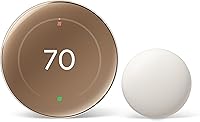
The Nest Learning Thermostat includes a second-generation temperature sensor, and its app can set the temperature that a room should reach at a certain time of day. If a room feels uncomfortable because of humidity, see how a smart thermostat controls humidity before assuming a temperature sensor will address it.
Which smart home integrations should you consider?
Choose integrations that match the devices and voice assistants you already use. Check platform support directly, since compatibility can vary by thermostat and may depend on setup.
If you use voice control, confirm whether the thermostat works with your assistant and whether a separate smart speaker is required. Also consider whether you want to control it from one app alongside other home devices.
Matter compatibility may matter if you want a common smart home connection standard. Read how to choose a Matter-compatible smart thermostat to compare that feature with the platforms you use today.
A smart plug is not a substitute for HVAC control. If you're weighing those device types, see smart thermostat vs smart plug.
How important are app and wall controls?
Pick controls that are easy for everyone in your home to use. Check the wall display, touch or button controls, app layout and the functions available when your phone is not nearby.
A thermostat may offer remote changes through an app while keeping basic temperature adjustments at the wall. Look at whether the display is readable from where people will use it and whether common tasks take a few clear steps.
App features can include schedules, alerts, remote control and energy information. For example, Honeywell's Total Connect Comfort app supports remote monitoring and management, while its thermostat offers on-screen comfort information and seven-day programming.
If you want fewer connected features and a straightforward setup, compare the best basic smart thermostats.
Which features matter most in daily use?
Prioritize features that solve a routine problem in your home. Remote access, alerts, schedule control and sensors are useful when they fit how you live, but extra options can add setup and decisions.
Use this checklist to narrow your choices:
- Scheduling: Can you set different temperatures for workdays, weekends and sleep?
- Sensors: Can you prioritize rooms where temperature differs from the thermostat's location?
- Remote access: Can you adjust settings and see useful information in the app?
- Integrations: Does it support your voice assistant or smart home platform?
- Usability: Are the display, wall controls and app understandable to everyone at home?
- Setup: Does the wiring and installation process fit your system and comfort level?
Some thermostats also offer energy-saving modes, alerts or automatic adjustments. Decide whether those tools match your goals, and check how you can review or change them.
Which smart thermostat features fit different needs?
Choose based on the feature you will use most, rather than the longest feature list. These options illustrate different priorities using the available product details.
Honeywell Wireless WiFi Thermostat for scheduled control
The Honeywell Wireless WiFi Thermostat suits someone who wants seven-day programming and app access. It supports Alexa voice control when paired with a separately sold Alexa device.
Its Energy Savings mode and on-screen comfort information may be useful if you want key controls visible at the thermostat. Honeywell describes installation as professional, so factor that into your setup plans.
Google Nest Learning Thermostat for routines and sensors
The Google Nest Learning Thermostat suits someone who values learning features, room sensors and connected platforms. It includes a second-generation temperature sensor and works with Alexa, Apple HomeKit and Google Home.
Google says the thermostat can learn preferred temperatures and ask permission before schedule changes. Its app supports remote adjustments and room temperature goals for a certain time of day.
Google says it works with most 24V systems, and that no C wire is required in most homes. Check the compatibility tool for your equipment and wiring before choosing it.
Honeywell VisionPRO 8000 for touchscreen and remote access
The Honeywell TH8321WF1001 VisionPRO 8000 suits someone who wants a large touchscreen, a weekly schedule and remote app control. Its description notes that you can program each day of the week or adjust the temperature through the Total Connect Comfort app.
Check that its system support and wiring fit your home before making a choice. For another Honeywell model with app access, see our X8S smart thermostat review.
How to narrow your choices to one thermostat
Choose the model that clears your compatibility checks and fits your preferred way to manage temperature. A short comparison can expose trade-offs before you focus on brand or display style.
| Your priority | What to compare |
|---|---|
| Predictable routines | Weekly schedule controls and how easy edits are |
| Changing routines | Learning features and whether you approve adjustments |
| Uneven room temperatures | Sensor support, sensor inclusion and room selection in the app |
| Connected home control | Voice assistants, app access and Matter support |
| Simple operation | Wall controls, display readability and basic scheduling |
| Less installation uncertainty | System compatibility, wiring needs and installation guidance |
If two models both support your HVAC system, consider which one gives you the clearest controls for the people who use it. A feature you can easily find is more useful than one you rarely open.
What should you do before installation?
Confirm compatibility, wiring and installation requirements for your exact HVAC setup. Read the thermostat maker's instructions before removing the existing thermostat, and label the wires if the instructions call for it.
Take a clear photo of the current wiring and note the equipment model if you have it. If the wire labels are unclear or your system has multiple stages, ask an HVAC professional to check the setup.
Compare a smart thermostat vs programmable thermostat if you're still deciding whether connected app controls are worth choosing. If you're ready to narrow the field, start with the best basic smart thermostat options.
Pick a scheduled model if you want to set temperatures yourself, a learning model if you want suggested changes, and a sensor-equipped option if room differences matter. Let compatibility and daily usability make the final call.
Frequently asked questions
How do I choose a smart thermostat for my home?
Start by checking whether the thermostat supports your heating and cooling system and wiring. Then compare schedule controls, room sensors, app access, voice assistants and smart home platforms.
Choose features you expect to use, and confirm the installation requirements for your exact system before buying.
Do smart thermostats work with every HVAC system?
No. Compatibility depends on the thermostat and the heating and cooling equipment in your home.
Check the system type, number of heating and cooling stages, wiring and any special controls.
Use the thermostat maker's compatibility checker or ask a qualified HVAC professional when the wiring is unclear.
Are room sensors worth it in a smart thermostat?
Room sensors can help when one room runs hotter or colder than the room with the thermostat. Check whether the thermostat supports sensors, whether they are included, and how its app lets you choose which room matters at different times.
A sensor does not change the HVAC system's capabilities.
Should I choose a learning thermostat or a scheduled thermostat?
Choose a scheduled thermostat if you want to set temperatures for specific days and times. A learning model may suit you if you want it to adapt to routines and review suggested changes.
Compare how each handles schedule edits, away periods and app controls before deciding.
Does a smart thermostat need Wi-Fi?
Wi-Fi is commonly used for remote app access and connected features, but the exact controls available without internet vary by model. Check which functions work at the wall and which depend on an app, network or voice assistant.
A reliable home network also matters for remote control.