Sensi Lite Smart Thermostat Review: Worth It? (October 2026)
The Sensi Lite Smart Thermostat suits basic app-controlled heating and cooling if your HVAC system is compatible and its wiring meets the setup needs. It supports schedules, remote control and geofencing, but some systems need a C-wire or compatible power accessory.
On this page (7 sections)
- Sensi Lite Smart Thermostat Review
- What does the Sensi Lite smart thermostat offer?
- What should you check before installing it?
- How useful are its app and scheduling features?
- How does the Sensi Lite compare with other smart thermostats?
- Can the Sensi Lite control humidity?
- Is the Sensi Lite a good choice for your home?
Sensi Lite Smart Thermostat Review
The Sensi Lite Smart Thermostat suits basic app-controlled heating and cooling if your HVAC system is compatible and its wiring meets the setup needs. It adds scheduling, remote access, geofencing and usage reports without requiring a C-wire in most homes.
Its main buying check is compatibility. Some heating-only, cooling-only and heat pump systems need a C-wire or another compatible power accessory.
What does the Sensi Lite smart thermostat offer?
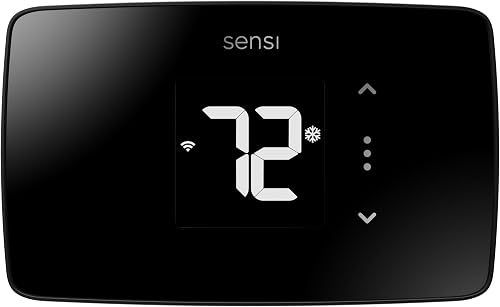
The Sensi Lite offers Wi-Fi app control and simple scheduling for homeowners who want to adjust temperatures from a phone or tablet. It also supports geofencing and usage reports.
Sensi Lite Smart Thermostat: Best for simple app control
- Wi-Fi control
- Flexible scheduling
- Geofencing
- Works without a C-wire in most homes
A straightforward smart upgrade for homes that want remote control, schedules and usage reports. Check the wiring requirements for your specific HVAC system before choosing it.
Pros
- Remote control from an Android or iOS app
- Flexible scheduling and geofencing
- Designed to work without a C-wire in most homes
- ENERGY STAR certified
Cons
- Some HVAC systems require a C-wire or compatible power accessory
- Wi-Fi connection is required for app control
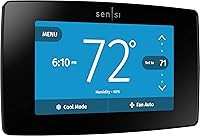
The thermostat has an LCD display and supports app, touch and voice control. Sensi says it protects personal information and does not use thermostat activity data for targeted advertising.
Those features focus on everyday temperature control. If you want a thermostat with a different app or smart-home setup, compare the Sensi Touch vs Sensi Touch 2 to see how those models differ.
Who should consider the Sensi Lite?
The Sensi Lite may fit if you want to set a schedule, adjust the temperature remotely and use geofencing. It is also worth considering if avoiding a C-wire matters, as long as your system is among the setups it supports without one.
It may not suit you if your wiring needs a power accessory you don't want to add, or if your HVAC system falls outside its compatibility. Confirm those details before removing your current thermostat.
What should you check before installing it?
Check system compatibility and wiring first, since the Sensi Lite does not work without a C-wire on every HVAC setup. The common-wire requirement can depend on the type of heating and cooling equipment in your home.
Sensi says its thermostat works with HVAC equipment found in most homes and can be installed as a DIY project using step-by-step instructions. Still, “most homes” isn't a substitute for checking your specific system and wire connections.
Take a clear photo of your current thermostat wiring before disconnecting anything. Label wires as you remove them, and follow the installation guide for your system.
If you're unsure what equipment you have, start with our guide to HVAC systems that work with smart thermostats. If your home uses electric baseboard heat, compare options in our guide to the best smart thermostats for baseboard heaters.
How useful are its app and scheduling features?
The app, scheduling and geofencing features help you adjust temperatures around your routine. You can make changes from a compatible phone or tablet, whether you're at home or away.
A schedule is useful when your household follows a fairly regular pattern. Set the temperatures you want for the times you’re usually home, asleep or away, then revise them if your routine changes.
Geofencing offers another way to respond to location. Check how it behaves in the app and decide whether automatic temperature changes match your household’s preferences.
Usage reports can help you review activity over time. Sensi says the thermostat includes features that can help save money, including flexible scheduling, geofencing, remote access and usage reports; actual energy use depends on your home, settings and HVAC system.
How does the Sensi Lite compare with other smart thermostats?
The Sensi Lite is a basic app-control option, while the Amazon and Google models offer different smart-home features. Choose based on your existing devices, desired controls and wiring.
| Thermostat | A useful fit | Wiring note |
|---|---|---|
| Sensi Lite Smart Thermostat | App control, scheduling, geofencing and usage reports | Works without a C-wire in most homes; some systems need one or a compatible power accessory |
| Amazon Smart Thermostat | Alexa routines and preferred home, away and sleep temperatures | C-wire required |
| Google Nest Thermostat | Google Home control and Savings Finder suggestions | Works without a C-wire in most homes; some systems need one or a compatible power accessory |
Amazon Smart Thermostat: Best for Alexa routines

- Alexa control
- C-wire required
- Home, away and sleep settings
Consider this thermostat if Alexa is already part of your home and you want it to switch among preferred home, away and sleep temperatures. It requires a C-wire.
Pros
- Alexa can automate preferred temperature settings
- Remote control through the Alexa app
- Can use select Echo devices for comfort zones
Cons
- C-wire required
- Some features depend on compatible Echo devices or an Amazon Smart Air Quality Monitor
Amazon's thermostat may be a better match if you already use Alexa and want it to switch among preferred home, away and sleep settings. Amazon says the C-wire is required, so make sure your wiring can support it.
Google Nest Thermostat: Best for schedule suggestions

- Google Home app
- Savings Finder
- Works without a C-wire in most homes
A Google Home option with a programmable schedule and Savings Finder suggestions. Check compatibility and power needs for your HVAC system before buying.
Pros
- Remote control from the Google Home app
- Savings Finder suggests schedule changes
- Designed to work without a C-wire in most homes
- ENERGY STAR certified
Cons
- Some systems require a C-wire or compatible power accessory
- Requires Wi-Fi and the Google Home app
Google's thermostat may suit you if you use Google Home and want schedule suggestions through Savings Finder. Google also says it works without a C-wire in most homes, with exceptions for some system types.
For a closer look at Google's other thermostat option, see our Nest Learning Thermostat fourth generation review. If your HVAC uses a ductless mini-split, a controller such as the Cielo Breez Max may be more relevant than a wall thermostat.
Can the Sensi Lite control humidity?
The Sensi Lite information here describes temperature control features, not a humidity-control function. If humidity is your main concern, check your HVAC equipment and consider whether a separate humidifier or dehumidifier is needed.
A smart thermostat's humidity features vary by model and connected system. Read our guide on how a smart thermostat controls humidity for the differences to look for.
Is the Sensi Lite a good choice for your home?
The Sensi Lite is a reasonable choice for basic smart temperature control when your system is compatible and you want app access, schedules and geofencing. Its main limitation is that some system types need a C-wire or compatible power accessory.
Choose the Sensi Lite if its wiring requirements fit and its features match how you plan to manage comfort. Choose Amazon if Alexa routines and a C-wire setup suit you, or Google if you prefer Google Home and Savings Finder suggestions.
For a Sensi model with a different display and feature set, read our Sensi Touch 2 smart thermostat review and Sensi Touch thermostat reviews.
Frequently asked questions
Does the Sensi Lite need a C-wire?
The Sensi Lite is designed to work without a C-wire in most homes. Some systems, including heating-only, cooling-only and heat pump systems, need a C-wire or another compatible power accessory, so check the wiring and system requirements before starting installation.
Can I control the Sensi Lite from my phone?
Yes. The Sensi Lite connects over Wi-Fi and can be controlled through Sensi's app on Android and iOS devices.
Remote app control depends on a working Wi-Fi connection, so confirm that the thermostat's location has reliable coverage.
What features does the Sensi Lite offer?
The Sensi Lite offers flexible scheduling, geofencing, remote access and usage reports. Those features suit basic temperature control through an app, with the option to automate settings around a schedule or your location.
How do I know if the Sensi Lite works with my HVAC system?
Compare your system type and existing thermostat wiring with Sensi's current compatibility and installation guidance before buying. Pay close attention to heating-only, cooling-only and heat pump setups, since those may need a C-wire or compatible power accessory.