9 Best Digital Thermostats for Home (October 2026)
The best digital home thermostats include the Suuwer Non-Programmable Thermostats for Home 1 Heat/1 for simple single-stage control, the Google Nest Thermostat for app control and scheduling, and the Riseem NonProgrammable Thermostat for Home for a clear white backlight.
On this page (6 sections)
- Which digital thermostat is best for home use?
- The best digital thermostats for home heating and cooling
- How should you choose a digital thermostat for central heating?
- Do you need a programmable or non-programmable thermostat?
- What do digital thermostats add for central heating?
- Final choice: which digital thermostat should you pick?
The best digital thermostat for home heating and cooling depends on how you want to control the system. Suuwer is a simple manual pick for compatible single-stage equipment, while Google Nest, Sensi and ecobee add app control, schedules or automatic adjustments.
Digital thermostats range from basic wall controls to connected systems that adjust from a phone. For central heating, system compatibility matters more than the display style: a thermostat made for a conventional furnace may not work with a heat pump, multistage system or line-voltage heater.
For electric baseboard heating and cooling, compare line-voltage thermostats for heating and cooling.
If you need a plain-language overview first, read What Is a Digital Thermostat? Tips and Guidance.
We compared the listed system support, power options, controls and features to match each pick to a practical home use.
Our picks at a glance
-
1
 Best for simple single-stage control
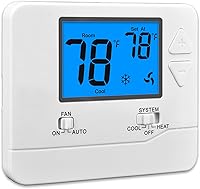
Suuwer Non-Programmable Thermostats for Home 1 Heat/1
9.7/10 our score
See it on Amazon -
2

-
3
 Best for a clear white backlight
Riseem NonProgrammable Thermostat for Home
9.5/10 our score
See it on Amazon
- 4
 Check it
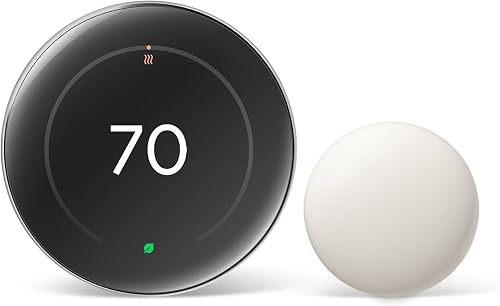
Google Nest Learning Thermostat
Best for learning schedules - 5
 Best for a familiar button layoutCheck it
 - 6
 Check it
Riseem Non-Programmable Thermostat for Home Single-Stage Systems
Best for broader single-stage compatibility - 7
 Check it
ecobee Smart Thermostat Enhanced
Best for occupancy-based adjustments - 8
 Check it
Honeywell Home X2P Programmable Thermostat
Best for weekday and weekend schedules - 9
 Check it
Honeywell Home X1N Non-Programmable Thermostat
Best for basic Honeywell Home controls
Which digital thermostat is best for home use?
The Suuwer S701 is the best fit here for simple, manual control on a compatible single-stage conventional system. The connected models suit households that want schedules, remote access or automatic changes.
A digital wall control can be easy to use and still be the wrong fit for your HVAC system. Before comparing screens or app features, identify whether your equipment is single-stage, multistage, a heat pump, a boiler or line-voltage electric heat.
| Product | Best for | System fit | Power | Display | Our score |
|---|---|---|---|---|---|
| Suuwer Non-Programmable Thermostats for Home 1 Heat/1 | simple single-stage control | Conventional single-stage, 1 heat/1 cool | 24 VAC or 2 AAA batteries | Blue backlit LCD | 9.7 |
| Google Nest Thermostat | app control and scheduling | Check with Google's compatibility checker | 2 AAA batteries included; some systems need C-wire or accessory | 9.7 | |
| Riseem NonProgrammable Thermostat for Home | a clear white backlight | Single-stage systems, up to 1 heat/1 cool | 24 VAC or 2 AA batteries | White backlit LCD | 9.5 |
| Google Nest Learning Thermostat | learning schedules | Most 24V systems; confirm compatibility | 9.4 | ||
| Sensi Smart Thermostat | a familiar button layout | 2 AA batteries included | 9.3 | ||
| Riseem Non-Programmable Thermostat for Home Single-Stage Systems | broader single-stage compatibility | Several single-stage systems; check exclusions | 24 VAC or 2 AAA batteries | Blue backlit LCD | 9.2 |
| ecobee Smart Thermostat Enhanced | occupancy-based adjustments | ecobee says compatible with 90% of HVAC systems; check first | 9.1 | ||
| Honeywell Home X2P Programmable Thermostat | weekday and weekend schedules | 1 heat/1 cool and listed compatible systems | 2 AA batteries, not included | 8.7 | |
| Honeywell Home X1N Non-Programmable Thermostat | basic Honeywell Home controls | 1 heat/1 cool and listed compatible systems | 2 AAA batteries, not included | Backlit LCD | 8.2 |
The best digital thermostats for home heating and cooling
These picks cover manual controls, programmable schedules and Wi-Fi thermostats. Each one has a different system compatibility range, so use the model guidance and your current wiring to narrow the choices.
Suuwer Non-Programmable Thermostats for Home 1 Heat/1: Best for simple single-stage control
- Non-programmable push-button control
- Blue backlit display
- 1 heat/1 cool conventional single-stage systems
- 24 VAC or 2 AAA battery power
A straightforward digital wall control for compatible single-stage conventional systems. Its backlit screen and push buttons suit buyers who do not need schedules or app control.
Pros
- Backlit display
- No C-wire required on most systems
- Separate heat and cool swing settings
Cons
- Not for heat pumps or multistage systems
- Check the existing wiring before buying
The Suuwer S701 suits homes with conventional single-stage heating and cooling, up to 1 heat and 1 cool. Push buttons and a blue backlit display keep daily adjustments direct, without requiring a schedule or phone app.
It can use 24 VAC power or 2 AAA batteries, and Suuwer says a C-wire is not required on most systems. Separate heat and cool swing settings let you adjust cycle timing, while a selectable five-minute compressor delay is included.
This thermostat does not support heat pumps, multistage systems, dual-fuel heating, mini splits or line-voltage baseboard heat. Check the existing thermostat base and wiring before choosing it, especially if you have not installed a thermostat before.
Choose it for a conventional single-stage system when you want manual temperature changes and a clear backlit screen. If you want the same simple approach from a different brand, compare our best Honeywell digital thermostat guide.
Google Nest Thermostat: Best for app control and scheduling
- Wi-Fi and Google Home app control
- Programmable schedule
- Can turn down when you leave
- Works without a C-wire in most homes
Choose Nest if you want to adjust temperatures remotely and set an energy-efficient schedule in the Google Home app. Some system types need a C-wire or compatible power accessory.
Pros
- Remote app control
- Schedule support
- HVAC monitoring alerts for eligible systems
Cons
- Needs Wi-Fi for remote control and notifications
- Compatibility varies by system
The Google Nest Thermostat suits a household that wants app control and a programmable schedule. It can adjust from a phone, laptop or tablet, and the Google Home app can hold an energy-efficient schedule.
Nest can turn itself down when you leave and offers HVAC monitoring alerts for eligible systems. These connected features need working internet and Wi-Fi, and voice control needs a compatible device.
Google says this model works without a C-wire in most homes, though some heating-only, cooling-only, zone-controlled and heat pump systems need a C-wire or another compatible power accessory. Use Google's compatibility checker before deciding.
Choose it for remote changes and scheduling if its smart features fit your routine. For a plain explanation of connected controls, see [What Is a Smart Home Thermostat?
Plainly Explained](/what-is-a-smart-home-thermostat/).
Riseem NonProgrammable Thermostat for Home: Best for a clear white backlight
- Non-programmable touch control
- White backlit LCD
- Single-stage heating and cooling
- 24 VAC or 2 AA batteries
Riseem's S3001-White is a simple digital control for listed single-stage systems, including some heat-only and cooling-only setups. Check the wiring and system type carefully before choosing it.
Pros
- Large backlit display
- Separate heat and cool swing settings
- No C-wire required on most systems
Cons
- Not for multistage or heat pump systems
- C-wire is required for heat-only and cool-only systems
Riseem's S3001-White suits compatible single-stage systems where you want a non-programmable digital thermostat with a white backlight. It supports up to 1 heat and 1 cool, with listed uses that also include some heat-only and cooling-only setups.
It can run on 24 VAC or 2 AA batteries. Riseem says a C-wire is not required on most systems, but its guidance says one is required for heat-only and cooling-only systems.
The thermostat is not designed for multistage equipment, heat pumps, mini splits, hot water systems with three-wire hydronic wiring or 120–240 V baseboard heat. Read the wiring instructions and compare them with your current setup before buying.
Choose it for a straightforward single-stage control when the listed system fit matches your equipment. If you want a manual thermostat that uses batteries, see our best battery powered thermostat guide.
Google Nest Learning Thermostat: Best for learning schedules
- Learns preferred temperatures and routines
- 60% larger display than prior model
- Includes Nest Temperature Sensor
- Works with most 24V systems
This Nest model suits homes where routines change and room temperatures vary. It can learn preferred settings and includes a separate sensor for choosing a room's target temperature at set times.
Pros
- Includes a room temperature sensor
- App and voice control
- No C-wire needed in most homes
Cons
- Smart features rely on compatible setup
- Confirm system fit before installation
The Google Nest Learning Thermostat suits homes where preferred temperatures and routines change over time. Google says it learns the temperatures you like and includes a Nest Temperature Sensor, which you can place in a room and use to set the temperature it should reach at certain times.
The larger display can show information from across the room, and its brightness adjusts automatically or manually. You can adjust settings in the Google Home app or use a compatible voice assistant.
Google says it works with most 24V systems, including gas, electric, oil, forced air, heat pump and radiant systems. Compatibility still depends on the specific setup, so check the compatibility tool before installing.
Choose it if you want learning features and a room sensor as part of a connected thermostat setup. Our best large display thermostat guide covers other screen-focused options.
Sensi Smart Thermostat: Best for a familiar button layout
- Wi-Fi app control and flexible scheduling
- Buttons and shape like a traditional thermostat
- C-wire not required in most applications
- Filter reminders and usage reports
Sensi keeps a traditional thermostat shape and buttons while adding Wi-Fi access, schedules and usage reports. Its installation app provides step-by-step guidance.
Pros
- Traditional button-style control
- Remote access and usage reports
- C-wire not required in most applications
Cons
- Smart functions need Wi-Fi
- Check compatibility with your HVAC equipment
Sensi suits buyers who want Wi-Fi features in a familiar thermostat shape. It has buttons and fits the same space as a traditional thermostat, while its app adds remote access, flexible scheduling and usage reports.
The Sensi app provides step-by-step installation instructions, and a built-in level helps with mounting. Sensi says a C-wire is not required in most applications, but check that your system and wiring are supported.
The thermostat can provide equipment alerts and maintenance reminders, including filter replacement. Sensi also states that it won't sell personal information to third parties.
Choose it if you want connected scheduling without a touchscreen-style interface. If you prefer a schedule but do not need Wi-Fi, compare the best non wifi programmable thermostat picks.
Riseem Non-Programmable Thermostat for Home Single-Stage Systems: Best for broader single-stage compatibility
- Non-programmable button control
- Blue backlit LCD
- Supports several single-stage system types
- 24 VAC or 2 AAA battery power
This Riseem model lists compatibility with several single-stage system types, including some heat pumps without auxiliary heat. It does not support heat pumps with auxiliary or emergency heat.
Pros
- Backlit display
- Temperature calibration and swing adjustment
- C-wire not required on most systems
Cons
- Not for heat pumps with auxiliary or emergency heat
- Not for line-voltage baseboard heat
This Riseem model suits buyers who want a manual digital control with broader single-stage system support than the S3001-White. For fireplace controls, compare low-voltage thermostats for gas fireplaces.
Its listed compatible uses include forced-air furnaces, hot water steam or gravity radiant heat, millivolt systems, gas fireplaces and heat pumps without auxiliary or emergency heat.
The blue backlit LCD and front-load battery compartment keep common controls easy to reach. It can use 24 VAC or 2 AAA batteries, and Riseem says no C-wire is needed on most systems.
Do not choose it for a heat pump with auxiliary or emergency heat, dual-fuel heating, mini splits, RV systems or line-voltage baseboard heat. Compare its specific exclusions with the wiring and equipment in your home.
Choose this Riseem when your system is single-stage and falls within its supported types. To compare models with schedules, read about the best digital programmable thermostat.
ecobee Smart Thermostat Enhanced: Best for occupancy-based adjustments
- Wi-Fi app control
- Occupancy sensing and automatic adjustments
- Power Extender Kit included
- Works with major smart home systems
ecobee combines a digital thermostat with occupancy sensing, remote app access and smart home support. The included Power Extender Kit can help in homes without a C-wire.
Pros
- App control from phone, tablet, or Apple Watch
- Occupancy-based adjustments
- Power Extender Kit included
Cons
- Smart features need a compatible setup
- Additional SmartSensors are sold separately
The ecobee Smart Thermostat Enhanced suits homes where occupancy-based adjustments and remote access are useful. It can adjust temperatures when people are away or asleep, and its sensing can preheat or precool the home before you arrive.
The ecobee app works on a smartphone, tablet or Apple Watch. The thermostat also works with major smart home systems, including Amazon Alexa, Google Assistant, Apple HomeKit and SmartThings.
ecobee says the model is compatible with 90% of HVAC systems, but directs buyers to check their specific equipment. A Power Extender Kit is included for homes without a C-wire, and extra SmartSensors are sold separately.
Choose it if you want occupancy sensing and app control with a connected home setup. Check system compatibility before deciding, especially if your heating and cooling equipment has unusual wiring.
Honeywell Home X2P Programmable Thermostat: Best for weekday and weekend schedules
- 5-2 day schedule with non-programmable option
- Backlit display with clear font
- Filter reminders
- Battery powered
The X2P offers a weekday and weekend schedule, with the option to use it without programming. Its backlit screen and filter reminder add practical features without requiring app control.
Pros
- Can run with or without a schedule
- Filter reminder option
- No C-wire required
Cons
- Not for multistage systems
- Not for electric baseboard heat
Honeywell Home X2P suits buyers who want weekday and weekend programming without app control. Its 5-2 schedule can be set for different routines, and it also has a non-programmable option if you'd rather change the temperature yourself.
The backlit display has a clear font, with custom display settings and an optional air-filter reminder. It runs on 2 AA batteries, which are not included, and does not need a C-wire.
Honeywell Home lists support for 1 heat/1 cool systems, forced-air heating, hot water heat and certain single-stage heat pumps. It does not work with multistage systems or 120–240 V electric baseboard heat.
Choose it for a simple 5-2 schedule on a compatible system. Its optional manual mode makes it a flexible choice if you sometimes want to change settings without programming.
Honeywell Home X1N Non-Programmable Thermostat: Best for basic Honeywell Home controls
- Non-programmable digital control
- Backlit display with clear font
- Filter reminder option
- Battery powered
The X1N is a basic digital wall control for compatible single-stage systems. Its clear backlit screen and optional filter reminder suit buyers who do not need a schedule.
Pros
- Non-programmable operation
- Filter reminder option
- Backlit display
Cons
- Not for electric baseboard heat
- Confirm system compatibility before choosing
The Honeywell Home X1N suits buyers who want a basic non-programmable digital control with a backlit screen. The display uses a clear font, and custom settings let you choose how information appears.
It runs on 2 AAA batteries, which are not included, and offers an optional filter reminder. Honeywell Home lists it for 1 heat/1 cool systems, 750 mV, hot water heat and forced-air gas, oil or electric systems.
The X1N does not support 120–240 V electric baseboard heat. Check your HVAC type before choosing it, and compare the wire connections with the thermostat's instructions.
Choose it for simple manual control on a supported single-stage system. If scheduling is more useful, the X2P above offers a 5-2 program and a non-programmable option.
How should you choose a digital thermostat for central heating?
Choose a central heating thermostat by matching its supported equipment and wiring to your system first. Then decide whether you want manual settings, a repeating schedule or connected app control.
A thermostat for a conventional furnace may not support a heat pump or boiler. Check the number of heating and cooling stages, whether the system uses a C-wire, and any model-specific exclusions such as baseboard heat or auxiliary heat.
If you are replacing an existing control, photograph and label the wires before disconnecting anything. Turn off system power and follow the installation instructions; if the wiring does not match or you cannot identify it, ask an HVAC professional.
Do you need a programmable or non-programmable thermostat?
A non-programmable thermostat fits a routine where you want to set the temperature manually. A programmable model can change settings on a regular weekday and weekend schedule, while a smart thermostat adds remote control and connected features.
For simple manual control, consider the Suuwer or either Riseem model, provided the system is compatible. The Honeywell Home X2P offers a 5-2 schedule and can also be used without programming.
A Wi-Fi thermostat can be useful if you want to change the temperature away from home. It also depends on the right network, app and power setup, so make sure those features solve a real need before choosing one.
What do digital thermostats add for central heating?
Digital thermostats show a set temperature on an electronic display and provide buttons or touch controls for changing it. Depending on the model, they may also offer schedules, app access, room sensors, alerts or filter reminders.
A basic thermostat can be a good fit if you only need direct temperature adjustments. A smart thermostat adds more ways to manage a heating system, but those features depend on compatibility and, often, a working Wi-Fi connection.
Final choice: which digital thermostat should you pick?
Pick the Suuwer S701 for manual control on a compatible conventional single-stage system, the Honeywell Home X2P for a 5-2 schedule, or Nest and ecobee if you want connected features. Confirm the system type and wiring before you buy any digital thermostat for home use.
For scheduled temperature changes, compare the best digital programmable thermostat guide with the models above. If manual control is all you need, focus on the compatibility notes first, then choose the screen and power setup that suit your home.
Our top 3 picks at a glance
-
1
Best for simple single-stage control
Suuwer Non-Programmable Thermostats for Home 1 Heat/1
9.7/10 our score
See it on Amazon -
2
-
3
Best for a clear white backlight
Riseem NonProgrammable Thermostat for Home
9.5/10 our score
See it on Amazon
Frequently asked questions
What is a digital thermostat for home heating?
A digital thermostat uses an electronic display and controls to set a target temperature for a heating or cooling system. Some models only adjust the setpoint, while programmable and smart models can follow schedules or accept remote app changes.
Check your system type and wiring before choosing one.
Are digital thermostats compatible with central heating?
Many are, but compatibility depends on the heating equipment and wiring. A single-stage furnace may use different terminals than a heat pump, multistage system, boiler, or line-voltage baseboard heater.
Match the thermostat's supported system types to your existing setup before buying, and call an HVAC professional if the wiring is unclear.
Do digital thermostats need a C-wire?
Some digital thermostats run on batteries or work without a C-wire in many systems. Smart models may need a C-wire or a compatible power accessory in certain setups, including some heat-only, cooling-only, zone-controlled, or heat pump systems.
Check the model's compatibility guidance for your exact system.
Should I choose a programmable digital thermostat?
Choose a programmable model if you want temperatures to change on a regular weekday and weekend routine. A non-programmable thermostat may suit you better if you prefer to change the setting manually.
Smart models add app access and other connected features, so consider whether you'll use them.
Can I install a digital thermostat myself?
Some models are designed for DIY installation, but the work still depends on wiring and HVAC compatibility. Turn off power to the system, label existing wires, and follow the model's instructions.
If the wire labels or system type are uncertain, ask a qualified HVAC professional to identify them before connecting a new control.
What should I check before replacing a central heating thermostat?
Identify whether the system is a furnace, boiler, heat pump, or another type, then note the wires connected to the current thermostat. Confirm the new model supports that equipment, its heating and cooling stages, and its power needs.
A compatibility checker or HVAC professional can help resolve unclear wiring.