Nest Learning Thermostat 4th Gen Reviews: Worth It? (November 2026)
The Google Nest Learning Thermostat (4th gen) suits homes that want app control, adaptive scheduling and a room sensor in the box. Check system compatibility first, especially if you have an unusual HVAC setup or need a C wire.
On this page (9 sections)
- Is the Nest Learning Thermostat 4th gen worth considering?
- What does the fourth generation add?
- How does the Nest Learning Thermostat 4th gen control your home?
- What HVAC systems are compatible?
- What does the included Nest Temperature Sensor do?
- Who should choose this Nest thermostat?
- How does it compare with other Nest models?
- How we score this thermostat
- Should you buy the Nest Learning Thermostat 4th gen?
The Google Nest Learning Thermostat (4th gen) is a strong upgrade for homes that want adaptive temperature control, app access and a room sensor included. It works with most 24V systems, and Google says a C wire isn't required in most homes, but you should check your exact system before buying.
This review looks at the fourth generation's learning features, sensor, controls and compatibility. We checked the stated features against the needs of people replacing a basic thermostat or upgrading a Nest setup.
Is the Nest Learning Thermostat 4th gen worth considering?
Yes, consider it if you want a thermostat that learns your preferences and gives you remote control through the Google Home app. Its included room sensor and permission-based schedule suggestions make it more useful for homes where one thermostat location doesn't reflect comfort in every room.
Google Nest Learning Thermostat: Best for app control with a room sensor
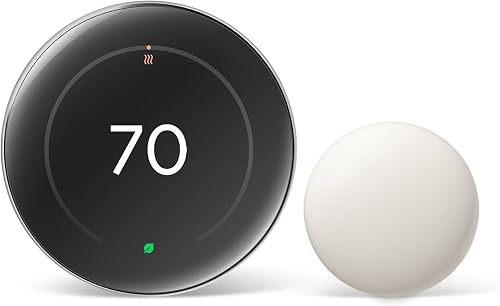
- Google Home app control
- Nest Temperature Sensor (2nd gen) included
- Matter compatible
- Works with most 24V systems
A feature-rich option for households that want a learning thermostat, remote app control and a room sensor together. Check system compatibility and installation needs before choosing it.
Pros
- Includes a Nest Temperature Sensor (2nd gen)
- Google Home app control from anywhere
- Matter compatible
- Asks permission before schedule changes
Cons
- Compatibility should be checked for your exact HVAC system
- Learning and smart-home features may be more than a basic thermostat needs
The thermostat learns temperatures you like and adapts as your routine changes. It can also learn how outdoor temperature affects your home, such as sunlight warming a room, and pause heating or cooling to help save energy.
Google says the thermostat can help save up to 31% on heating and cooling bills. That's a potential saving claim, not a guaranteed result; actual energy use depends on your home, habits and system.
If you mainly need simple manual temperature changes, many of these connected features may be unnecessary. Compare the Nest thermostat differences to see how the models line up with your needs.
What does the fourth generation add?
The fourth generation focuses on visibility, adaptive control and room-by-room comfort. Its larger display, Dynamic Farsight and included sensor are the main changes to weigh against a simpler thermostat.
The 60% larger display can show information from across the room with Dynamic Farsight. You can choose a clock or weather display, and the brightness adjusts automatically or manually.
Schedule adjustments are more visible, too. The thermostat asks permission before making schedule changes, sends a notification in the Google Home app and lets you accept a change with a tap.
Adaptive Eco uses the outdoor temperature to help choose an energy-saving setting while you're away, then aims to return the home to a comfortable temperature within an hour of your return. That timing is a feature description, not a promise that every home will reach a chosen temperature in that window.
The natural heating and cooling feature accounts for how outside conditions can warm or cool your home. For example, it may pause the system when sunlight through windows is raising the indoor temperature.
How does the Nest Learning Thermostat 4th gen control your home?
You can adjust the thermostat in the Google Home app, by voice with supported smart speakers, or using its on-device controls. The app lets you make changes from anywhere, while voice control works with Alexa, Siri and Google Assistant.
The thermostat is Matter compatible, which is useful if you're building a smart home around more than one platform. Check that your chosen devices and setup support the controls you want before relying on a specific automation.
For setup and daily routines, see our guide on how to use a Google Nest Learning Thermostat. If you want a general overview of the category first, read what a learning thermostat does.
What HVAC systems are compatible?
Google says the thermostat works with most 24V systems, including gas, electric, oil, forced-air, heat-pump and radiant systems. Compatibility can vary by wiring and equipment, so use Google's Compatibility Checker with your actual system details before you buy.
A C wire isn't required in most homes, according to Google. “Most” matters: don't assume your setup is covered without checking, especially if your existing thermostat uses unusual terminals or controls multiple stages or zones.
If you're replacing an older thermostat, take a clear photo of its wiring before disconnecting anything. Follow the installation instructions for your equipment, and use an HVAC professional if you can't identify the wires or system type.
What does the included Nest Temperature Sensor do?
The included Nest Temperature Sensor (2nd gen) lets you measure conditions in a room away from the thermostat. Use the Google Home app to set the temperature you want that room to reach at a certain time of day.
This can help if a bedroom runs warmer than the hallway where the thermostat sits, or if a frequently used room needs priority at a certain time. Placement and room airflow still matter, so put the sensor where you want the reading to represent the room.
For a closer look at the accessory, see our Google Nest Temperature Sensor review. If you only need a connected thermostat without the Learning model's focus on adapting schedules, compare it with our Google Nest Thermostat review.
Who should choose this Nest thermostat?
Choose it if app access, voice control, adaptive features and a room sensor would all be useful in your home. The included sensor saves you from choosing one separately, and permission prompts give you a chance to review proposed schedule changes.
It may be more thermostat than you need if you rarely change settings and don't care about smart-home controls. In that case, compare the Nest Thermostat vs Nest Learning Thermostat to weigh simpler controls against learning and sensor features.
Before deciding, check these points:
- HVAC compatibility: Verify your system and wiring with Google's Compatibility Checker.
- Room comfort: Decide whether the included sensor can help with a room that differs from the thermostat's location.
- Smart-home use: Confirm you want Google Home app access, voice control or Matter integration.
- Schedule preferences: Consider whether you want adaptive changes and permission prompts.
How does it compare with other Nest models?
The fourth generation is the choice to examine when you want the Learning model's adaptive behavior and a sensor included. Other Nest models may suit you better if your priority is straightforward app control or a different feature mix.
Model names can be easy to mix up, so compare the functions you would use rather than choosing by generation number alone. Our Nest thermostat model comparison outlines the distinctions, while the Nest Thermostat vs Nest Learning Thermostat comparison focuses on the two product types.
How we score this thermostat
Our 9.4 score weighs specs, features and buyer feedback against what you're shopping for. The included room sensor, broad stated 24V compatibility, app and voice control, and permission-based schedule changes make it a compelling upgrade for connected homes.
The score reflects fit for this review's intended buyer, not a promise of energy savings or a guarantee that every HVAC system is compatible. Check your wiring and system before ordering.
Should you buy the Nest Learning Thermostat 4th gen?
Pick the Google Nest Learning Thermostat (4th gen) if you want adaptive scheduling, Google Home app control and a room sensor in one upgrade. Pick a simpler Nest model if you don't need learning features or room-based temperature goals.
Before buying, verify your system with Google's Compatibility Checker. The best fit depends on both your HVAC wiring and whether you'll use its connected features.
Frequently asked questions
What is new about the Nest Learning Thermostat 4th gen?
The fourth generation adds features including Dynamic Farsight, Adaptive Eco and natural heating and cooling. It also comes with a Nest Temperature Sensor (2nd gen), and schedule suggestions require your permission before they take effect.
Does the 4th gen Nest Learning Thermostat need a C wire?
Google says a C wire isn't required for installation in most homes, but compatibility depends on your HVAC system and wiring. Check the Nest Compatibility Checker with your system details before buying, and ask a qualified HVAC technician if the wiring is unclear.
Does the Nest Learning Thermostat 4th gen include a temperature sensor?
Yes. The Google Nest Learning Thermostat (4th gen) includes a Nest Temperature Sensor (2nd gen).
You can place it in a room and use the Google Home app to set the temperature that room should reach at a certain time of day.
Can the Nest Learning Thermostat 4th gen work with Alexa?
Yes. It supports voice control with Alexa, Siri or Google Assistant smart speakers, and it works with the Google Home app.
It is also Matter compatible, which can help it fit into a connected smart home.