Built-In vs Remote Thermostats: Which Should You Choose? (November 2026)
Choose a built-in thermostat for direct room control, or a remote thermostat or sensor when you need control or temperature reading from another spot. First check what the device actually does: a remote control sends commands, while a remote sensor measures temperature.
On this page (7 sections)
- Integral thermostat versus remote: what is the difference?
- Which setup is better for everyday room control?
- When does a remote sensor help?
- When is a handheld remote the right choice?
- Can a plug-in controller replace a wall thermostat?
- What should you check before choosing?
- Which option should you choose?
Built-in and remote thermostats serve different needs: built-in control is simple to reach at one fixed location, while a separate thermostat or sensor can put control or temperature reading elsewhere. The phrase “integral thermostat versus remote” can also refer to a handheld remote, which sends commands but may not measure room temperature.
Start by identifying the job you need done. Do you want to set a heating or cooling temperature at the wall, control an appliance from across the room, or read temperature in a different part of the home?
Integral thermostat versus remote: what is the difference?
An integral thermostat has its control built into a device; a remote thermostat or sensor is separate from the equipment it serves. “Remote” can describe a separate control, a temperature sensor, or a handheld appliance remote, so check which one you mean.
A wall thermostat is already separate from the furnace or air handler, even though it is usually fixed in place. A remote sensor is another device that reports temperature to a compatible thermostat; it may not let you change settings.
A handheld remote works differently. It sends commands to a compatible appliance, such as a TV or air conditioner, but that alone doesn't make it a thermostat.
For a plain-language overview, see What Is a Portable Thermostat? A Homeowner’s Guide.
Which setup is better for everyday room control?
Choose a wall thermostat when you want one clear place to set the home's temperature. That layout is direct, and you don't need to keep a separate controller nearby.
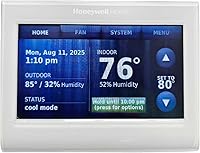
A conventional wall thermostat can suit a home where the chosen mounting spot reflects the temperature you care about. Avoid placing it where direct sunlight, drafts, cooking heat or a frequently opened exterior door may distort the reading.
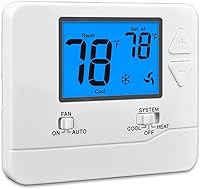
The Suuwer thermostat is for compatible single-stage conventional systems with 1 heat and 1 cool. It has a blue backlit display and push-button control, but it does not support heat pumps or multistage systems.
Before replacing a thermostat, identify the system type and inspect the existing wiring. Suuwer advises checking that the wiring base has 2 to 5 compatible wires and notes that installation should be approached cautiously if you are inexperienced.
If you need a general home option, compare system compatibility first in our guide to the best thermostat for home. For a heating-only setup, see the best heat only thermostats for home.
When does a remote sensor help?
A remote sensor helps when the temperature at the thermostat's location does not represent the room you want to prioritize. It reports temperature from another spot to a compatible thermostat, which may then use that reading to guide operation.
This can matter in a bedroom, upper floor or room that tends to differ from the thermostat area. The sensor only helps if the thermostat supports it and lets you configure how its reading is used.
A wired sensor connects by cable; a wireless one communicates without that sensor wire. Both still depend on compatible equipment and suitable placement.
See options in our guides to the best thermostat with wired remote sensor and best wireless remote thermostats.
Don't assume a sensor changes the temperature in that room independently. In many setups, it provides a reading to a central thermostat that still controls the whole system.
When is a handheld remote the right choice?
Choose a handheld remote when the main need is sending commands to a compatible appliance from a convenient spot. It can improve access to controls, but it won't necessarily measure room temperature or manage a home's HVAC system.
The SwitchBot Universal Remote supports compatible infrared appliances, including air conditioners, and certain Bluetooth devices. Its listed features include 19 buttons, a touch wheel and support for up to 25 devices; it does not support RF remotes or 5GHz Wi-Fi.
The Product Journey remote is a replacement for compatible AT&T TV Now and DirecTV Stream receivers. Its IR and RF modes and voice recognition after pairing relate to TV control, not heating or cooling.
If you want a handheld control for supported home devices, compare the best thermostats with remote controls. Check the exact appliance compatibility before choosing a remote, since similar names don't mean the devices share the same control method.
Can a plug-in controller replace a wall thermostat?
A plug-in temperature controller can manage compatible equipment, but it is not a direct substitute for a home's wall thermostat. Its role is to operate equipment connected to its outlets or relays, within its supported load and temperature range.
The Inkbird ITC-308 has heating and cooling relays, a temperature probe, a dual display for measured and set temperatures, and high and low temperature alarms. For other probe-based options, see digital thermostats with probes.
Its maximum output load is 1100W at 110V, so check the connected equipment's requirements.
This type of controller can fit equipment such as a freezer or heating device when the load and use match its limits. A central HVAC system usually needs a thermostat designed for its wiring and control signals, so don't connect equipment based only on a shared “thermostat” label.
What should you check before choosing?
Match the device to the system, the control job and the room you want to measure. A name like “remote thermostat” does not confirm what it can control.
Check these points before buying:
- System compatibility: Confirm whether the thermostat works with conventional heating, a heat pump, multistage equipment or another system type.
- Wiring and power: Compare the new thermostat's requirements with the existing terminals and wiring. Follow the installation instructions, and use a qualified technician if the wiring is unclear.
- Control versus sensing: Confirm whether the separate device changes settings, reports temperature, or does both.
- Placement: Choose a representative location and follow the maker's guidance about sun, drafts and nearby heat sources.
- Appliance compatibility: For a handheld remote, confirm the appliance type and control protocol. A remote's buttons may not cover every function.
For thermostat access in a shared area, a lock box can limit casual changes while leaving the thermostat mounted in its usual place. Our guide to the best thermostat lock boxes covers that separate need.
Which option should you choose?
Choose built-in or fixed wall control for a simple, central temperature setting; choose a separate sensor when another room's reading matters, or a handheld remote when you only need appliance commands. Match the device to the system before you decide.
If you want the thermostat itself to respond to a different room, pick a compatible remote sensor and check its placement options. If you only want to change an air conditioner's settings from nearby, a compatible handheld remote may be enough.
For the phrase integral thermostat versus remote, the key decision is whether you need a temperature reading or a command. Pick the device that performs that job, then confirm it works with your equipment.
Frequently asked questions
What does integral thermostat mean?
An integral thermostat has its temperature control built into the appliance or system it operates. You adjust the setting at that unit.
A separate thermostat sits elsewhere and communicates with compatible equipment, while a remote sensor may only report temperature to a thermostat.
Is a remote thermostat the same as a remote sensor?
No. A remote thermostat can provide control from another location, while a remote sensor measures temperature and sends that reading to a compatible thermostat.
Some systems use both, but compatibility and the role of each device depend on the specific model.
Can a universal remote replace a thermostat?
A universal remote can send commands to compatible appliances, including some air conditioners, but it does not automatically replace a thermostat. Check that the appliance is supported and that the remote provides the temperature control you need.
A remote that only changes settings won't measure room temperature.
Where should a thermostat's remote sensor go?
Place a remote sensor where you want the system to read temperature, following the thermostat maker's placement instructions. Avoid assuming one sensor can represent every room.
Drafts, direct sun, appliances and unusual heat sources can affect readings, so check the system's guidance before mounting it.